Table of Contents: How to Reduce the Cost of the WhatsApp Business API
- How WhatsApp’s Rates Work
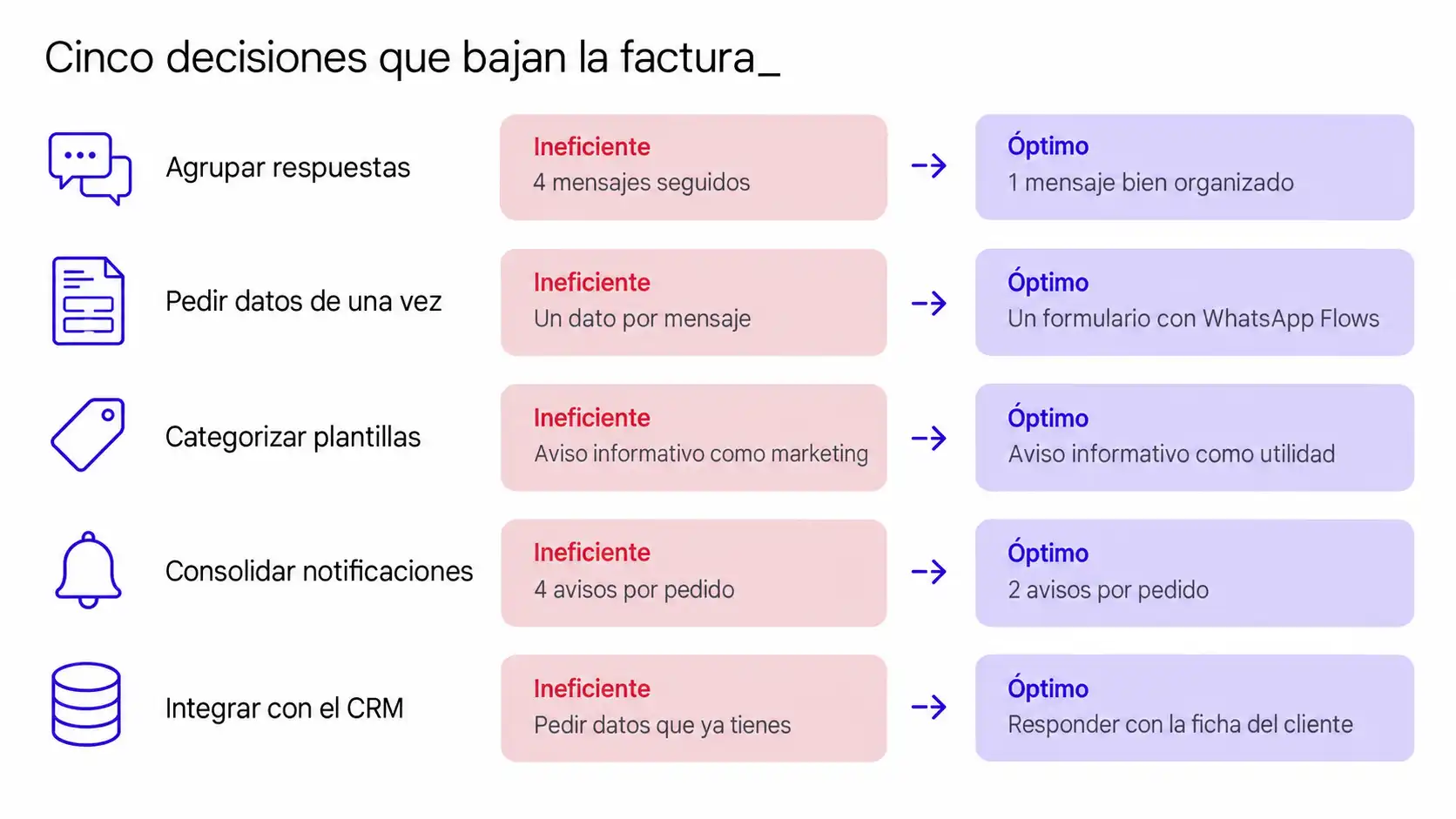
- Nine Strategies to Reduce the Cost of the WhatsApp Business API
- Things That Aren’t Worth Doing
- What to Measure to Know If It’s Working
- Frequently Asked Questions
- From Savings to Profit Margin
When you review a conversational flow that’s been in use for a while, the same pattern almost always emerges. The conversation does what it’s supposed to do, yes, but it takes six, eight, or ten messages to do so. A piece of information is requested, the customer responds, and then the next piece is requested. Something that was already confirmed gets confirmed again. A greeting is sent that adds nothing and takes up an entire message. And that pattern is the first place to look if you want to reduce the cost of the WhatsApp Business API.
Until now, that only required patience. Starting October 1, 2026, it will cost money, because Meta will begin charging per message for responses sent within the 24-hour service window. If you’re still unsure exactly what’s changing, you should first read the details of the new WhatsApp Business API pricing model, which includes the official rates for Spain. And if you’re just getting started with this channel, check out our WhatsApp Business API guide for small and medium-sized businesses.
This article is about the other side of the issue with rate changes: what can be done about them. And it’s about something that’s rarely discussed—namely, that almost all of these decisions also improve communication, and with it, the results. It’s not just about the bill.
The Quickest Improvement to Implement: WhatsApp Flows
Before we get into the nine decisions, here’s one that usually yields results in days, not weeks. WhatsApp’s native forms replace a series of messages with a single screen. We explain this in point 3, but if you want to get started right away, our WhatsApp Business Platform service will help you set it up.
How WhatsApp’s Rates Work
High costs on WhatsApp are almost never due to your plan. It’s a design issue.
The rate is set by Meta; it’s the same for all providers —Woztell, Blip, Spoki, or any other—and it’s non-negotiable. Switching platforms won’t lower it. The only variable you have real control over is how many messages you need to do your job, and which category they fall into.
There is a second layer of cost to keep in mind that does not depend on Meta: the supplier’s markup. Business Solution Providers (BSPs) do not simply pass on Meta’s rate as-is; they typically add their own markup on top, which varies depending on the type of message. This is a matter of negotiation between your company and your provider, so it’s a good idea to ask about it explicitly and request a breakdown: how much is Meta’s fee and how much is the provider’s markup.
And that’s the interesting part: streamlining messages the right way isn’t about cutting back on service. It’s about eliminating the wait time between questions for the customer. The very decisions that lower the bill also increase the first-contact resolution rate—which is one of the factors most closely correlated with whether someone ends up making a purchase.
Nine Strategies to Reduce the Cost of the WhatsApp Business API
1. Review and reoptimize your current workflows
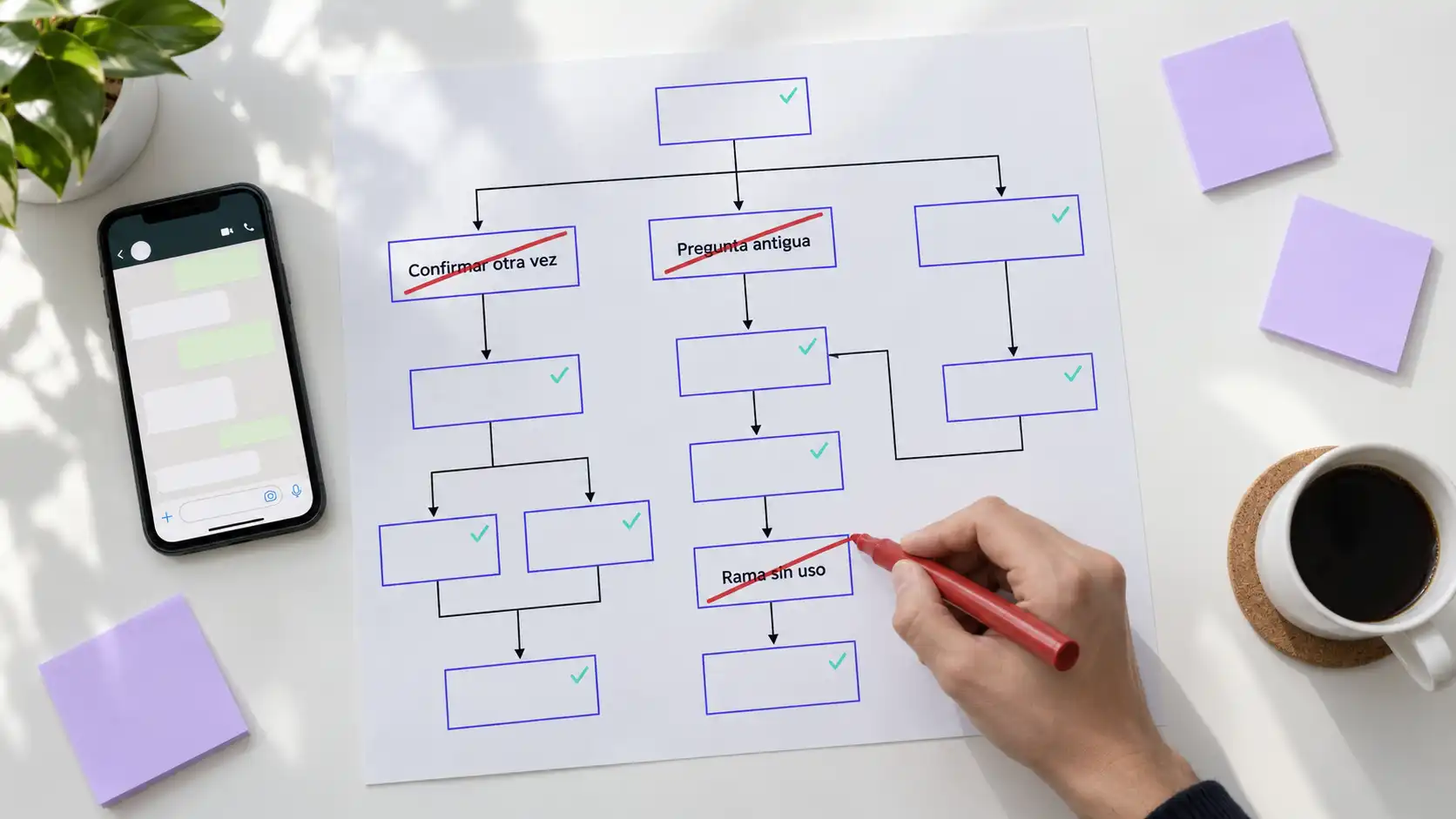
Before you make any changes, take a look at what you’ve already set up. Over time, conversational flows accumulate steps that are no longer necessary: questions left over from a previous version, duplicate confirmations, and branches that almost no one uses. Reviewing them with this list in hand and removing what’s unnecessary before optimizing what remains is usually the first—and easiest—way to save time.
2. Group the answer together instead of breaking it up
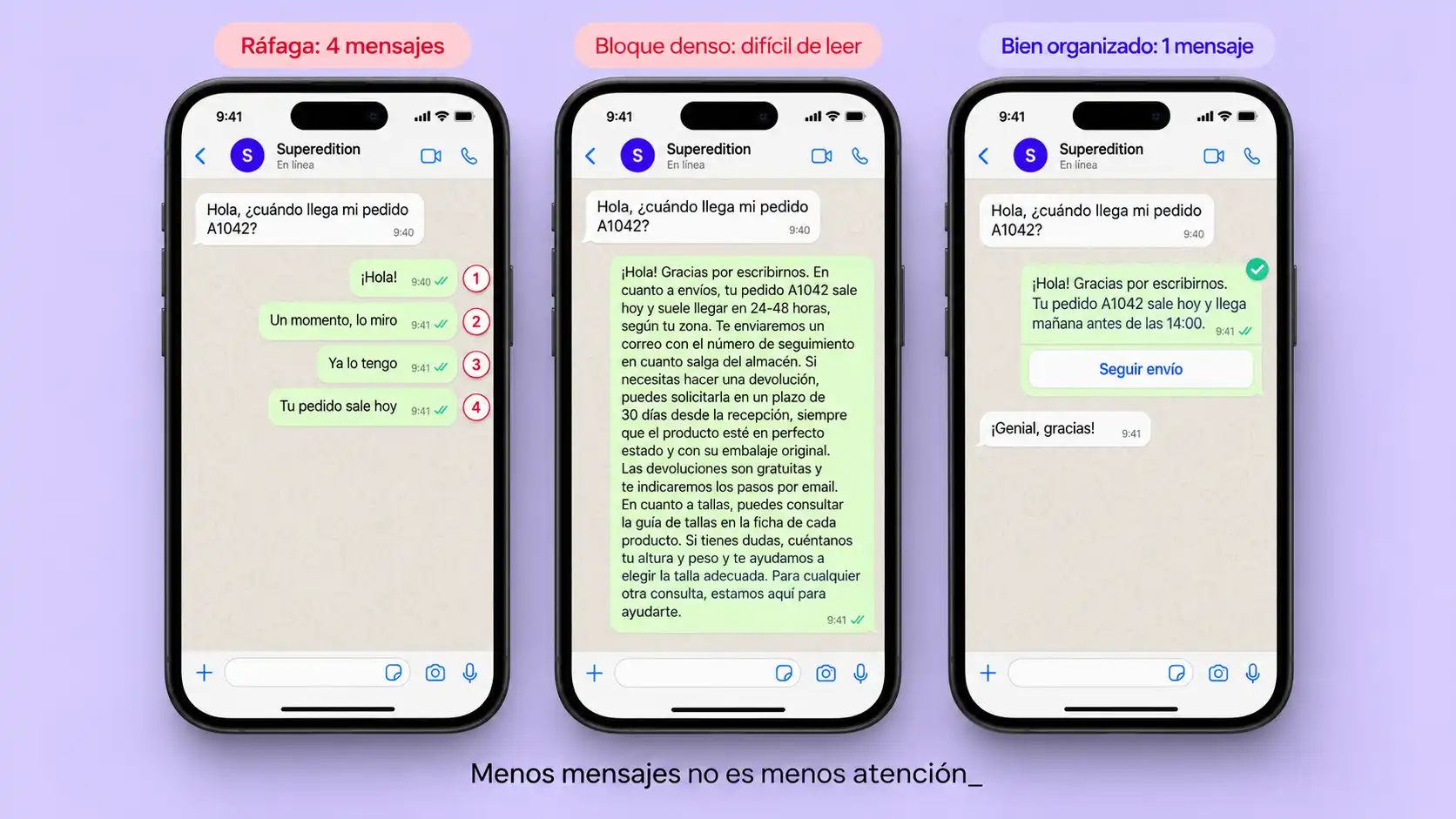
Many streams and many contributors write the way people write in a private chat: in bursts of short sentences. Four messages in a row to say just one thing.
What you save: every batch of four messages is reduced to one or two. In a customer service operation, this is the most impactful and easiest-to-implement strategy, because service messages don’t offer volume discounts: whether there are many or few, each one costs the same.
It’s also great because the customer can read the entire response at once, without getting stuck halfway through as ellipses appear. Fewer conversations are abandoned midway.
A word of caution: you also don’t want to go too far in the other direction and cram everything into a single dense block of text. A message that requires three readings to understand doesn’t help either. The optimal length is usually what fits on a mobile screen without scrolling —stated clearly and well-organized—not the most condensed version possible at all costs.
3. Request all the information at once
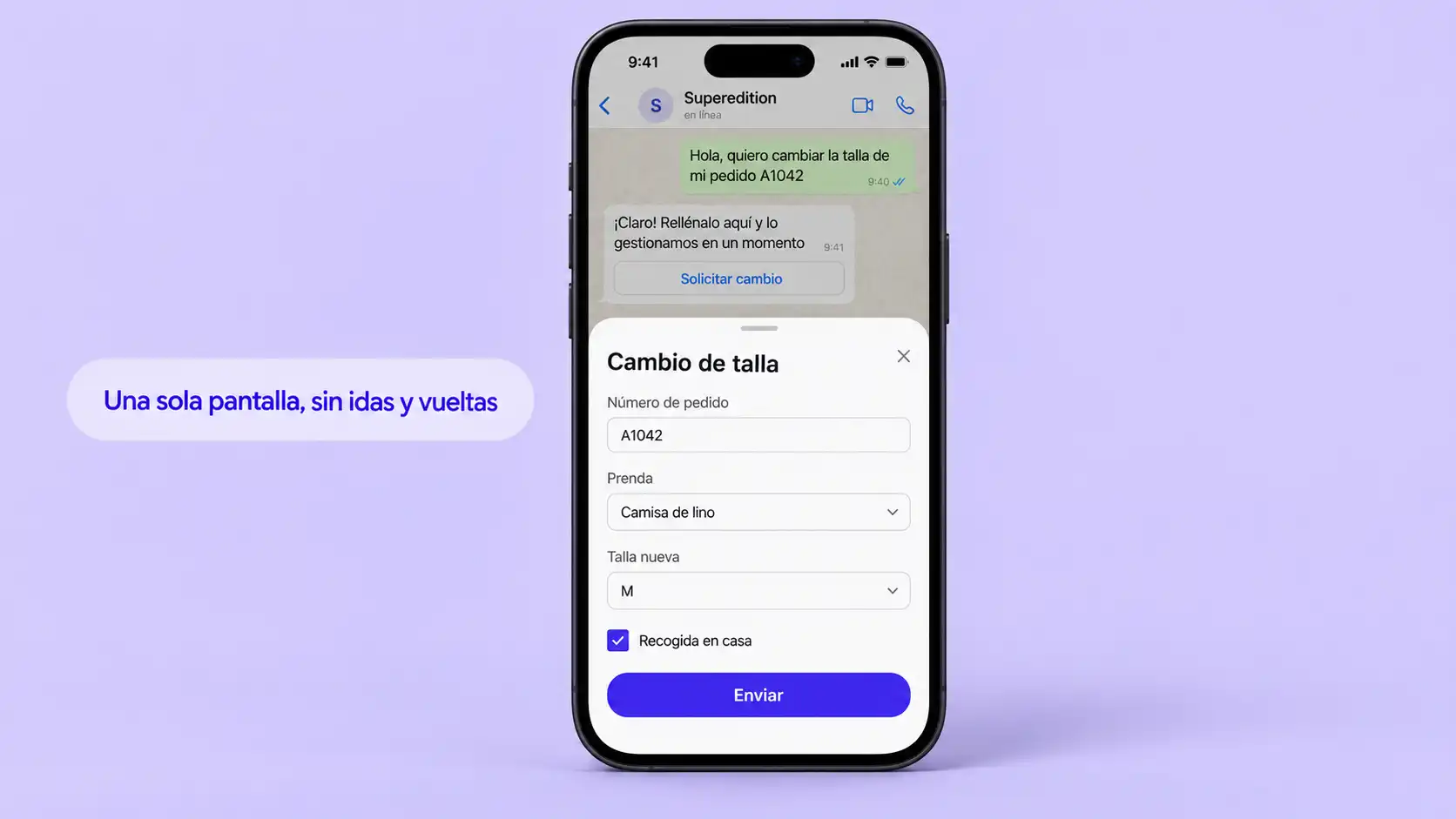
The workflow that asks for the name, waits, asks for the email address, waits, and asks for the order code is the most expensive pattern there is: it multiplies the number of messages by the number of fields.
What you save: A conversational form with five fields can help reduce the number of messages from ten to two if the information is requested all at once or handled using a list or buttons.
And that’s great, too: fewer drop-off points in the conversation. Every time you bounce the ball back to the customer, you give them a chance to walk away.
This is where WhatsApp Flows come in: native forms that open right within the conversation itself, complete with fields, drop-down menus, and validation—without the user having to leave WhatsApp or respond message by message. An appointment booking flow that currently takes eight messages can be condensed into a single screen that the customer fills out in fifteen seconds. It’s the improvement with the most direct relationship between implementation effort and cost savings—and a business opportunity that many companies aren’t yet taking advantage of.
4. Review the categorization of your templates
Each template is assigned a category by Meta when it is approved, and it is billed according to that category each time it is used. It is common to find informational templates classified as “marketing,” which is the most expensive category of all.
How much you save: In Spain, a marketing template costs €0.0585 and a utility template costs €0.0166. That’s more than three times as much. For every thousand miscategorized messages, you’re wasting about €42 for no reason—every month.
And it’s so exciting: templates that customers perceive as a service rather than advertising, which means fewer blocks and a higher-quality number for you.
How to do it: The category isn’t chosen freely from a drop-down menu; Meta decides it when reviewing the template’s content. What you can control is reframing the text—removing the promotional tone and focusing on information the customer needs—so it better aligns with the usefulness criteria. That’s where having an experienced provider helps: at Reinicia, we know what types of copy tend to be approved in each category, and we apply that knowledge to our WhatsApp advertising campaigns as well.
5. Consolidate notifications instead of sending them individually
Order received, order prepared, order in transit, order delivered. For an online store, these are four useful templates—but often, all it takes are two well-crafted notifications that include the information that really matters to the customer.
How you save: Every notification you delete means one less service fee, and starting in October, this also applies when it’s sent within the 24-hour window.
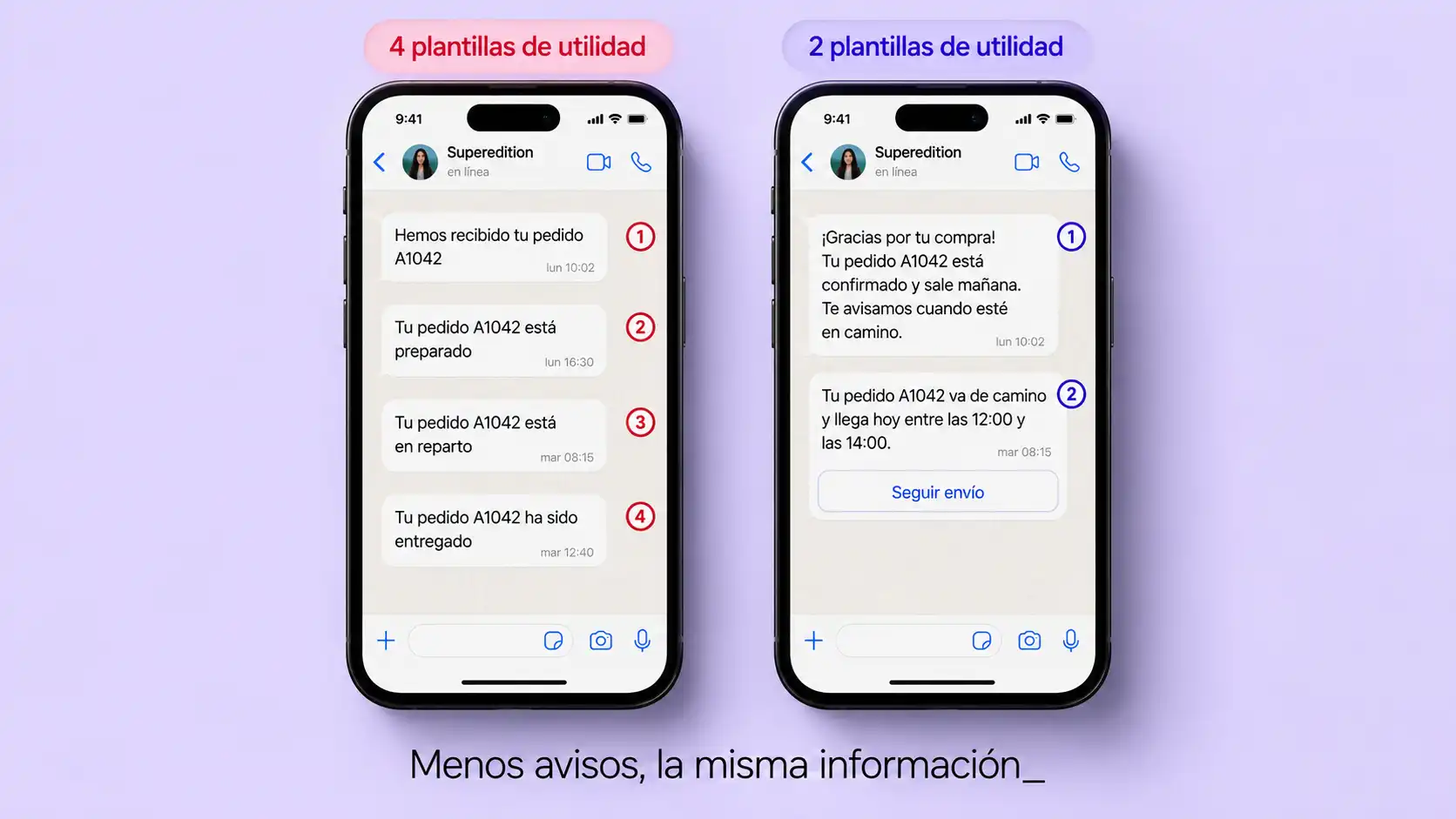
And what’s more, it’s great: less noise. Over-notification isn’t just a nuisance for the customer— for Meta, it’s a negative signal that affects your account’s quality score. The account quality indicator alerts you before your account’s quality deteriorates completely, so it’s worth keeping an eye on it in WhatsApp Manager—don’t just wait for something to go wrong.
6. Take Advantage of Free Entry Points: Click-to-WhatsApp
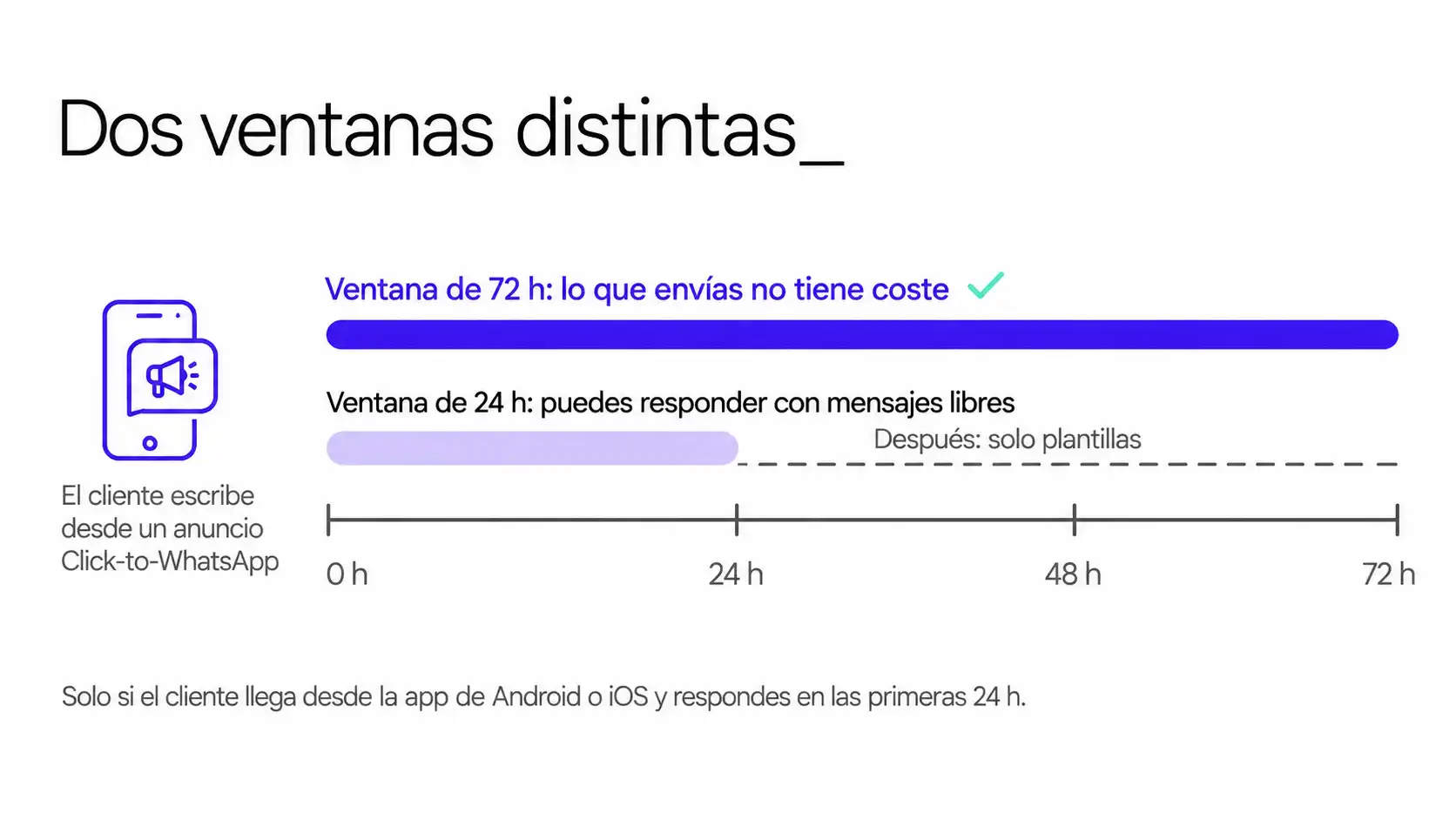
When a user messages you through a Click-to-WhatsApp ad or a button on a Facebook page and you reply within the first 24 hours, a 72-hour free window opens during which everything you send is free—including templates. That window won’t change in October.
What you save: The most intensive part of the conversation—which is usually the initial part— no longer incurs a delivery fee. There are two conditions specified by Meta that you shouldn’t overlook: the user must access the service from the Android or iOS app, and the 72-hour window is separate from the 24-hour window, so if the latter expires, you’ll only be able to send templates.
It’s also really exciting: the traffic from those ads comes with context, because the customer already knows what product is being discussed. That leads to better conversations and better customer acquisition.
7. Integrate the channel with your CRM
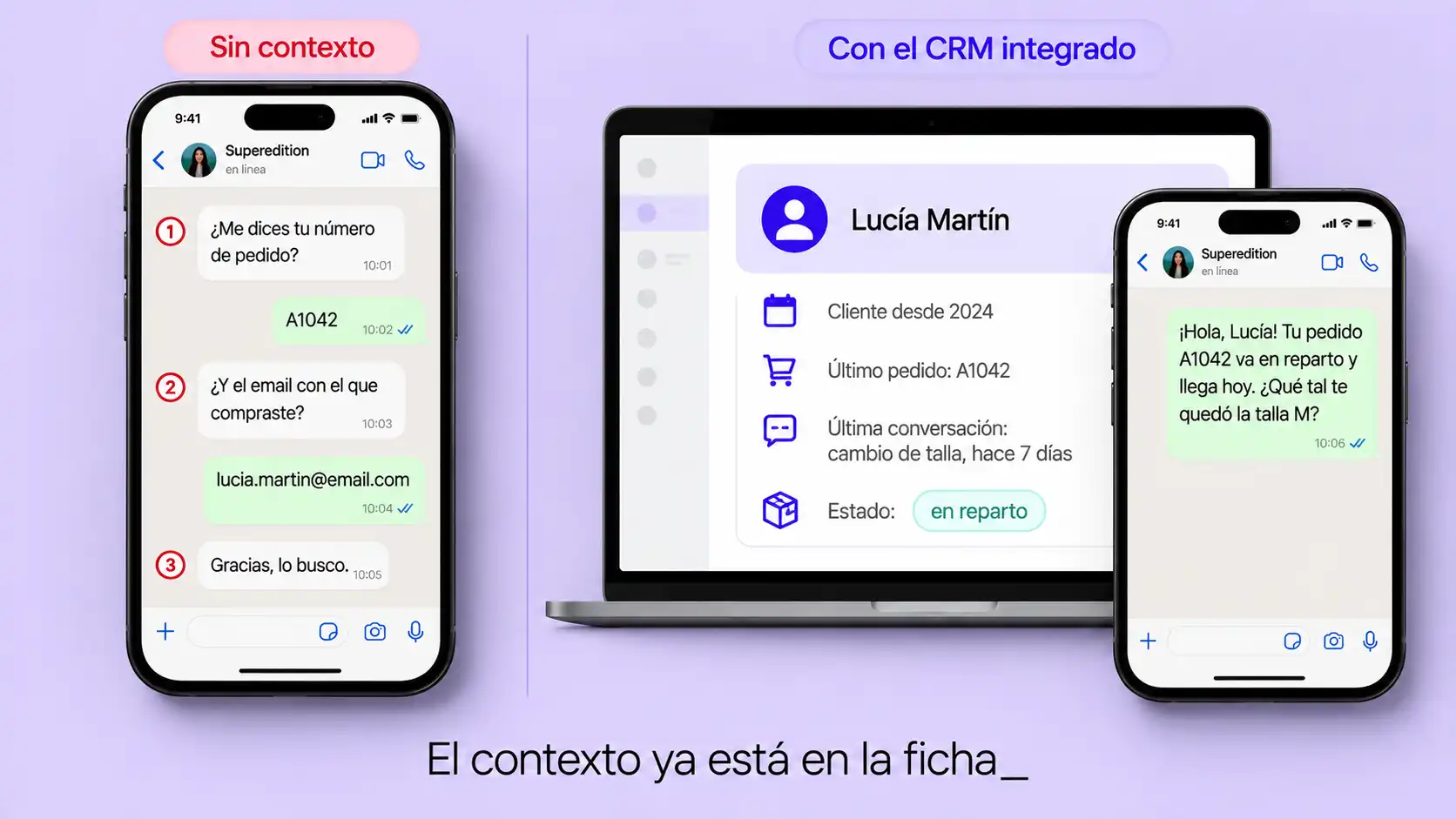
Without CRM integration, every conversation starts from scratch. We ask about an order that’s already in the system, request information we already have, and repeat details the customer provided last week.
What you save: all the messages spent trying to retrieve information your company already had. In operations involving repeat customers, this accounts for a huge portion of the traffic.
And what’s more: traceability. The conversation is no longer confined to an isolated thread but becomes part of the customer’s history in Zoho CRM, available to whoever assists them next time. And this is the foundation that makes the omnichannel approach described below possible: without a connected CRM, there’s no way to know what’s already been said on another channel.
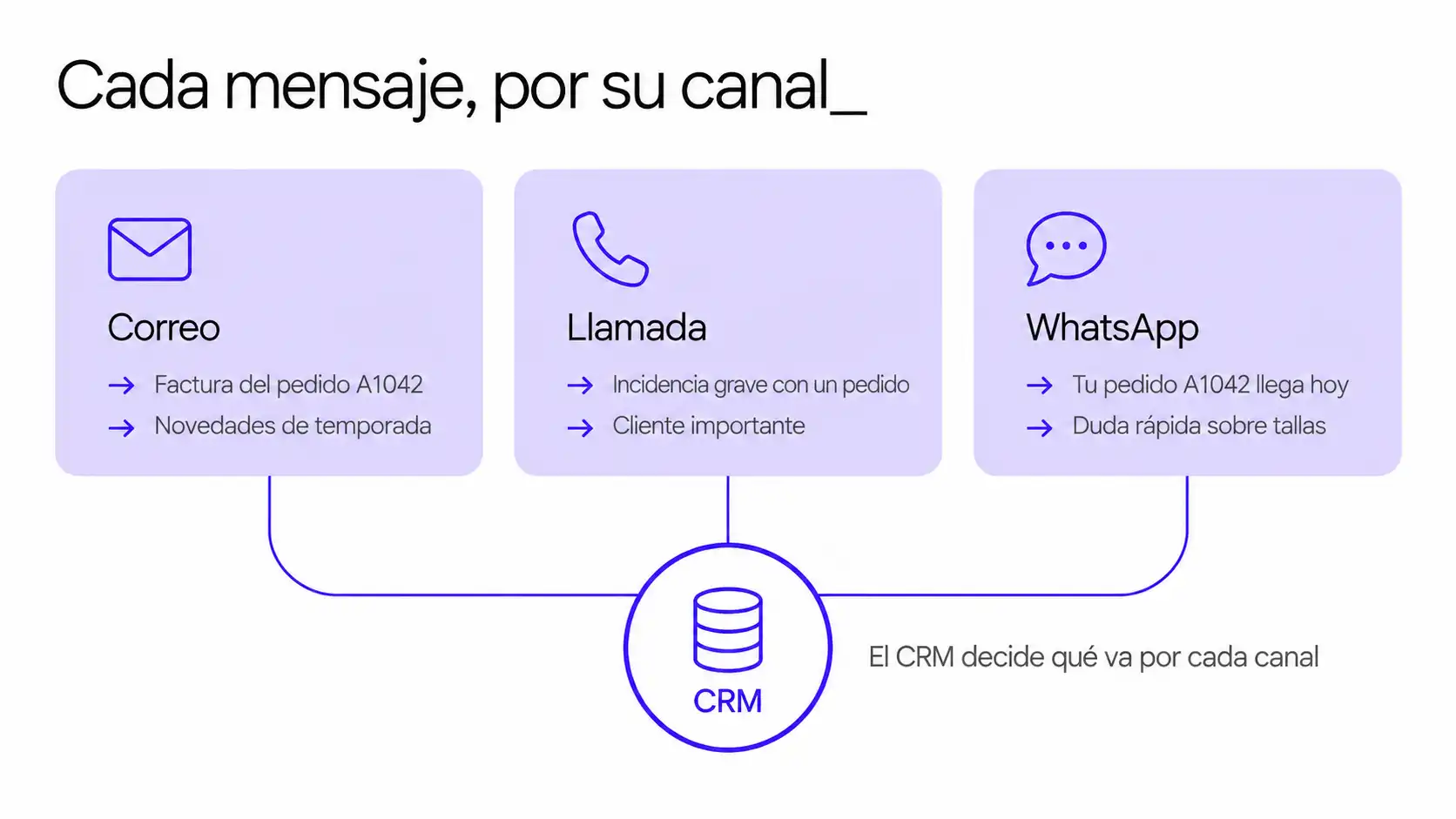
8. Omnichannel Approach: Ensure that each message is delivered through its own channel
Not everything has to go through WhatsApp. With an omnichannel CRM, you can make informed decisions about which messages go through each channel: a routine notification via Zoho’s automated email, a matter requiring an explanation via a call from the team, and only those that truly require immediate attention and a conversation via WhatsApp.
That decision isn’t made based solely on the price per message. Three other factors come into play:
- Hidden costs. A call center call costs the time of the person making it, not just the channel fee. Sometimes WhatsApp works out cheaper overall, even though individual messages have a cost, because it usually requires less effort.
- Attention. An email is opened and read much less often than a WhatsApp message. If something is truly urgent, sending it through the channel that’s checked the least doesn’t save money—it wastes it on steps that have to be repeated.
- Brand image. A personal phone call conveys a sense of care that an automated message cannot. For sensitive situations—a serious incident, an important client, or a product or service where personalized attention is essential—the channel itself is part of the message.
This is a topic substantial enough to warrant its own discussion, and it’s something we’re currently working on. For now, here’s a rule of thumb: before automating a message, ask yourself not only how much the message costs, but also which channel delivers the best results at the lowest total cost.
9. Understanding How Your Messages Are Counted
There are two separate quotas, and it’s best not to mix them up. The 1,000-message free service quota is assigned per phone number: a company with three numbers has 3,000 messages per month, but in blocks of 1,000, and any unused messages cannot be carried over from one block to another. The quotas for usage volume and authentication, on the other hand, are accumulated at the business portfolio level, combining all your WhatsApp Business accounts.
What you save: Knowing this helps you avoid two costly mistakes. Artificially splitting up numbers to scrape together free tiers complicates operations and fragments your transaction history. And spreading your profit volume across different portfolios can cost you discounts, because the tiers are calculated by market and category based on the total portfolio.
I’m really looking forward to it: a review like this usually uncovers architectural decisions that were never consciously made—and that have been lingering since the day the channel was set up.
Things That Aren’t Worth Doing
Just as useful as knowing what to do is knowing what not to do. These four moves always occur whenever there’s a price change, and none of them are worth it.
Return to the free WhatsApp Business app
It’s an instinctive reaction: if the API costs money, I’ll leave. But when you leave, you lose the shared inbox, the automations, the campaigns, and the CRM integration. And what you gain—in an SME—is just a few euros a month. You’re trading sales potential for pocket change.
Break numbers into segments to multiply the free segments
Three numbers mean 3,000 free messages a month—that’s true. But they also mean three fragmented message histories, three inboxes to keep track of, and customers who don’t know which one to write to. The savings rarely make up for the operational hassle it creates.
Reply Less Often or Later to Spend Less
Reducing messages by design is one thing. Leaving conversations unfinished is quite another. A customer who doesn’t receive a response doesn’t save money—it costs you a sale, and sometimes it costs you the customer entirely.
Switching providers based solely on price
Meta’s rate is the same across all providers. The only thing that changes is the BSP’s margin and what it offers you in return in terms of functionality and support. Migrating an entire channel just to save a few cents—and having to redo templates and workflows along the way—is almost never worth it. Comparing prices is one thing; migrating just for that reason is rarely worth it.
What to Measure to Know If It’s Working
Optimizing without measuring is just guesswork. Here are the numbers you should keep in mind before and after making any changes:
- Messages by resolved conversation. The key metric. This is the metric that directly translates design into cost. By “resolved,” we mean a conversation in which the customer gets what they were looking for and does not write back for the same reason in the following days; a conversation that is closed due to inactivity does not count as resolved.
- Cost per resolved call. More useful than the total cost, because it isolates the effect of volume.
- Breakdown by category. How much goes to marketing, how much to profit, and how much to service. With marketing costing more than three times as much, that’s where surprises tend to pop up.
- Percentage of calls coming in through the free entry point. It shows how much of your traffic is taking advantage of the 72-hour window.
- Resolution on the first contact. The balance between cost and quality: it rises when the flow is well-designed and falls when it isn’t.
- Conversion rate per conversation. How many conversations result in a sale or the outcome you’re looking for—not just how many are initiated.
- Conversion rate based on the total number of messages sent. The same idea at the aggregate level: it tells you if you’re sending messages that don’t convert at all, even if each one individually seems inexpensive.
- Revenue per conversation. The one that brings us full circle. If costs go down but revenue does too, then it wasn’t really optimization.
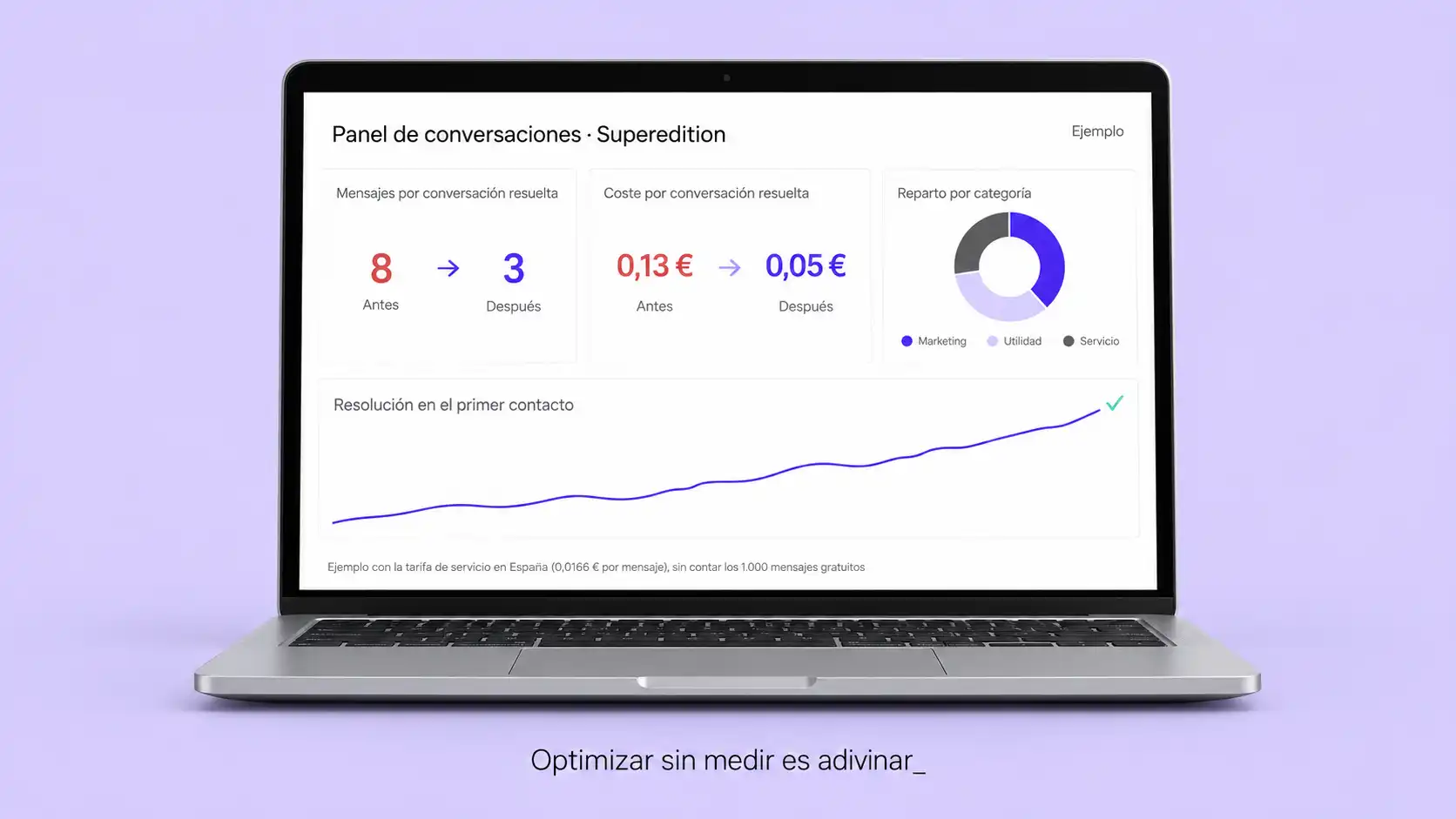
The good news is that you don’t have to wait until October to track this. In WhatsApp Manager’s statistics, you can already see how many messages you send and how they’re broken down, and if you have technical access, Meta’s pricing analytics field and status webhooks mark each message as billable or non-billable, along with its category. Using last month’s data, you can make a fairly accurate estimate today of what your bill will be in a month. And if you want a rough estimate in a minute, the calculator below will give it to you.
How much will your WhatsApp Business API bill go up?
Since October 1, Meta charges for service replies. Enter the figures for a typical month and see right here how much your bill changes.
- €0.0028per service reply (United States), from the 1,001st reply of the month
- 1,000free replies a month per number
- €0.0265per marketing template (United States)
Meta's official price per marketing message (United States) is €0.0207; the rest is the usual platform and reseller margin. Service replies carry no margin.
The last two metrics are the ones that are most often overlooked. Reducing the cost of a channel is easy if you’re willing to provide poorer service. The goal isn’t to spend less—it’s to ensure that every euro that comes in through WhatsApp brings in more in return.
Frequently Asked Questions
How much can you save by redesigning workflows?
It depends entirely on your starting point. The useful metric isn’t a percentage, but rather the number of messages you send per resolved conversation: if you’re sending eight today and can reduce that to three, your cost per conversation drops by more than half. Measure it before making any changes so you know where you’re starting from.
Does cutting back on messages make customer service worse?
Well done—that’s an improvement. Consolidating a response or asking for all the information at once doesn’t mean giving a shorter answer; it means preventing the customer from having to wait between questions. What does make customer service worse is cutting corners just for the sake of it—which is exactly what we advised against in the previous section.
What are WhatsApp Flows, and why do they save so much?
These are native forms that open within the conversation, complete with fields and drop-down menus. They replace an exchange of multiple messages with a single screen that the customer fills out all at once. Since you’re only charged for delivered messages, every back-and-forth you eliminate is one fewer message on the bill.
Can I change a template’s category to pay less?
Not directly: Meta assigns the category when reviewing the template. What you can do, however, is reframe the text so that it meets the criteria for usefulness rather than marketing. If the content is truly informative, it makes sense; if it’s promotional, trying to pass it off as useful will only result in it being rejected.
Is it worth using Meta’s AI agent to save money?
It depends on the volume and complexity of your conversations. Meta’s agent combines the response and its delivery into a single charge; with a third-party AI chatbot, you have to pay Meta for the service message and your tool separately. There’s no one-size-fits-all answer: you’ll need to compare the costs based on your actual numbers. We’ll walk you through five scenarios to show how much each AI option costs on the WhatsApp Business API, and if you already have an assistant, our guide on how to optimize an AI chatbot on WhatsApp will show you how to reduce its resource consumption.
From Savings to Profit Margin
It’s worth stating this clearly, because almost everything being published about this change focuses only on the defensive side of the issue.
A channel where every message counts is a channel that forces you to think through the conversation. And a well-thought-out conversation leads to better results: it gets to the point faster, requires less effort from the customer, and leaves fewer opportunities for them to drop off along the way. The companies that come out on top in October won’t be the ones that send the fewest messages, but rather the ones that have carefully considered the purpose of each one.
You can’t just wing it on the fly. It requires analyzing the workflows you already have, measuring how they actually perform, and redesigning the ones that don’t hold up to scrutiny.
We make WhatsApp Business work for your company—through strategy, not just technology_

We streamline your workflows—not your customer service
We review your current conversations, measure how much each one actually costs you, and redesign the ones that aren’t worth it—without losing a single sale along the way.
About the sources for this article
The rates for Spain are taken from Meta’s official rate card in euros, effective as of July 1, 2026, and from Meta’s official pricing document for developers, accessed on September 9, 2026.