
Index
- Why Use the WhatsApp Business API for Customer Service
- WhatsApp Business App vs. API: Which One Do You Need for Customer Support?
- How Customer Service Works on WhatsApp (the 24-Hour Window)
- A Step-by-Step Guide to Getting Started with the WhatsApp Business API
- Automate Without Losing the Human Touch: Bots and Routing
- Connect WhatsApp to your CRM for context-aware customer service
- Best Practices for Customer Service via WhatsApp
- Frequently Asked Questions
Your customers already use WhatsApp every day; it would be strange if they didn’t want to get their questions answered there. That’s why customer service via the WhatsApp Business API has become the standard: it lets you respond where your customers already are, with the immediacy they expect, and without forcing them to call or wait for an email. The key is to use the right tool—the API, not the mobile app—so you can provide support as a team, automate processes, and keep the context intact. In this guide, you’ll learn how to set it up step by step in 2026.
Why Use the WhatsApp Business API for Customer Service
The numbers explain why: WhatsApp has over 3.3 billion users, and around 98% of its messages are opened. For customer support, this translates to responses that are received and read instantly, conversations that customers can pick up where they left off whenever they want—without having to repeat their issue three times—and a sense of personal connection that an email ticket simply can’t provide. Offering customer service via WhatsApp reduces friction, shortens response times, and—when done right—improves satisfaction and loyalty.
WhatsApp Business App vs. API: Which One Do You Need for Customer Support?
Here’s the first decision—and the one most people get wrong. The free WhatsApp Business app is fine for a freelancer or a very small business, but it falls short when it comes to volume and team size.
App Limitations (1 device, no multi-agent support, no automation)
The WhatsApp Business app is designed for individual use: it runs on a single device, doesn’t allow multiple agents to handle the same number at the same time in an organized manner, doesn’t automate responses beyond basic messages, and doesn’t integrate with your CRM. When it comes to providing real support, those limitations become apparent right away.
What the API Offers (multi-agent, routing, integrations, scalability)
The WhatsApp Business API (WhatsApp Business Platform) breaks through all those barriers: multi-agent support, with conversations routed to the appropriate department or person; integrations with your CRM and other tools; true automation with bots; and the ability to scale to thousands of conversations. It’s exactly what you need to professionalize your support. You can find a detailed overview of its capabilities on our WhatsApp Business API for Businesses page, and an introduction in the guide on what the WhatsApp Business API is.
How Customer Service Works on WhatsApp (the 24-Hour Window)
There’s a Meta rule that governs all customer service, and it’s important to understand it well: the 24-hour service window. When a customer messages you, a 24-hour window opens during which you can respond freely with regular messages, without incurring a template fee. If 24 hours pass without the customer messaging you again, you can only use a Meta-approved template to proactively reach out to them. In practice, this rewards agility: responding within the window is more flexible and cheaper, so speed isn’t just good customer service—it’s also efficiency.
A Step-by-Step Guide to Getting Started with the WhatsApp Business API
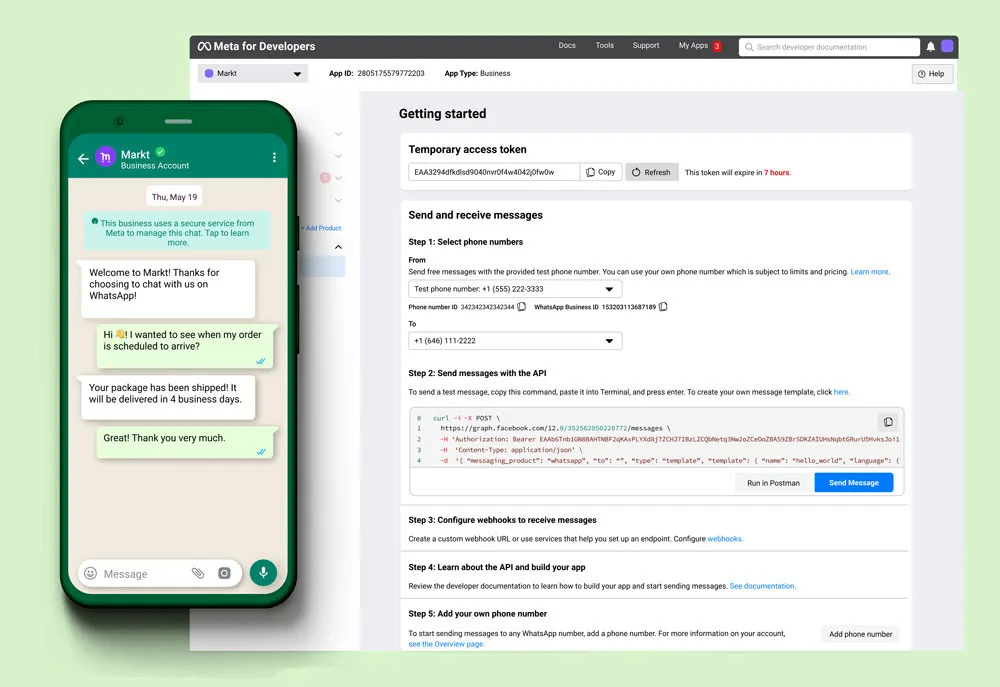
Setting up the channel is easier than it seems if you follow the correct order.
Choosing a provider/BSP or partner
Unless you have a dedicated technical team, it’s best to access the API through a BSP (Meta-certified solution provider) or a partner who can set it up for you and provide support. This simplifies onboarding, template management, and infrastructure.
Verify the business on Meta and the phone number
You need a verified Meta Business Portfolio and a phone number (landline or cell phone) that can receive the verification code. Business verification unlocks advanced features and increases messaging limits.
Create message (and approval) templates
For proactive messages sent outside the 24-hour window (notifications, confirmations, follow-ups), you’ll create templates that Meta must approve. They’re usually approved within minutes if they comply with the policies. Have the most frequently used support templates ready: ticket receipt, resolution, and satisfaction survey.
Get customers to opt in
Before you can message them, you first need the customer’s consent (opt-in). Obtain it on your website, through the contact form, or during the checkout process, making it clear that you’ll be responding via WhatsApp.
Automate Without Losing the Human Touch: Bots and Routing
When done right, automation doesn’t replace people—it frees them from repetitive tasks so they can focus on what adds value. A WhatsApp Business chatbot can instantly answer frequently asked questions (hours of operation, order status, common inquiries), collect initial information, and route the inquiry to the appropriate agent when human intervention is needed.
And this is where 2026 makes a difference: combining WhatsApp with generative AI (ChatGPT, Claude) allows us to go far beyond the usual decision-tree bots. Instead of rigid menus, customers type naturally and receive a thoughtful response, written in a human tone, capable of understanding the nuances of their inquiry and resolving issues that previously required an agent without fail. The result is automated customer service that doesn’t sound robotic: it’s faster, available 24/7, and—when well-designed—offers a better experience than many human-staffed channels. The key is to always provide a clear path to a human agent for issues the machine can’t resolve on its own.
Connect WhatsApp to your CRM for context-aware customer service
Providing good customer service means providing it with context. If every time a customer messages you, your team has their history right in front of them—their purchases, previous issues, and conversations—the quality of support skyrockets. You can achieve this by integrating WhatsApp with your CRM: every conversation is linked to the customer’s profile, and any agent can pick up where the last one left off without asking the customer to repeat themselves.
If you use Zoho, check out our step-by-step guide to integrating WhatsApp Business with Zoho CRM. And since this channel can be used for much more than just customer support, take a look at how to recover abandoned shopping carts with WhatsApp: same channel, same integration, more sales.
Best Practices for Customer Service via WhatsApp
To ensure that customer service on WhatsApp Business adds value rather than detracts from it: respond quickly (take advantage of the 24-hour window), use a friendly yet professional tone, don’t overuse proactive messages, respect business hours and consent, and always make it clear how to speak with a live person. Track response and resolution times, and review conversations to improve your templates and your bot. A well-maintained support channel builds loyalty; one overloaded with cold, automated responses drives customers away.
Frequently Asked Questions
Can I use the WhatsApp API for customer service?
Yes, and that’s exactly what it’s best used for. The API enables multi-agent support, automation, and integration with the CRM—all of which the standalone app doesn’t offer. It’s the best option for providing professional support at scale.
How much does it cost to use the WhatsApp Business API for customer service?
Access to the API is unlicensed; you pay per conversation, based on Meta’s pricing model and the country. Service conversations (those initiated by the customer) have a free monthly allowance, plus the BSP or partner’s fee. For support, where the 24-hour window initiated by the customer applies, the cost is usually very low.
Do I need technical knowledge to set it up?
If you’re working through a BSP or a partner, no—they handle the technical side. You’d only need development if you choose to integrate directly with the Cloud API using custom logic.
App or API for customer support?
API, without a doubt, as soon as you have more than one person handling customer service or want to automate and integrate with the CRM. The app is limited to a single device and does not support automation.
Want to take your WhatsApp support to the next level? At Reinicia, we set it up from start to finish with our WhatsApp Business service for customer support.