Zoho Books integrates with VeriFactu through B2Brouter, a third-party provider that validates each invoice and submits the record to the AEAT. Zoho does not charge for this integration; B2Brouter does, based on your volume. You’ll need a B2Brouter account, which you’ll need to connect under “Settings > VeriFactu,” and you’ll need to review the tax information and invoice series before issuing an invoice.
This guide is for anyone who uses (or is considering) Zoho Books or Zoho One. In summary, the regulations require invoicing to be done using software that prevents invoices from being altered without a trace, and the effective dates listed in the Official State Gazette (BOE) remain January 1 and July 1, 2027, until the postponement to October 2028—as announced by the Tax Authority—is published. We explain the different options, the complete timeline, and who is exempt in our guide on what VeriFactu is and when it becomes mandatory.
Table of Contents: VeriFactu in Zoho Books
How Zoho Books Integrates with VeriFactu
Zoho announced support for VeriFactu in Zoho Books on November 14, 2025, on its official community forum. It is not a native connection with the AEAT: Zoho Books generates the invoice and its entry, and B2Brouter validates them and transmits them to the tax authorities. This is explained in the official Zoho Books help section for Spain.
Zoho Books operates exclusively in VERI*FACTU mode: each invoice is sent to the AEAT upon issuance. Zoho states this in its affidavits dated September 27, 2025—one for Zoho Books and one for Zoho One—which covers four financial applications: Zoho Books, Zoho Invoice, Zoho Billing, and Zoho Inventory. You do not need the AEAT to verify your account: certification is the responsibility of the manufacturer (Zoho) and the provider (B2Brouter).
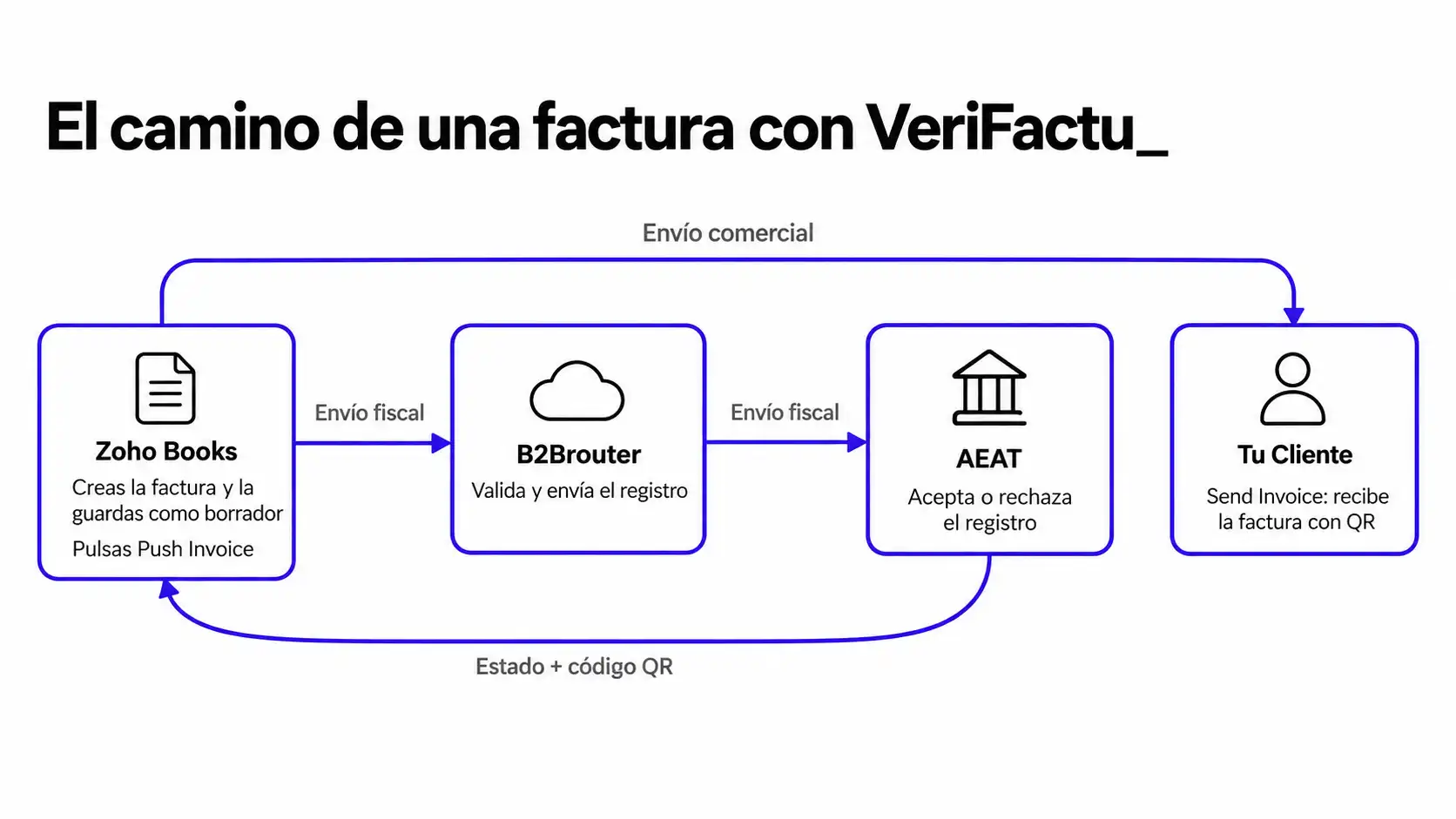
What each person does and what remains your responsibility
| Who | What it does |
|---|---|
| Zoho Books | Creates the invoice, calculates the chained digital signature, displays the delivery status, adds the QR code to the PDF, and prevents editing of documents that have already been sent. |
| B2Brouter | Validates the invoice, transmits it to the AEAT, and returns the result. It requires your account and your authorization to send on your behalf. |
| AEAT | Receives the submission, accepts or rejects it, and allows your customer to verify the invoice using the QR code. |
| Your company | Remains responsible for ensuring compliance: correct tax information, sequential invoice numbers, reviewing failed submissions, and correcting them with amended invoices. |
This last point is important. Delegating the submission to a third party does not relieve you of responsibility, as the AEAT points out in its FAQs on compliance and delegation. The software helps you; the invoice is still yours.
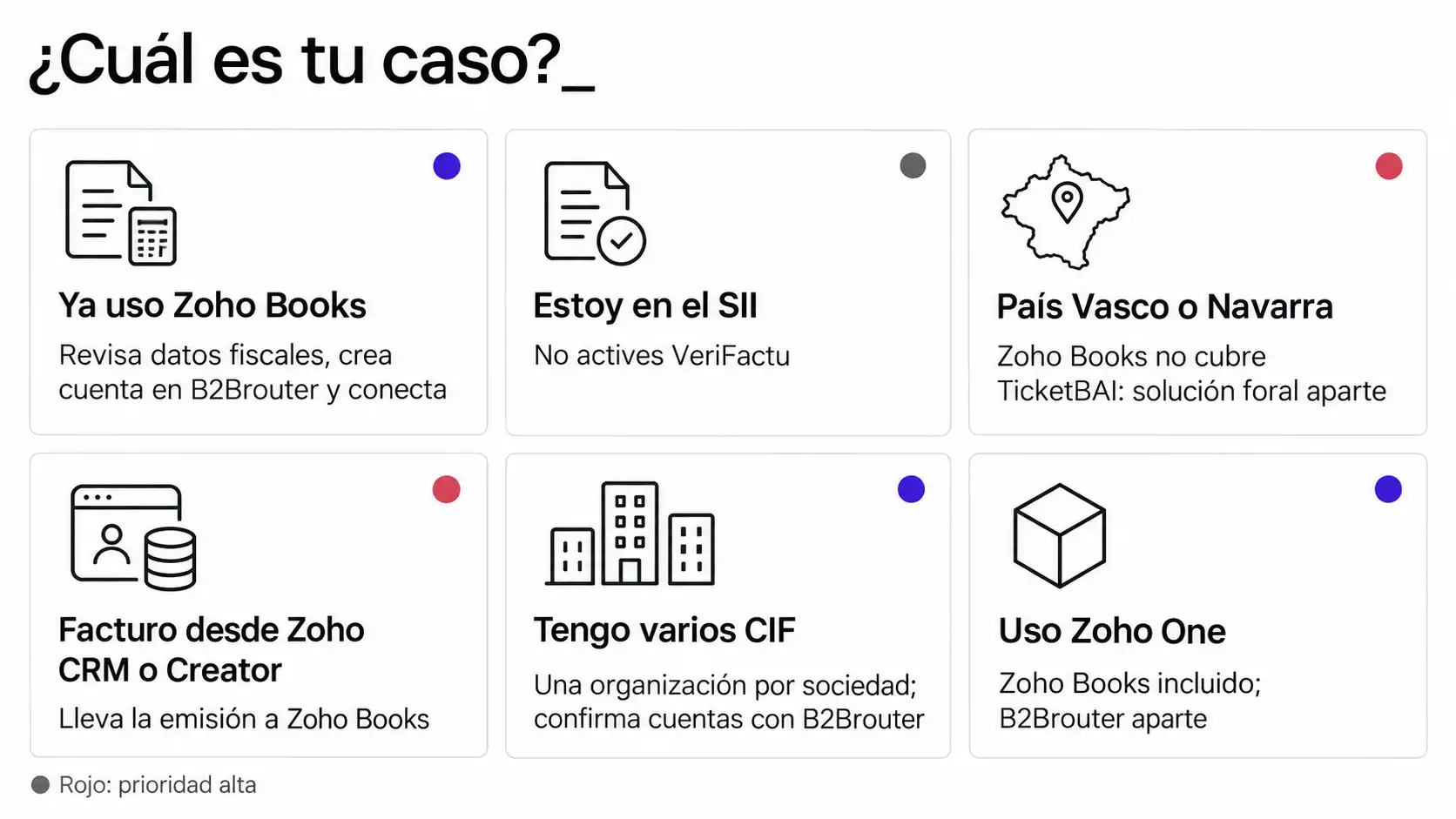
What you need to do depending on your situation
| Your Situation | What to do | Priority |
|---|---|---|
| You already invoice with Zoho Books | Review tax information and series, create a B2Brouter account, and connect it | Plan ahead of your legal deadline |
| Your company is registered with the SII | Do not activate VeriFactu; continue using the SII | Confirm with your tax advisor |
| Tax address in the Basque Country or Navarre | Do not activate VeriFactu; Zoho Books does not support TicketBAI | Registration: seek a regional solution |
| Invoices from Zoho CRM or Zoho Creator | Move invoice issuance to Zoho Books | Setup: Requires redesigning the workflow |
| Multiple Tax ID Numbers | Review Zoho Books organizations and B2Brouter accounts using B2Brouter | Media |
| You use Zoho One | Zoho Books is already included; B2Brouter is purchased separately | Same as “you already invoice with Zoho Books” |
You’re already using Zoho Books
You don’t need to switch to another program. The work involves getting your organization set up: taxes enabled, tax ID numbers (NIF) labeled “ES,” complete tax information for your customers, and organized invoice series. Next, create a B2Brouter account, connect it, and start sending. At Reinicia, we’ve already activated VeriFactu for our clients’ Zoho Books organizations, and the most time-consuming part isn’t the connection itself, but getting that data and those series organized.
The real decision is when to activate it. Before your legal deadline, you’re in the voluntary period, but Zoho recommends not deactivating it once it’s up and running—except to migrate to another program. If the VeriFactu option doesn’t appear in Settings, contact Zoho Books’ European support (support@eu.zohobooks.com), which is the contact Zoho provides for questions about configuration and pricing.
Your company is already registered with the SII
SII and VeriFactu are mutually exclusive: if you keep your VAT records through the SII, you do not need to send records to VeriFactu or include the QR code. In Zoho Books, do not connect B2Brouter for that organization. What will affect you, however, is B2B electronic invoicing, which is in addition to the SII. Check with your tax advisor to see if any company in the group is not registered with the SII, since the analysis is done on a company-by-company basis.
Your tax address is in the Basque Country or Navarre
VeriFactu does not generally apply to taxpayers subject to regional tax regulations. In Álava, Bizkaia, and Gipuzkoa, your obligation is TicketBAI, and Zoho Books does not currently comply with TicketBAI, as acknowledged in Zoho’s own knowledge base. If you’re in Navarra, follow the instructions from your regional tax authority. In both cases, before implementing Zoho Books, you must decide how to fulfill your regional tax obligations.
Invoices from Zoho CRM or Zoho Creator
Zoho’s self-certification statement covers only its financial applications. Neither Zoho CRM nor Zoho Creator are listed as invoicing systems compatible with VeriFactu. If you currently issue invoices from a CRM module or a custom app, you have two options:
- Send the invoice to Zoho Books and integrate it with the CRM: the quote or order is created in the CRM, and the invoice is issued in Zoho Books. This is the approach we usually recommend.
- Develop your own connector using Zoho Creator or the CRM. Note: According to the AEAT, anyone who develops or expands an invoicing system becomes its producer and must sign their own affidavit. This is a responsibility that should be carefully considered.
Zoho Books also lets you import invoices created in another application and submit them to the AEAT from there. If you use multiple applications with the same B2Brouter account, each one must have its own numbering series. If you want to review the role of each tool, check out how Zoho CRM works and what you can build with Zoho Creator.
Your company has multiple tax ID numbers
In Zoho Books, each company is typically an organization with its own tax ID number and its own VeriFactu configuration. Zoho states that its system can be used by multiple taxpayers, but it does not document how B2Brouter accounts are structured within a group with multiple tax ID numbers. Before activating the service, confirm this with B2Brouter and check whether any company in the group is registered with the SII and another is not.
You use Zoho One
Zoho Books is included in Zoho One, so you don’t have to pay for an additional license. B2Brouter is also purchased and paid for separately. The advantage of Zoho One lies elsewhere: it’s easier to have data from CRM, projects, or inventory fed into Zoho Books without having to enter it twice.
How much does VeriFactu cost in Zoho Books
The cost consists of two parts. According to Zoho’s official help documentation, Zoho Books does not charge for sending invoices to B2Brouter: you pay for your Zoho Books (or Zoho One) plan as usual. The number of invoices you can send depends on your B2Brouter plan, and additional packages are purchased directly from B2Brouter.
Zoho states that B2Brouter offers special pricing to Zoho Books customers, which can be requested at support@eu.zohobooks.com. In its November 14, 2025, announcement, Zoho explained that if you create a B2Brouter account through Zoho Books, you won’t pay the activation fee, and the first 50 transactions are free; after that, you can purchase additional transactions as needed.
What about the price of those packages? B2Brouter does not list specific rates for Zoho customers on its website: prices depend on volume, so check with B2Brouter directly before signing up. The pricing for their general plans for freelancers and small businesses isn’t necessarily the same as what applies to the integration with Zoho Books.
How to Estimate Your Annual Cost
Before requesting a quote, estimate how many transactions you’ll send. Keep in mind that it’s not just invoices that are sent: every cancellation and every correction is also sent to the AEAT. Here’s an example to illustrate:
- A fictional company issues 35 invoices per month and corrects 2 per month (cancellation plus correction, two shipments each).
- Shipments per year: 35 × 12 + 2 × 2 × 12 = 468 shipments, about 39 per month.
- The 50 free transactions would cover slightly more than the first month; the remaining 418 transmissions for the year would be billed through B2Brouter packages.
With that figure in mind, ask B2Brouter for a fixed price and inquire about how it counts transactions (whether a cancellation counts the same as an invoice) and what happens if you use up your package halfway through the year.
How to Activate VeriFactu in Zoho Books, Step by Step
Here is a summary of the steps based on the official Zoho Books help documentation, accessed on October 15, 2026. The Zoho and B2Brouter menus appear in English in the documentation; we’ve listed them that way so you can find them.
Before you begin
- Taxes enabled in your Zoho Books organization.
- Tax ID number registered with the “ES” prefix.
- Your customers’ full tax ID numbers and addresses, and verified invoice series.
- A B2Brouter account. If you already have one, it must be subscribed to eDocExchange, which provides access to the Developers module.
Step 1: Set up VeriFactu in B2Brouter
In B2Brouter, go to Settings > VeriFactu (under Taxes), fill in your company’s information, and save. Like any third party that submits records on your behalf, B2Brouter needs your authorization: the AEAT requires a power of attorney or a partnership agreement for this purpose.
Step 2: Register your Tax ID (NIF) in Zoho Books
In Zoho Books, go to Settings > Taxes (in the Taxes & Compliance section), open Tax Settings, and enter your tax ID number with the “ES” prefix.
Step 3: Connect Zoho Books to B2Brouter
- In Zoho Books, go to Settings > VeriFactu, and click ” Connect to B2Brouter.”
- Project Identifier: In B2Brouter, go to Developers, click the edit icon next to the Groups dropdown menu, and copy the Account Identifier.
- API Key: In Developers > API Key, click Show API Key and copy it.
- Webhook: In Zoho Books, click Copy Webhook URL; in B2Brouter, under Developers > Webhooks, click Add webhook, paste the URL, and select the “Changes in tax return status” event.
- Signature Key: In the same webhook section, click “Show Key,” copy the key, paste it into Zoho Books, and click “Finish.”
Step 4: Issue the first invoice
Create the invoice in Sales > Invoices and save it as a draft. On its details page, click “Push Invoice” to send it to the AEAT. Once it’s validated, you’ll see the QR code on the invoice and receive a notification. Only then should you click “Send Invoice” to send it to your customer.
These are two separate submissions: the tax submission (to the AEAT via B2Brouter) and the commercial submission (to your customer). Zoho Books won’t let you email the invoice until the first submission is complete.
What Changes in Your Daily Invoicing
Invoice statuses with VeriFactu
Zoho Books adds a VeriFactu status to each invoice. The interface displays these statuses in English; here are their equivalents and what they mean, according to the official help documentation:
| Status in Zoho Books | In Spanish | What does it mean? |
|---|---|---|
| Yet to Be Pushed | Pending submission | Saved draft, not yet submitted to the AEAT. |
| Initiated | Submission Initiated | Submission to the AEAT is in progress. |
| Pushed | Sent | Successfully registered with the AEAT. You can now send it to your client. |
| Failed | Failed | An error occurred during submission. Check the reason and correct it. |
| Cancellation Initiated | Cancellation Initiated | You have requested a cancellation, and it is pending confirmation. |
| Canceled | Canceled | The AEAT has confirmed the cancellation. |
| Marked as Canceled | Marked as canceled | It was canceled directly in B2Brouter, and you marked it as canceled manually in Zoho Books. |
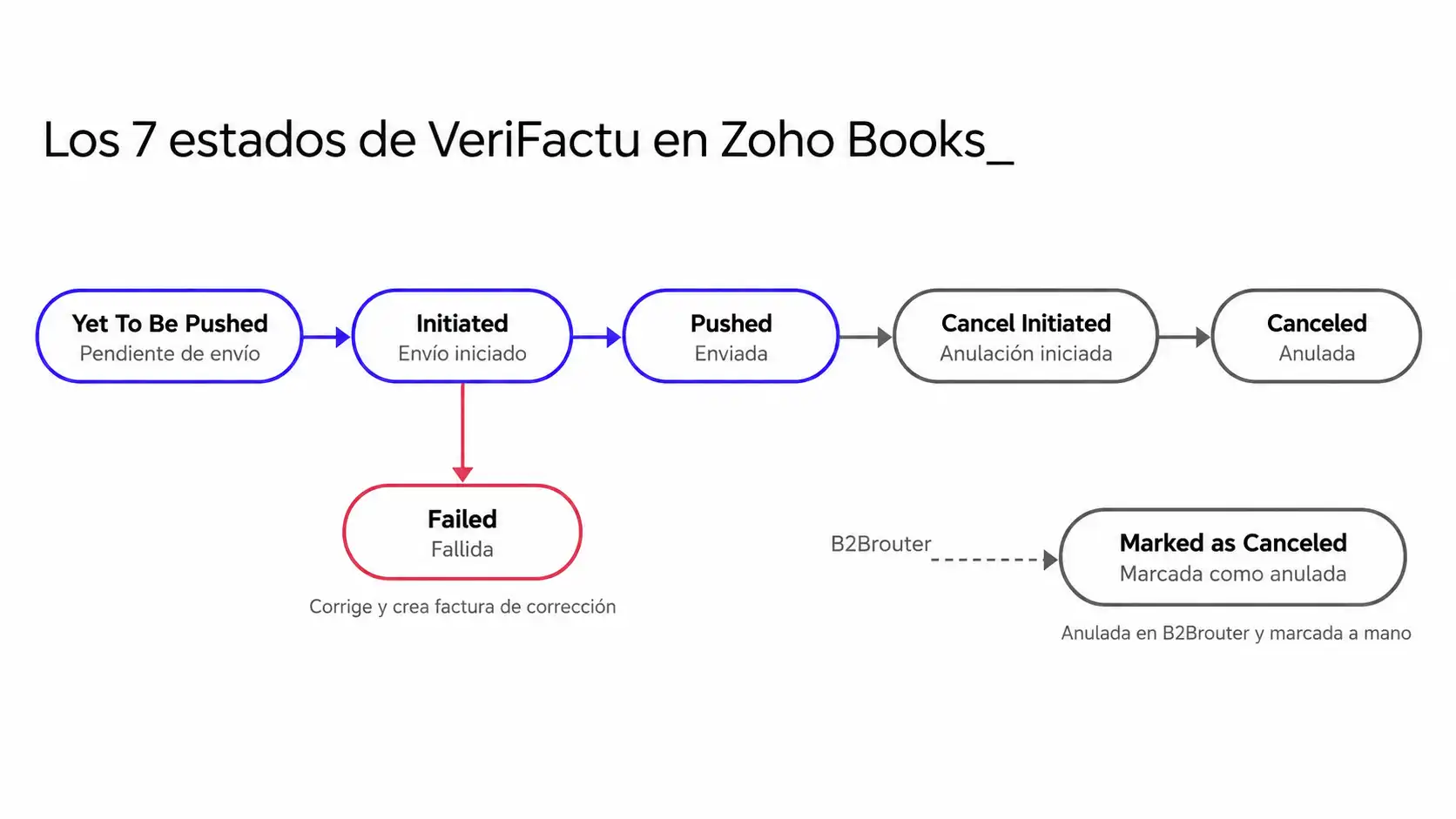
You can filter invoices by status using the drop-down menu in the list or create a custom view. We recommend creating a view that includes failed invoices and having someone from the Administration Team review it every day.
Correcting or Canceling an Invoice That Has Already Been Sent
An invoice sent to the AEAT can no longer be edited or deleted. Only drafts can be edited. To make corrections, the process depends on what stage the invoice is at:
- Sent to the AEAT but not to your client (still a draft in Zoho Books): Click “Cancel” next to the VeriFactu status, enter the reason, and confirm. It is voided in the AEAT via B2Brouter.
- Already sent to your client: Under “More > Cancel,” Zoho Books automatically creates a cancellation invoice in “Credit Memos,” which you must send to the AEAT. Then create the corrected invoice by selecting “More > Create Correction Invoice”; the original appears in the PDF as the preceding invoice.
- Already canceled in B2Brouter: Under “More” > “Mark as Canceled,” specify the reason so that Zoho Books can reflect it.
- Rejected by the AEAT: Zoho Books notifies you in the app and via email, explaining the reason; create a corrected invoice and resubmit it.
Please note that cancellation is irreversible: the associated transactions are unlinked, and the invoice is removed from the accounts and journals.
Recurring invoices, credit memos, and bulk processing
- Recurring: The invoices they generate are automatically sent to the AEAT via B2Brouter. If there’s a problem, you’ll be notified in the app and by email.
- Credit memos: These can only be sent to the AEAT if they were created from an invoice and that invoice has already been submitted.
- In bulk: From the invoice list, you can select up to 200 invoices and click “Push to AEAT.”
- International clients and mobile app: VeriFactu works the same way for clients outside of Spain, and the Zoho Books app also allows you to submit invoices to the AEAT.
Limitations You Should Be Aware Of
- It’s not native: you rely on B2Brouter. If their service experiences an outage, your shipments will be delayed.
- Separate cost: Zoho doesn’t charge for the connection, but B2Brouter does, and its rate for Zoho customers isn’t publicly available.
- Continuity: Technically, you can disable the submission (the “Push Transactions to AEAT” toggle), but Zoho recommends keeping it enabled for the rest of the calendar year unless you switch to a different program. Choose carefully when to enable it.
- No TicketBAI support: Zoho Books currently does not cover the reporting requirements for the Basque autonomous communities.
- Financial apps only: Zoho CRM and Zoho Creator are not supported as invoicing systems.
- English interface and help: VeriFactu’s menus, statuses, and documentation appear in English, and Zoho’s official help section still displayed dates from 2026 when accessed on October 15, 2026. Always check the calendar against the BOE.
- Limited history: You can submit invoices created before activating VeriFactu, but not those prior to July 1, 2024, or those with a future date.
- B2B electronic invoicing, by the way: this is another requirement, with its own timeline. B2Brouter is also an electronic invoicing platform, but as of October 15, 2026, Zoho Books’ support for Spain only covers VeriFactu. Check with Zoho and B2Brouter to see how you’ll comply with both requirements.
Zoho Invoice has its own activation process, which is similar but not identical; if you use this tool, please refer to its specific help section.
Preguntas frecuentes
¿Es obligatorio usar B2Brouter para cumplir VeriFactu con Zoho Books?
Sí, si quieres que Zoho Books envíe tus facturas a la AEAT. B2Brouter es el proveedor que Zoho ha integrado y su ayuda oficial indica que necesitas una cuenta en B2Brouter para enviar. No tienes que crear las facturas en B2Brouter: se emiten en Zoho Books y B2Brouter solo las valida y transmite. Una misma cuenta puede servir para varias aplicaciones si cada una usa su propia serie.
¿Puedo desactivar VeriFactu en Zoho Books?
Técnicamente sí, con el interruptor Push Transactions to AEAT en Configuración > VeriFactu. Pero Zoho recomienda hacerlo solo si migras a otro programa: una vez activado, la organización debería seguir enviando el resto del año natural, porque la AEAT entiende que trabajas en esa modalidad. Durante el periodo voluntario, previo a tu fecha legal, la AEAT no exige permanencia.
¿Qué pasa si una factura falla al enviarse a la AEAT?
Su estado pasa a Failed y Zoho Books te avisa en la aplicación y por correo con el motivo. Si la AEAT la rechaza, crea una factura de corrección y vuelve a enviarla. Conviene tener una vista filtrada de facturas fallidas y revisarla a diario: hasta que una factura está enviada, no puedes mandarla a tu Cliente desde Zoho Books.
¿Zoho CRM cumple VeriFactu?
No como sistema de facturación. La declaración responsable de Zoho cubre Zoho Books, Zoho Invoice, Zoho Billing y Zoho Inventory, no Zoho CRM ni Zoho Creator. Si facturas desde el CRM, lo habitual es integrarlo con Zoho Books para que la factura se emita allí. Desarrollar un conector propio es posible, pero te convierte en productor del sistema, con su propia declaración responsable.
We’ll help you set up VeriFactu properly in your Zoho Books_
About the sources for this article
Official sources linked throughout the text: Zoho Books help and knowledge base for Spain (zoho.com/books/help/e-invoicing/spain and articles from zoho.com/books/kb/e-invoicing/spain), Zoho Books announcement in its community (November 14, 2025), Zoho One’s statement of responsibility (September 27, 2025), the B2Brouter website (plans and pricing), and the AEAT’s electronic portal. Accessed on October 15, 2026. Menu and status names are cited as they appear in the English interface; the translation is ours. The shipping calculation is an illustrative example using a fictional company. Reinicia has no commercial agreement with B2Brouter: it is mentioned because it is the provider used by Zoho.