Table of Contents: How to Optimize an AI Chatbot on WhatsApp
If you want to optimize an AI chatbot on WhatsApp, the first step isn’t to switch models, but to look at what it reads before each response. In the previous article in this series, which discussed the cost of each type of AI response on the WhatsApp Business API, we saw that almost the entire token cost comes from reading, and that a hastily built assistant can read five times more than necessary to provide the same response. This article explains how to avoid this and what you should ask your provider or technical team at each step (you don’t need to know how to code to understand it).
If you’re still not sure what such an assistant is used for, start with our guide to chatbots for WhatsApp Business. Fisio Norte is a fictional, illustrative example: a made-up network of physical therapy centers, with sample conversations and figures, which we use as a central theme, just as in the previous article. The providers’ rates are real and were retrieved on October 14, 2026.
Why Optimizing an AI Chatbot on WhatsApp Starts with What It Reads
An AI chatbot connected to the WhatsApp Business API doesn’t just type out a response— it first has to read everything it needs to write it.
In each turn, the AI re-reads the instructions, the business knowledge, the actions it can perform, the conversation history, and the customer’s message. What it reads is billed as input, and what it writes is billed as output. The output costs more per token, but it’s much shorter, so it has less impact on the final bill.
Reminder: Almost the entire token bill consists of reading data (Fisio Norte case, for illustrative purposes)
Fisio Norte answers the question “How much does a session cost?” With the initial configuration, the AI reads 20,940 tokens to generate 120. With the optimized configuration, the customer receives the same answer, but the AI reads 3,935 and generates 90. Here’s how it breaks down, block by block (the previous article covered the first three adjustments, which brought the read count to 4,140; here, the conversation and the shorter responses are also included):
| Block | Before (tokens) | Next (tokens) | Savings |
|---|---|---|---|
| Instructions | 2.000 | 900 | −1,100 |
| Knowledge | 18.000 | 2.500 | −15,500 |
| Actions | 500 | 300 | −200 |
| History | 400 | 195 | −205 |
| Message from the customer | 40 | 40 | 0 |
| Total Input (Reading) | 20.940 | 3.935 | −17,005 (−81%) |
| Response (output) | 120 | 90 | −30 |
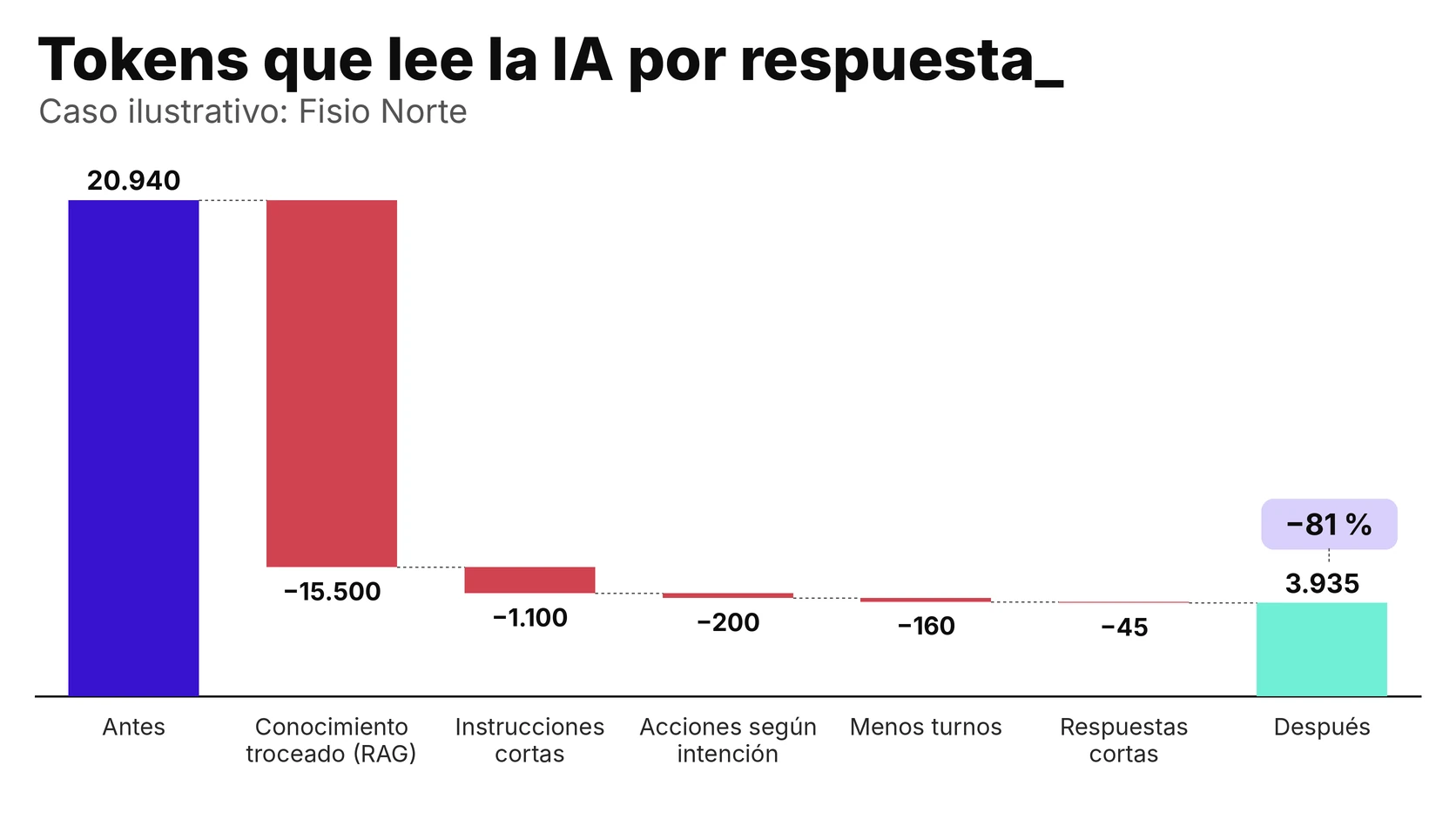
With advanced AI (GPT-6.1 Sol, at $2 input and $10 output per million tokens; 1 € = 1.14 $) and Meta’s service fee (0.0166 € per response), 1,000 responses cost 54.39 € before and 24.29 € after. This is the basis for the calculations in the rest of the article.
Structured Knowledge (RAG): How to Prepare the Information
Knowledge is the heaviest component (18,000 of Fisio Norte’s 20,940 tokens), which is why it’s where the greatest savings are realized. The technique that achieves this is called RAG, and its results depend almost entirely on how the information is prepared.
What Is RAG? Explained Without Technical Jargon
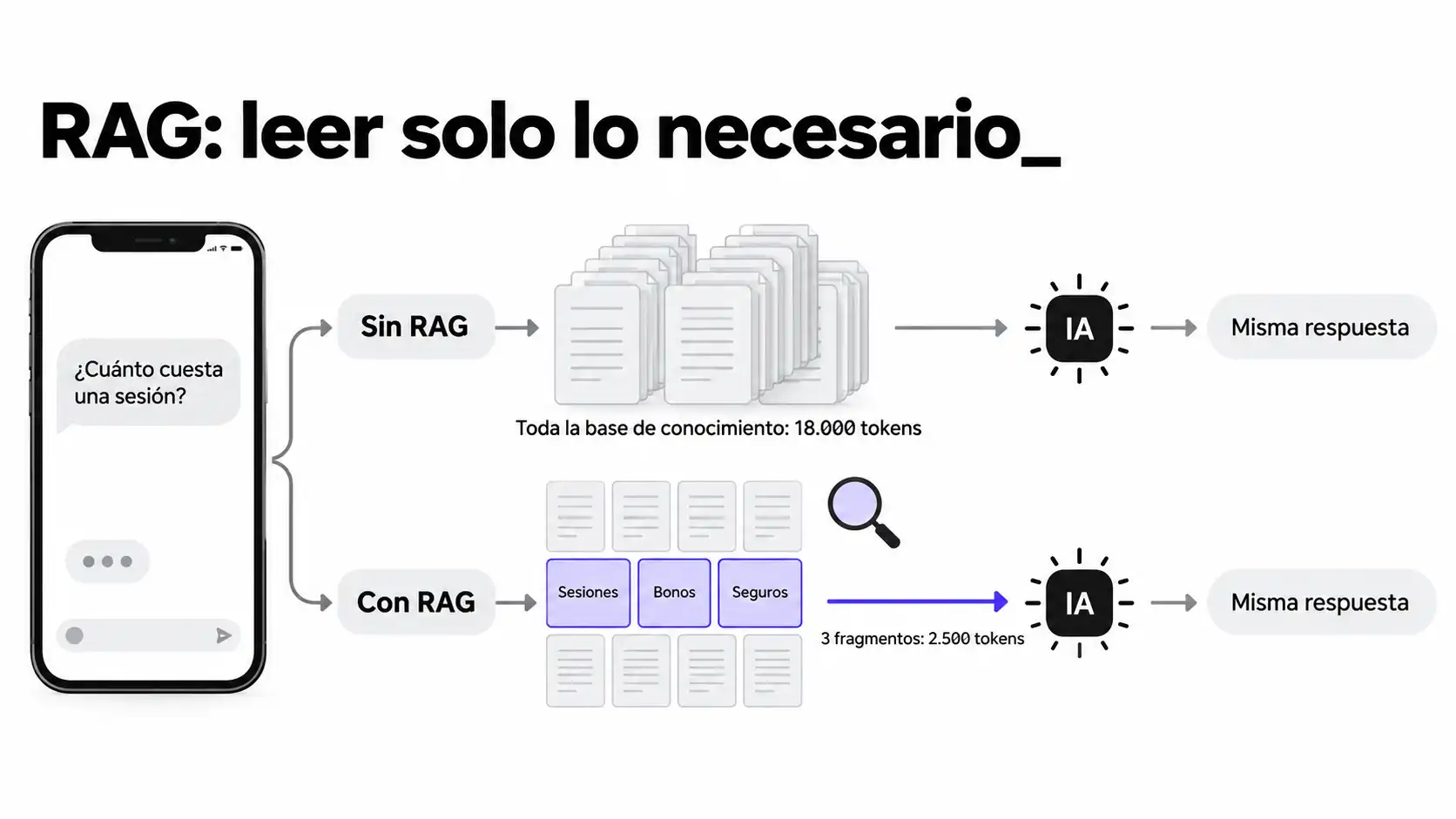
Think about the difference between giving a new employee the company’s entire manual before every call, or providing them with a good index so they can look up only the page they need. RAG is that index (an acronym for Retrieval-Augmented Generation): the information is divided into fragments, stored in a search engine that understands meaning (not just exact words), and when a question comes in, only the fragments that match it are sent to the AI.
For the customer, the answer remains the same; what changes is the interpretation.
How to cut: by sections and approximate size of the pieces
It’s more important to break things down properly than to break them down extensively. Each segment should contain a single, complete idea: a rate with its terms, a cancellation policy, or a center’s hours. If you cut off in the middle of an explanation, the AI receives half-truths; if you mix topics, it receives noise.
- By section, not by page. Each segment follows the natural structure of the content (a heading and the text that follows it), rather than an automatic break after a certain number of lines.
- Let it be self-explanatory. The excerpt should include at least some context (for example, “Downtown Gijón: hours”), because the AI won’t see the rest of the document.
- Approximate size. As a starting point (this is a working assumption, not a standard set by any provider), fragments ranging from about 300 to 900 tokens—that is, from about 200 to 650 words. At Fisio Norte, the three passages requested in the price inquiry total 2,500 tokens.
- One excerpt for every recurring question. The most common questions from customers are the best guide to how to organize knowledge.
How many fragments to retrieve per query
It’s a balance between falling short and reading too much into it. Too few passages may leave the answer out, and too many bring the assistant closer to reading everything. The Fisio Norte pricing question requires three options (sessions, packages, and insurance). As a rough starting point, use between three and five, then adjust based on where the assistant goes wrong: if information is missing, increase the number; if it reads too much, decrease it.
And here’s a safety rule: if none of the prompts match the question, the assistant should say so and hand the conversation off to a human, rather than making up an answer.
Why Markdown Is a Better Starting Point Than a PDF
A PDF is designed for printing, not for splitting up: it combines columns, headers, footers, and tables that, when converted to text, often become disorganized, and the excerpt reaches the AI with truncated sentences or misplaced data. Markdown (a text format in which headings, lists, and tables are easily marked up) preserves the structure: each heading indicates where a snippet begins, and each table remains a table.
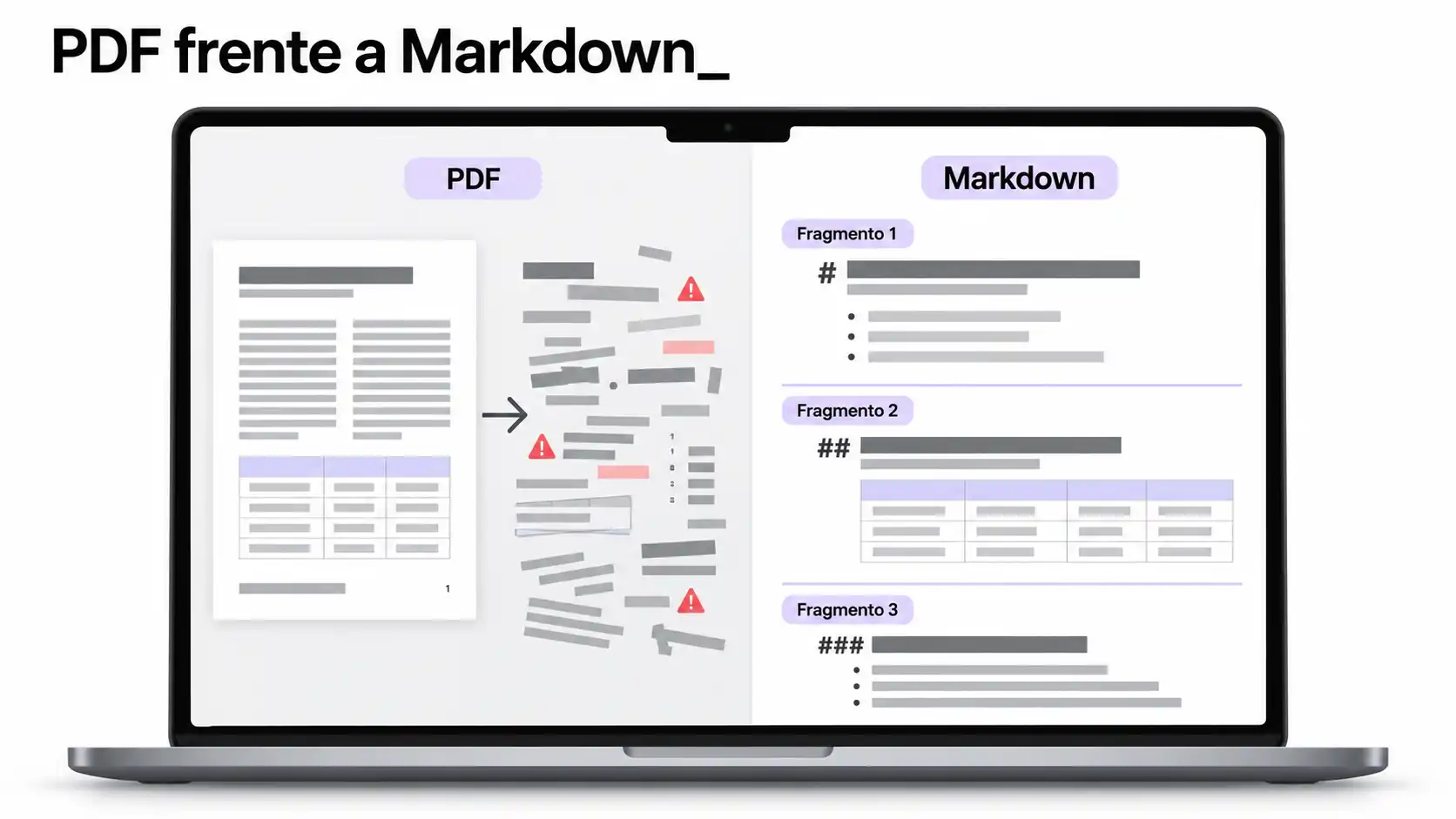
If your knowledge is currently in PDF format, the first step is to convert it to Markdown and review it manually once. It’s a one-time effort that improves everything that comes after it.
What to Ask Your Supplier
- How is my knowledge broken down? And who checks it when a price or schedule changes?
- How many fragments does it retrieve per query? Can I see which ones he used in each answer?
- What do you do when none of the fragments respond? Does it go to a person, or does it respond the same way either way?
Input Cache: How It Works at OpenAI, Anthropic, and Google
The input cache is a discount for repeating the same message header. When the initial part of what the AI reads is identical to that of a recent request, the provider does not process it again and charges much less for those tokens. To take advantage of this, you need to understand which part of the message is fixed.
Which part of the message can be cached (and which cannot)
The cache recognizes the beginning of the message, and only if it matches exactly. As soon as something changes, everything that comes after is no longer cached. That’s why order matters: stable content first, and finally, what changes with each turn. OpenAI’s documentation recommends this approach (stable content first and dynamic content last), and Anthropic’s documentation specifies the order as tools, instructions, and messages.
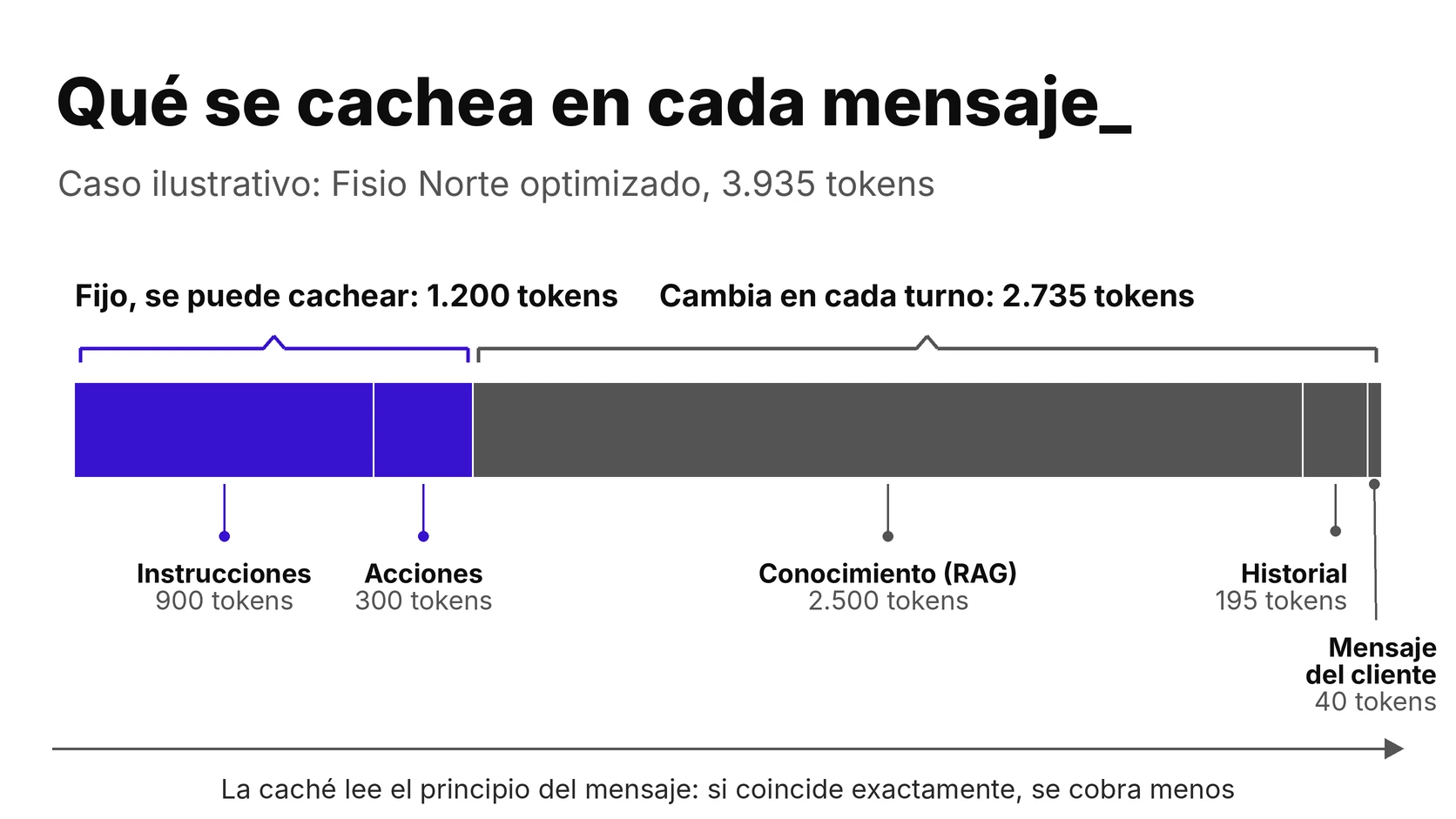
- The following can be cached: instructions, action definitions, and any information that is always sent in the same way.
- You can’t use a cache (or it almost never works): the fragments that the RAG changes for each question, the history, the client’s message, and any variable data (the time, the client’s name) placed at the beginning.
Automatic or manual: discount, minimum number of tokens, and duration for each provider
The three major providers offer cache, but they do not activate, charge for, or maintain it in the same way. Here is what their official documentation states as of October 14, 2026 (prices per million input tokens):
| Supplier | Do I need to activate it? | Minimum for a pat-down | Read from the cache | Write to the cache | How long does it last? |
|---|---|---|---|---|---|
| OpenAI | Automatic on compatible models. Starting with GPT-5.6, there is also an optional explicit mode | 1,024 tokens | 0.1 times the standard entry price; 0.05 times on GPT-6.1 Sol ($0.10 vs. $2) | 1.25 times the entry price starting with GPT-5.6 (previously, no additional charge) | At least 30 minutes since the last write or reuse (GPT-5.6 and later) |
| Anthropic (Claude) | Yes: It is indicated in the request, either automatically or with specific thresholds. | From 512 to 4,096 tokens, depending on the model | 0.1 times overall; 0.05 times in Claude Opus 5.5 and Sonnet 5.5 | 1.25 times (5 minutes) or 2 times (1 hour) | 5 minutes by default, which is reset with each use; 1 hour (optional) |
| Google (Gemini) | Implicit by default starting with Gemini 2.5. The explicit version is optional in some models. | From 2,048 to 4,096 tokens, depending on the model | 10% of the list price (90% discount) on Gemini 3.8 Flash and 3.1 Pro Preview | The explicit version charges for storage by the hour ($0.50 per million in 3.8 Flash; $4.50 in 3.1 Pro Preview) | The page I viewed does not indicate this. |
All three agree on the key points: they reduce repeated reading in the models in the table by between 90% and 95% and require an identical, sufficiently long beginning. They differ in how they are triggered, how long they last, and how much it costs to write. And for all of them, below the minimum threshold, there are no errors or penalties: the message is processed as if the cache did not exist.
The cost of writing to cache when it is not reused
Writing to cache is more expensive than not caching: 25% more expensive on OpenAI (starting with GPT-5.6) and on Anthropic with a 5-minute duration, and twice as expensive with a 1-hour duration. That extra cost is incurred every time a request cannot find its previously saved starting point, and it is recouped through successful hits.
With GPT-6.1 Sol’s pricing, the math is simple: each miss costs an additional $0.50 per million tokens ($2.50 to write versus $2 to read without caching), and each hit saves $1.90 ($2 versus $0.10). Caching starts to pay off when one out of every five responses is a hit (approximately 21%). Below that rate, caching is more expensive than not caching.
What to Ask Your Supplier
- Is caching enabled in my assistant? And which model?
- What percentage of requests are served from the cache? The data comes from the AI provider’s usage logs.
- What goes at the beginning of the message, and what goes at the end? Stability must come first.
RAG and Cache: When They Complement Each Other and When They Compete
They seem like two ways to achieve the same savings, and to a certain extent they are: both reduce the cost of what the AI reads. But they act on different aspects and don’t always add up. RAG reduces the amount that is read; the cache reduces the cost of reading repeated content.
If all knowledge is always processed in the same way, caching makes it much cheaper. But if the RAG changes it for each query, that part is no longer a stable starting point and is no longer cached. Let’s look at the numbers.
Fisio Norte with and without a service fee: a comparison in euros
Let’s return to Fisio Norte (an illustrative example, the same one from the previous article) with the GPT-6.1 Sol rates. In the initial configuration, 20,500 of the 20,940 tokens are fixed (instructions, knowledge, and actions), so they can be cached. In the optimized configuration, only 1,200 are fixed (instructions and actions), because the RAG fragments change with each question.
| Fisio Norte Settings | No cache | Cache with a 50% hit rate | Cache with a 100% hit rate |
|---|---|---|---|
| Before: all knowledge in each shift (20,940 tokens) | 54.39 € | 41.80 € | €20.22 |
| After: RAG and instructions, actions, history, and responses truncated (3,935 tokens) | 24.29 € | 23.56 € | 22.29 € |
It’s worth stating this honestly: with a perfect hit rate, the cache alone wins. The unoptimized assistant drops to €20.22, below the €22.29 of the optimized one. In terms of pure token cost, if the cache were always correct, not trimming the input could end up being cheaper. In this example, that advantage disappears below an approximate 95% hit rate.
And a 100% success rate is a theoretical maximum. With half that success rate, the unoptimized assistant costs €41.80 and the optimized one, €23.56. That’s why RAG is still worth it even when the cache is enabled:
- The cost is more predictable. With RAG, the difference between a perfect cache and no cache is about €2 per 1,000 responses (from €22.29 to €24.29). Without RAG, the difference is about 34 € (from 20.22 € to 54.39 €), and with few hits, it can end up being even more expensive than not using a cache, due to the cost of writing.
- It scales better. If the knowledge base grows, the amount of text read grows along with it; with RAG, it barely changes, because only the relevant fragments are transmitted.
- AI detects less noise. Including less irrelevant text in each response usually helps you focus on what matters. This isn’t something you can take for granted: it needs to be verified with real questions (as we’ll see in the section on measurement).
The pace of conversations determines whether the cache is worth it
The cache is only paid for if the header is reused before it expires. High, concentrated traffic benefits the cache: a store with hundreds of conversations per hour keeps its header valid at all times. Low traffic, or traffic with long gaps, favors RAG: a small clinic that receives ten messages a day, with hours between each one, would almost always let the cache expire and pay for the write without receiving the discount.
There are two other details. First: summarizing or trimming the history can reset the cache, as OpenAI’s documentation warns, so it’s best for the person configuring the assistant to decide when to summarize it rather than doing so at the start of each session. Second: the optimized assistant’s fixed 1,200 tokens barely exceed OpenAI’s minimum (1,024) and fall short of the Gemini models’ minimum (2,048 or 4,096), so the cache would not be triggered on Google.
In summary, the standard approach is to cache the stable data and use RAG to retrieve the variable data. At Fisio Norte, adding caching to the already-optimized assistant saves about €2 per 1,000 responses, because the fixed portion is small. The cache provides greater benefits the larger the fixed portion is and the higher the traffic; RAG provides greater benefits the greater the knowledge base is and the less of it is used for each question.
What to Ask Your Supplier
- How many calls does my number receive each day? That determines whether the cache will hit.
- How many fixed tokens does my assistant have? If they do not reach the model’s minimum, the cache does not take effect.
- When is the history summarized? Is it done every shift or at intervals?
Brief Instructions and Actions Based on Intention
After the initial assessment, the two categories where the most can be cut without losing anything are instructions and actions. At Fisio Norte, they reduced the total from 2,500 to 1,200 tokens across both categories.
Concise rules and examples outside the main message
A two-page manual with examples is reviewed in its entirety for each response. The instructions should explain how to respond, not cover every possible scenario: the tone, the boundaries, when to escalate to a supervisor, and the format of the response. Long examples (such as how to respond to a complaint or how to explain a fee) are stored separately, as another piece of knowledge, and are only retrieved when the question requires them. This is how Fisio Norte reduced its instructions from 2,000 to 900 tokens.
- One instruction per idea, in short sentences, without repetition.
- What never changes, at first. In addition to sorting the message, it prepares that block for caching.
Only the actions specified for each type of question
Every action the AI can perform (scheduling an appointment, checking on an order, transferring to a person) must be described in the message. With eight actions, each response is about 500 tokens long, even if the question is about prices and no actions are needed. The solution is to first detect the intent of the question and load only the relevant actions. This can be done using simple rules or a lightweight, low-cost model that classifies the question before passing it on to the main system.
For a pricing inquiry, Fisio Norte only needs to “schedule an appointment” and “transfer to a representative”: 300 tokens instead of 500. And if the agent checks customer data in the CRM (such as an appointment status or a voucher), that action is only charged when the inquiry is related to that specific information, as is the case with the WhatsApp Business integration with Zoho CRM.
What to Ask Your Supplier
- How many tokens do the instructions and actions take up? And how many actions are included in each response.
- Where do the long examples live? Do they travel all the time, or only when necessary?
Shorter history, with buttons and WhatsApp Flows
The history is the only block that grows with each turn: on the tenth response, the AI reviews the previous nine exchanges. At Fisio Norte, with short conversations, it takes up 400 tokens; in a long conversation, it would take up considerably more.
Shorten or summarize the conversation
There are two ways to trim it down. Keeping only the most recent entries (for example, the last four messages; this is just an example) is the simplest and most predictable approach. Summarizing the above in a few lines (what the customer wants, what they’ve been told, what’s missing) preserves more context, but requires care to ensure the summary doesn’t omit any important details. And, as we saw with the cache, modifying the history can reset it.
Fewer shifts, less history to review
The most effective way to shorten the conversation history is to have fewer turns in the conversation. Buttons, lists, and WhatsApp Flows (forms that open within the conversation itself) capture in one go what would otherwise take several messages. We explain this in our guide on how to reduce the cost of the WhatsApp Business API.
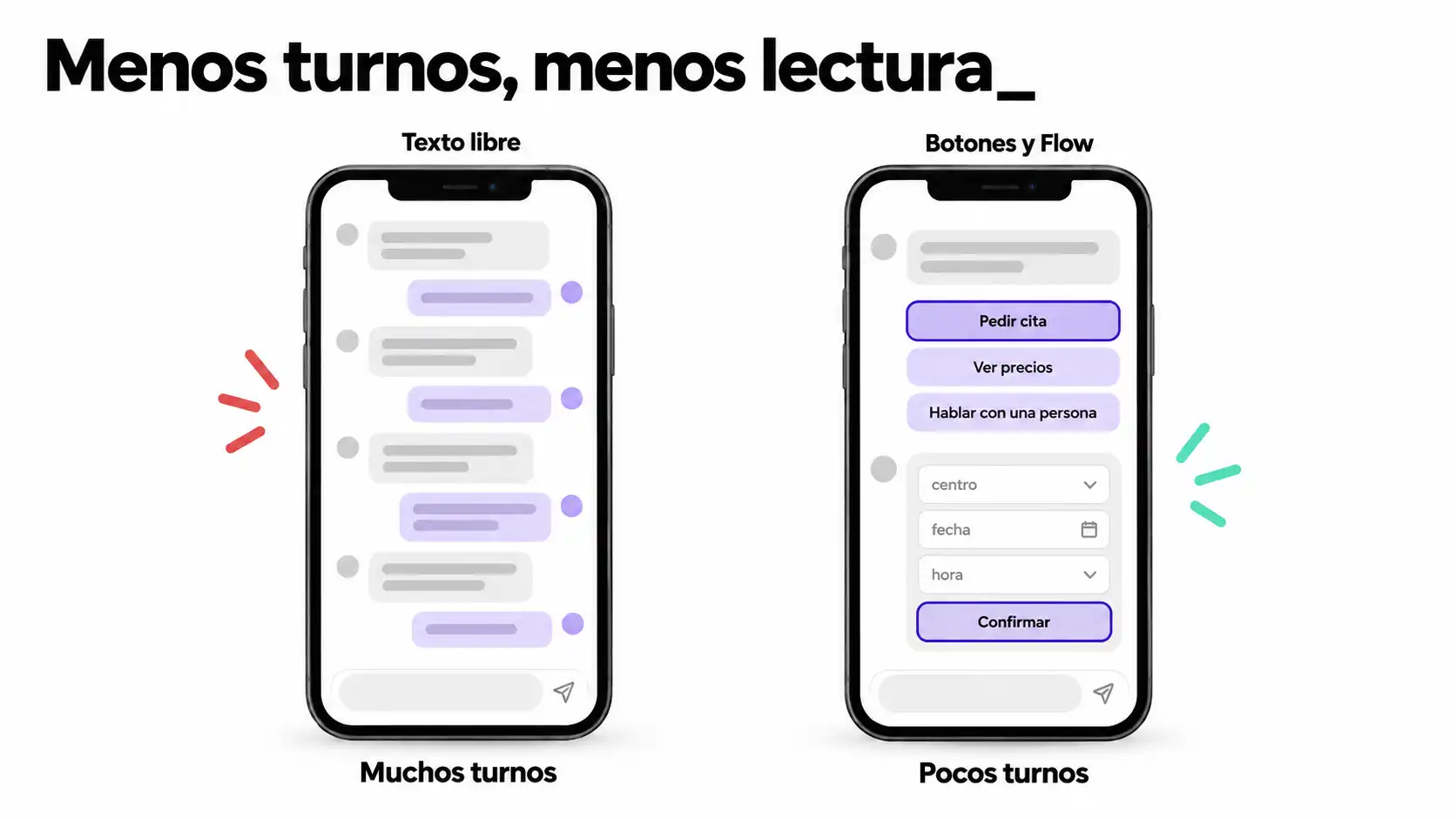
Every message you avoid sending saves you the trouble of having to reread it later. If you’d like to set this up with us, we can do it through our WhatsApp Business Platform service.
What to Ask Your Supplier
- How many history entries are sent? Should it be cut down, summarized, or included in its entirety?
- Which steps can be completed using buttons or Flows? Each one is one turn fewer.
Short Answers: How to Control the Output
The output is the most expensive token: in the example model, a written token costs five times as much as a read token ($10 versus $2 per million on GPT-6.1 Sol). Asking the assistant to respond in two or three sentences, without repeating the customer’s question, reduces Fisio Norte’s response from 120 to 90 tokens.
The direct savings are small, but it also shortens the history that is reviewed in subsequent shifts (at Fisio Norte, it goes from 240 to 195 tokens). There is a limit: a response that is too short compromises the quality of care. The useful guideline isn’t simply “be brief,” but rather “answer the question in two or three sentences, and offer to provide more details.” If the customer needs more information, a button (for example, “View Details”) provides it without the AI writing more than necessary.
What to Ask Your Supplier
- Is there a configured response length limit? So what is it?
- How can you verify that the short answers still work? For example, conversations that end with one person.
Meta’s AI Agent: What You Can Control and What You Can’t
All of the above applies to third-party AI connected to your platform. Meta’s AI agent works differently: it’s billed by tokens—$2 per million, according to its documentation—and we explain Meta’s other fees in the WhatsApp Business API pricing update. It’s worth knowing what profit margin this leaves.
Sources of Knowledge
According to Meta’s documentation, the agent draws on business information, FAQs, websites, and files, and is given instructions regarding tone, priorities, and brand voice. It can also connect to your systems via APIs and webhook subscriptions, and hand control over to your application in certain situations.
In other words, the responsibility for properly preparing the information still falls on you: outdated FAQs or a disorganized website can lead to outdated or disorganized answers here as well. What the documentation doesn’t specify is how that information is broken down or how many segments the agent reads in each response.
Token Usage
Meta states that a message typically consumes between 20,000 and 25,000 tokens (about 4 to 5 cents, or between 3.5 and 4.4 cents), and that simpler messages cost less. That amounts to between €35 and €44 per 1,000 responses. The documentation consulted does not mention which model is used or what it reads in each turn, nor does it describe cache, fragment, or history adjustments such as those discussed in this article.
In addition, the token charge also applies within the 72-hour free window for Click-to-WhatsApp. In practice, with Meta’s agent, you control the instructions, the quality of the sources, and when to hand the conversation over to a human; Meta handles the processing of each response.
What to Ask Your Supplier
- What sources feed the agent, and who updates them? If the price changes, it must change there as well.
- What usage data do we receive each month? Tokens per message and total cost.
- When and how does the conversation shift to a person? Who receives it?
How to Determine If Optimization Is Working
Optimizing without measuring is just guesswork. Three steps are all it takes to get started, and they’re all based on the usage data provided by the AI provider.
Tokens per response and cache hit percentage
Each API response reports how many tokens were read, how many came from the cache, and how many were written (for example, ` cached_tokens ` in OpenAI or `cache_read_input_tokens ` in Anthropic). These metrics are used to calculate the average number of input tokens per response (the goal is to reduce this number without compromising quality) and the cache hit rate (the goal is to comfortably exceed the 21% equilibrium we saw earlier).
Cost per 1,000 responses
This is the unit we’ve used throughout the series because it allows us to compare different options. It’s calculated by adding up the input tokens at their price, the output tokens at their price, and Meta’s service fee (€0.0166 per response starting with the 1,001st response of the month and per number). To go beyond just the cost and measure the value the assistant provides, check out our guide on how to calculate a chatbot’s ROI.
Quality: Make Sure Cost-Cutting Doesn’t Compromise the Response
An assistant that reads less but answers worse doesn’t save anything. Before making any changes, save between 30 and 50 real questions (this is a working assumption, adjustable) along with the answer you consider correct, and rerun them after each change. Pay attention to three things: whether it gives the correct answer, whether it makes up an answer that isn’t in its database, and whether it passes the question to a human when it should.
If you’d like to check how your company’s chatbot is set up, we explain how we work on our WhatsApp Business for Businesses page: WhatsApp Business for Businesses.
What to Ask Your Supplier
- What kind of monthly usage report do you provide me with? Tokens per response, cache hits, and cost per 1,000 responses.
- What test questions are used to validate each change? Can I see the results?
And if you want to put a number on your volume, our WhatsApp cost calculator estimates your Meta bill starting October 1 and the team hours you save by automating responses. It does not include AI usage, which depends on the model and what your assistant reads (that’s what the calculations in this article are for):
How much will your WhatsApp Business API bill go up?
Since October 1, Meta charges for service replies. Enter the figures for a typical month and see right here how much your bill changes.
- €0.0028per service reply (United States), from the 1,001st reply of the month
- 1,000free replies a month per number
- €0.0265per marketing template (United States)
Meta's official price per marketing message (United States) is €0.0207; the rest is the usual platform and reseller margin. Service replies carry no margin.
Preguntas frecuentes
¿Qué es el RAG en un chatbot de WhatsApp?
Es la técnica que divide el conocimiento del negocio en fragmentos y envía a la IA solo los que se parecen a la pregunta del cliente, en lugar de todo el conocimiento. La respuesta es la misma, pero la IA lee mucho menos, y la lectura es lo que más pesa en la factura.
¿La caché de entrada es automática o hay que activarla?
Depende del proveedor. En OpenAI es automática (a partir de 1.024 tokens), en Google la implícita viene activada por defecto y en Anthropic hay que indicarla en la petición. Pregunta a tu proveedor si está activa y qué porcentaje de aciertos tiene.
¿Cuánto se ahorra optimizando un chatbot de IA?
Depende del punto de partida y del modelo. En el caso ilustrativo de Fisio Norte, la lectura baja un 81 % (de 20.940 a 3.935 tokens) y el coste por 1.000 respuestas con una IA avanzada pasa de 54,39 € a 24,29 €. Con una IA ligera el ahorro es pequeño, porque casi todo es tarifa de Meta.
¿Recortar lo que lee la IA empeora sus respuestas?
No tiene por qué, pero hay que comprobarlo con preguntas reales. Guarda un conjunto de preguntas con su respuesta correcta y vuelve a lanzarlas tras cada cambio. Si falta información en alguna respuesta, sube el número de fragmentos recuperados.
¿Se puede optimizar el agente de IA de Meta?
Solo en parte. Puedes cuidar las fuentes de conocimiento y las instrucciones, pero la documentación de Meta consultada no describe ajustes sobre qué lee en cada respuesta ni sobre su consumo de tokens.
We check what your assistant reads and make sure it reads only what it needs to_
About the sources for this article
OpenAI Cache: Guide to Prompt Caching and API Pricing. Anthropic: Guide to Prompt Caching. Google: Context cache and Gemini API pricing. Meta: Pricing for template-free messages and an overview of Meta Business Agent. Accessed October 14, 2026; exchange rate used in the series: 1 € = 1.14 $. Calculations are by Reinicia, and Fisio Norte is an illustrative example. The sizes and number of fragments, history turns, and test questions are working assumptions, not recommendations from any provider.