If there is a question that every user with a blog asks is what type of article works best for SEO and how to carry it out. To begin with, your content should be your own and as original as possible. Apart from this, there are articles that always work for readers and rank very well for SEO: they are the lists, the “top 5” and also those that answer questions and teach, such as tutorials or “How can I do…? Why? Because they are “long-tail” searches, the competition in search engines is lower and the chances of ranking with good content increase.
A lot of information, summarized, gathering the best in that subject and with the option to expand the information or simple, direct explanations that solve all the doubts step by step. These contents simply succeed. They also have many points in favor of SEO that we will explain below. If your blog has many related articles or that revolve around the same topic, make a compilation as a summary and link those articles.
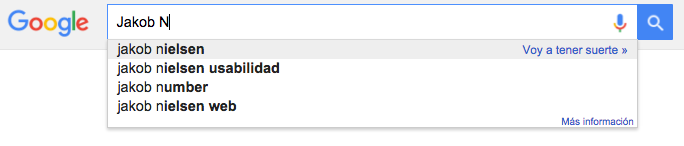
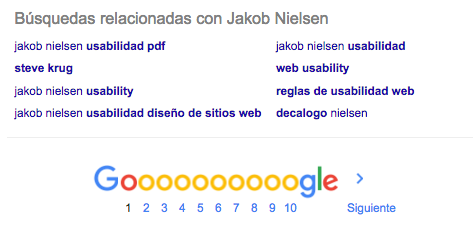
Another way to improve SEO is to write about what people are looking for. Know what are the needs of the public and give them the article they need. A simple and quick way to get ideas when sitting down to write and at the same time to know the most searched contents is to use Google search engine. As simple as this: in the search bar type the keyword of your article, or the topic, and before pressing Enter look at the autocomplete options offered by the search engine. Then choose one of these options or opt for yours and then see the “Related searches”, at the bottom of the first page of results.
But let’s focus on the articles. How does SEO come into all this?
1. Contents
You can’t do SEO without content. And not just any content will do: it must be quality content that really serves the user. If your article is a tutorial, it must really educate whoever reads it; if it is a news item, it must inform, etc. It’s not enough to just spin an idea without actually saying anything of value or novelty because people will arrive, read it -probably not until the end- and leave, when what we are looking for is a conversion: to subscribe to the newsletter, to spend time browsing the web, to contact us… Look for sources, link them, add photographs and nurture your texts thinking about what people want/expect to read when they open the article. The tone should be close, relaxed but professional enough, as well as focused on a topic.
2. Extension
You should not run out of characters, but neither should you write a book online. Keep in mind that reading on a screen is more uncomfortable (and if we talk about the screen of a phone, much more) and if the text is very compact it is worse. That’s why the perfect length is around 800 words. The good thing about lists is that, with small paragraphs about each mention you make, you will reach this figure quickly.
3. Use keywords
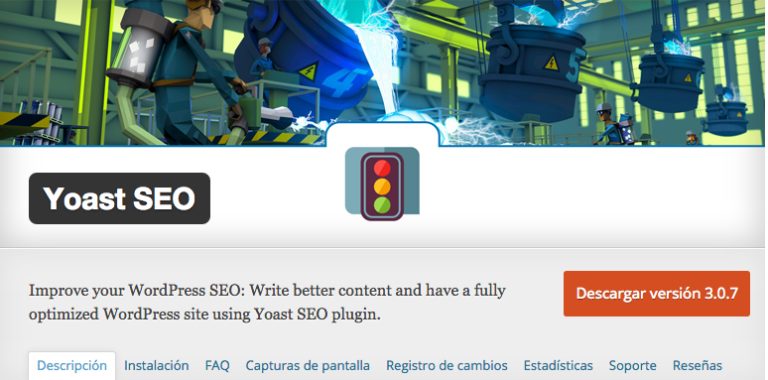
What is the topic of your post? Think about it and come up with a series of keywords related to it. Try to use them throughout the text but in a natural way and try to make them part of the most important sentence. Try to use it to form the title and repeat it in the text, at least in the first paragraph if possible. If building the sentence is more complicated, use at least the keywords in the first paragraph and in the closing. If you use WordPress as a CMS, we recommend the WordPress SEO plugging from Yoast, in addition to warn about what is being done right and wrong, it measures the density of keywords.
4. Shape the content
Use bold, italics and underlining. In addition to facilitating reading, bold words help in positioning, especially if these highlighted words include keywords, but without abusing them and always within longer texts.
5. Links and SEO
If linking to other reference websites is important, linking to your own content is even more important. If you have old posts related to the topic do not hesitate to link them. And in lists, articles with “top 5” or compilations this is indispensable. As for external links, it is good that they are of the same topic as the article or the page as a whole. By the way, use hyperlinks, do not paste the complete urls. In the words you choose to contain these hyperlinks, it helps to understand where the link leads to, do not use a “click here”.
6. Headings
Titles 2 and 3 (H2 and H3) work very well for SEO. Use several of them throughout the text, to divide it by topics or sections. because besides making it easier to read again, if you include the keywords, it will rank again. Do not hesitate to use them in the listings. The title of the article must always be an H1 and there can only be one. This is given by default by the content manager – except in certain templates where this is not the case and must be changed-.
7. Images
Always include images in your articles. If there can be 2 or more, all the better. And don’t forget to provide them with alt. Regarding the listings, you have the perfect excuse to use several images.
If you are starting out, the first thing to do is to generate content. Once you have several related ones, start putting together these types of articles. Share them on your social networks and you will see how your followers share them much more easily even than normal ones, which, once again, will benefit your SEO positioning.
And when you make tutorial or explanatory articles, use “screenshots” as images.
8. The URL
Again it must contain the keyword and also make sure that it does not contain other words with no SEO value such as conjunctions or prepositions. For example: /best-tools-for-your-marketing-strategy-in-2016 would not be appropriate but /best-tools-for-your-marketing-strategy-2016 would be.
