You have seen it many times on Facebook and you also want to do it but you don’t know how: don’t worry, we are going to explain step by step how to make a live poll with Facebook Live and show the votes live. Its mechanics is very simple and with Easypromos it costs nothing to set it up. We assure you. In addition, if you draw a prize among the participants, the results will be even greater and you will get immediate visibility.
If you are a first time Easypromos user, we have a 50% discount coupon on the tool for you. Just contact us so we can give it to you.
Before you start: what NOT to do
Probably your first idea is to do it using the reactions. Example: Potato omelette with or without onion? Vote and win a dinner for 2. Without onion = I like it. With onion = I love it. Then put the brakes on! This kind of polls are not allowed by Facebook. What is possible are votes through hashtags, so change those Like and Love for #onion and #sincebolla. You will avoid problems with this social network.
How to set up a Facebook Live Survey step by step
Thanks to Easypromos it is very easy to overcome this ban, since they have the Facebook Live Survey that uses hashtags. At the agency we set up a survey + sweepstakes for the Mad4Madrid website on the occasion of Valentine’s Day. This is the one we will use to explain the step by step of a real case, which is also a project of the agency.
The ingredients needed for your vote are:
- A White Label or Premium account: important detail, as this is a paid feature.
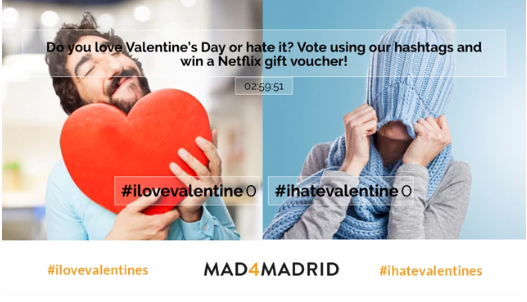
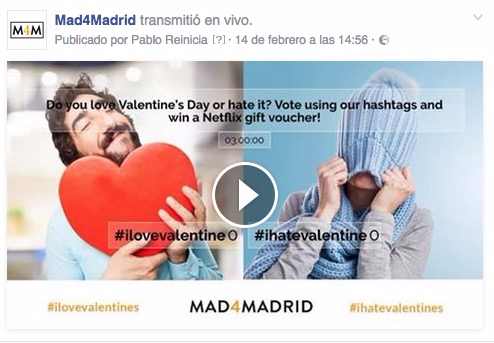
- A topic to vote on that brings you knowledge or can generate debate: this time we wanted to know if the followers of the page liked Valentine’s Day or not. Why? Because the contents of the website for that date would depend on it, including possible changes in the aesthetics of the page and the logo to celebrate such a romantic day. That is the knowledge that was extracted from this vote: a public in favor of Valentine’s Day, therefore, the contents related to this date are of interest to them.
- An image to remain static or a video to be played in a loop. At Mad4Madrid we opted to design a simple but striking creative that reflected very well the opinions we were looking for, who was conducting the survey and the hashtags to use.

- Hashtags: we use 2 but it is possible to use up to 10.
- The OBS software: don’t panic, now we explain what you need it for and how easy it is to get and use it.
- Optional, but highly recommended for greater participation: a prize to be raffled among those who respond to the survey (and yes, we will also explain how to do the raffle because that detail is not part of the Facebook Live Survey).

Have you got it all? Here we go:
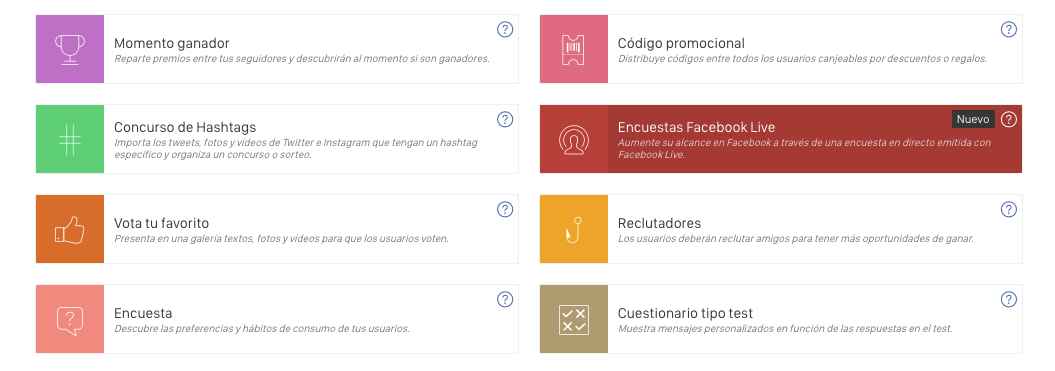
- Log in to your account, create a new promotion and choose from the applications the Facebook Live Survey:

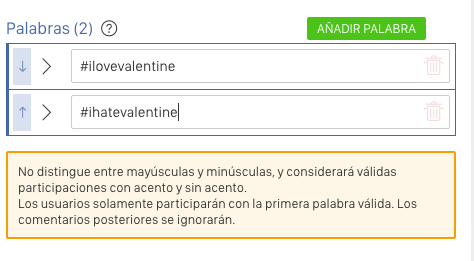
- If you have used Easypromos before, you will be very impressed by the Editor. No, they haven’t removed any features, it’s just that the steps are really simple! Start by typing your hashtags in the Words section, one per box. Remember that you can add up to 10 different ones. And, of course, don’t forget the hashtag. WARNING: Only 15 characters in total are allowed.

- We continue inside the Editor, under the Words box. In Options you will be able to add a Title for your survey that encompasses the theme of the vote and if you raffle something, we recommend that you mention it, although it is complicated because you have to be as brief as possible. However, adding the value proposition improves the participation rate.

- Add a background image or video. The creative must be 1280 x 720 px in size, and the video can be uploaded on YouTube, Vimeo or uploaded from your HTTPS server (for which you will need its URL for MPEG-4 format or WEBM format). In addition, Easypromos offers you several different videos with a free license.
- The countdown: the platform allows a maximum of 240 minutes, i.e. 4 hours.
- Fill in the rest of the options:
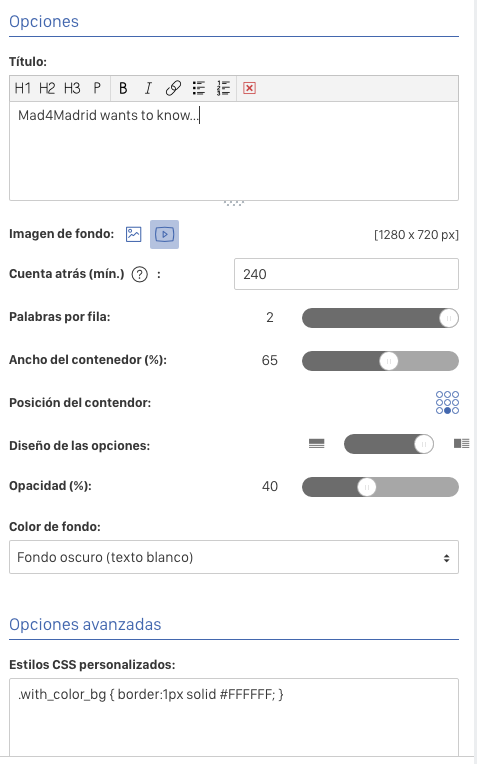
- Words per row to display as many hashtags per row as desired
- Width of the container containing your title and words
- Position of the container on the bottom
- Design of the options allows you to place the count figure behind or above the words
- Opacity to calibrate the darkness of the container
- Background color, either light with black lettering or dark with black lettering
7. You have Advanced Options where you can insert your custom CSS style. Here you can set the font of your choice, other colors, etc.
8. With all this done, save your changes and press Publish Later – you’re halfway done!
With Mad4Madrid this was the result:
9.Complete the 3 steps on the screen:
- The Facebook page on which you want to publish
- The streaming source and connect to Facebook Live: here you will get your streaming key and the streaming source URL.
- Verify the connection between OBS and Facebook (leave this step for when the software is installed).
Let’s go step by step to complete each one of them:
9.1. Now it is time to install OBS and make it work. The software can be downloaded from the obsproject.com website and there is a Help section on their website that you can consult to learn how to configure it.
9.2. Once installed, complete Step 1: the Facebook page you want to post to.
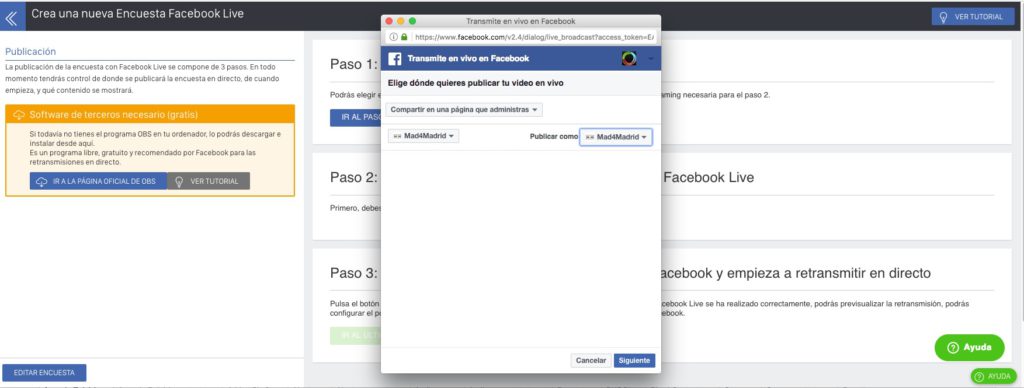
9.3. Then your Easypromos screen will change and you will get in Step 2: the url for the stream and a key.
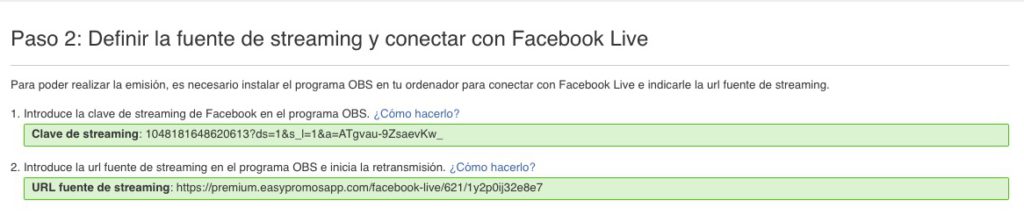
9.4. Within OBS you only have to worry about the Broadcast, Video and Source Settings, which is where you must insert the streaming URL. This, which might sound Chinese to you now, you will realize that it is a piece of cake as soon as you read the tutorial. Once you have finished the step-by-step tutorial, you will see the survey set up on Facebook within OBS.
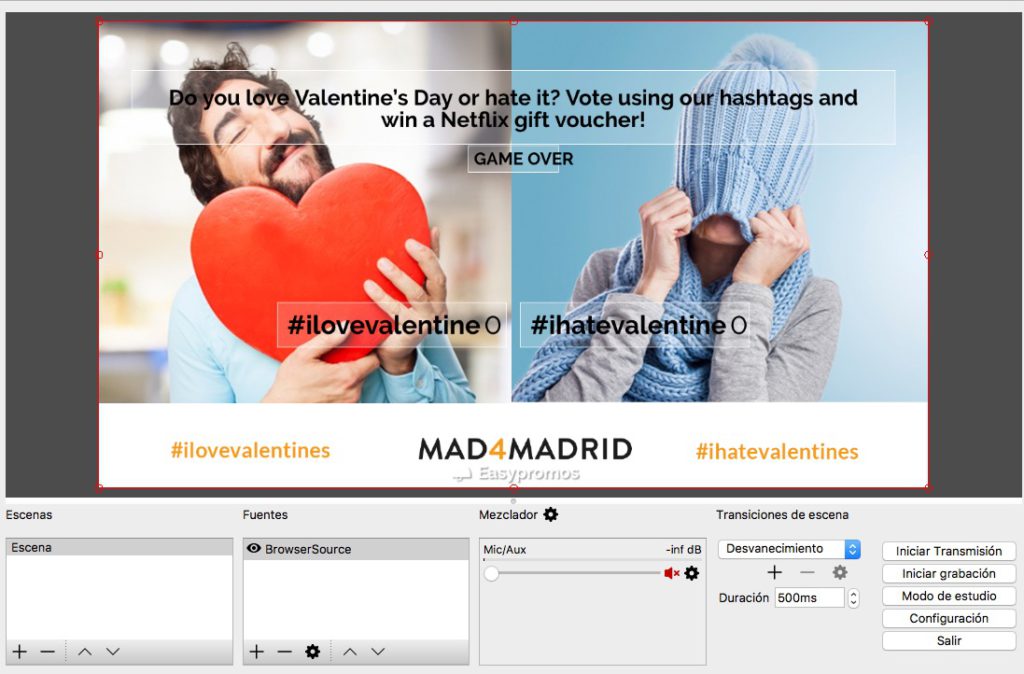
9.5. Go back to Easypromos and complete Step 3 that we had left unfinished: click on the green Go to last step button. Your Facebook page will open and you will only have to add a title and tags to the video.
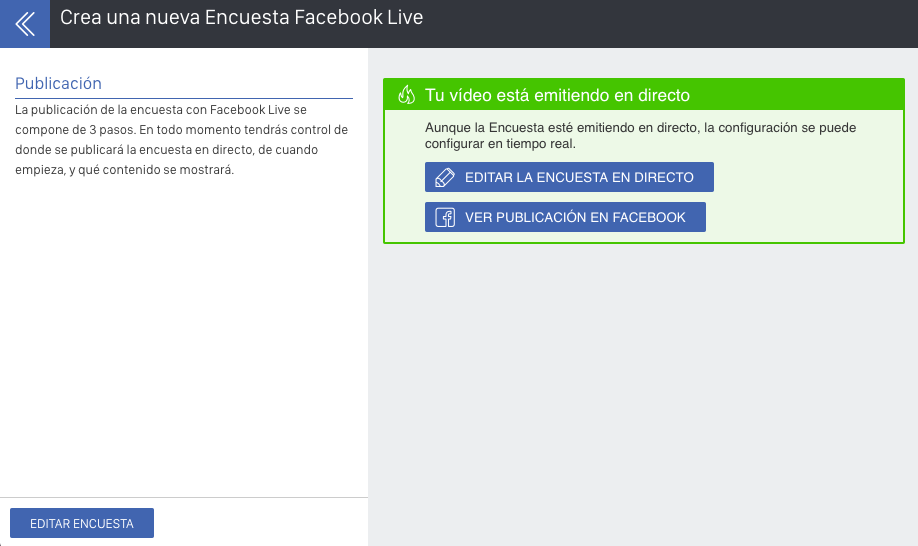
9.6. The transmission will be activated and the survey will start to be broadcasted. Easypromos will show you a screen with two buttons: Edit live poll and View Facebook post.
You’re done! And your Facebook post will look like this:
How do I achieve virality?
First of all, you should know that the organic reach of live broadcasts with Facebook Live is much higher than any other type of publication. In fact, Facebook not only shows the post several times to followers, but also notifies all your followers that you are broadcasting live. From there, the likelihood of people commenting or sharing is much higher, so virality is much more likely.
Advertising
In any case, you can always take advantage and invest in Facebook Ads advertising . To do this, it is best to wait until the end of the live video broadcast. With advertising you will reach further. Depending on who you need the opinion of, segment your audiences: if you need or want to know what the followers of your page think, segment towards them; if you want more followers, stay with the friends of your followers; if you just want virality and as many votes as possible, make a wider audience although with similar tastes to your page.
It is even advisable to change the image before advertising it once the survey has ended because, if the text density is higher than 20%, Facebook will penalize you and the cost will be higher than normal.
Your vote can be rewarded
As we mentioned before, you can raffle a prize. This will encourage more participation and in this case the mechanics could not be simpler: vote using a hashtag. Make sure you specify in the title what can be won.
It is important that you think about the reward beforehand, that it is interesting for your target audience and attractive for some reason, and also that it is related to your brand. The more generic the prize, the more people you will attract, true, but those participants may not be interested in your business and may “fade away” once the sweepstakes is over.
Did you find this article useful? We are Easypromos Ambassadors in Madrid and we can take care of that sweepstakes you have in mind or teach you how to use the tool so you can do it in the most effective way possible. Contact us!
In addition, if you register for the first time on the website of the tool from our affiliate link, you will get a 50% discount on the payment of the sweepstakes! Once you have completed the registration you only have to write us to get the discount coupon.
And remember that you can leave us your doubts or your case in a comment.
