
Based on the list prices as of October 2026, Zoho CRM costs significantly less than HubSpot: for 10 users on the mid-tier plan, the difference in software costs is around €30,000 over three years. HubSpot has the edge in quick setup and integrated inbound marketing. Which one is right for you depends on how your team works.
Updated on October 20, 2026, with prices from the official websites and the calculation assumptions clearly listed so you can recalculate using your own numbers. If you’re starting from scratch, read first about what Zoho CRM is and how it works.
Zoho CRM vs. HubSpot in 30 Seconds
| Zoho CRM | HubSpot Sales Hub | |
|---|---|---|
| Admission price | Free for up to 3 users. Standard: $14 per user per month (billed annually) | Free for up to 2 users. Starter: €20 per license per month without a promotion (there is a temporary promotion of €10 for new customers) |
| A realistic price for 10 users | Professional: $230 per month (billed annually) | Salary: €1,000 per month, plus a mandatory signing bonus of US$1,500 |
| Learning Curve | Longer: performs well when customized | Shorter: predefined structure; you start earlier |
| Customization | Very high: custom modules from the payment plans | Sign up for Pro, but custom objects require Enterprise |
| Integrated Marketing | CRM Campaign Module; Advanced Marketing with Other Zoho Applications | Marketing Hub on the same platform (sold separately) |
| Who is it for? | SMEs with their own processes that want to control costs and scale up to a suite of solutions | Teams that prioritize a quick start and rely on inbound marketing |
Table of Contents: Zoho CRM vs. HubSpot
What is Zoho CRM, and what is HubSpot?
Both are full-featured CRM systems, and both serve a Spanish small business. They come from different backgrounds, and that background explains almost all of their differences.
Zoho CRM is part of an ecosystem of business applications (accounting, support, projects, analytics) that share users and data. Its strength lies in its ability to adapt to your processes with customizable modules, fields, and automations. It’s a good fit for small and medium-sized businesses that have their own unique sales approach.
HubSpot started out as inbound marketing software and built its CRM around that concept: attracting leads with content, nurturing them, and passing them on to sales. Its strength is that everything works from day one with a pre-designed structure. It’s a good fit for teams that want to get started quickly and generate leads primarily through marketing.
If you’re still unsure about what you need (an operational CRM for day-to-day sales activities, an analytical CRM, or a collaborative CRM for cross-departmental use), review the different types of CRM before continuing.
Actual Prices: How Much Each One Costs
In both cases, the list price is just the starting point. What you actually pay depends on the plan you need, not the one that appears first on the page.
List Prices in 2026
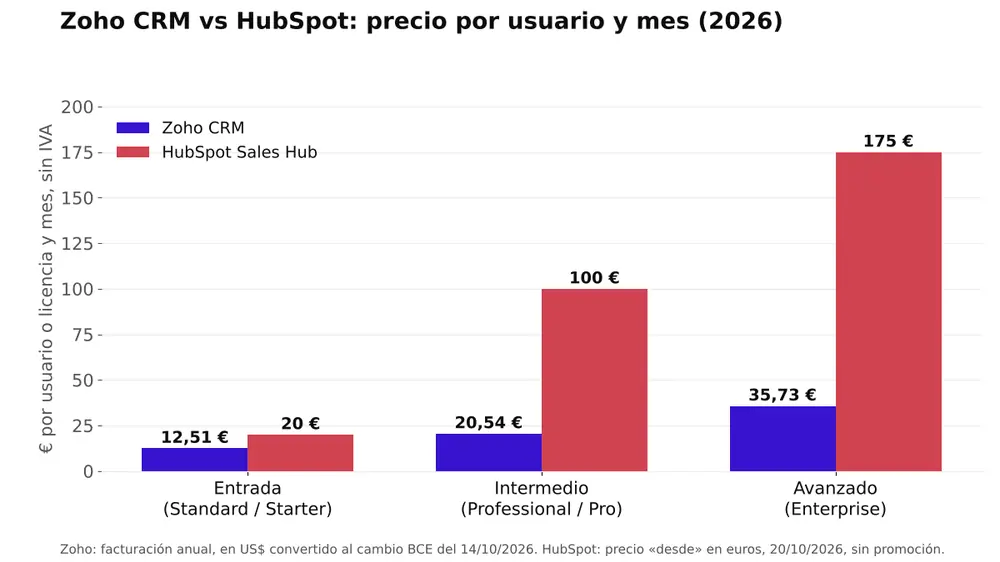
These are the prices per user (Zoho) or per license (HubSpot) per month, excluding VAT. The Zoho CRM prices are taken from its official edition comparison, which as of October 15, 2026, only showed amounts in dollars; we’ve added an approximate conversion based on the European Central Bank’s reference exchange rate as of October 14, 2026 (1 € = 1.1195 US$). The HubSpot prices are taken from its Sales Hub pricing page, accessed from Spain on October 20, 2026, which already displays them in euros. If, when you sign up for Zoho, they offer you prices in euros, use those: they are the ones you’ll pay.
| Level | Zoho CRM (annual/monthly billing) | HubSpot Sales Hub |
|---|---|---|
| Free | $0, up to 3 users | 0 €, up to 2 users |
| Home | Standard: 14 US$ / 20 US$ (≈ 12.51 € / 17.87 €) | Starter: €20 without the promotion. The website also features a limited-time promotion of €10 for new customers |
| Intermediate | Professional: 23 US$ / 35 US$ (≈ 20.54 € / 31.26 €) | Pro: starting at 100 €. Mandatory contribution: 1,500 US$ (≈ 1,340 €), one-time payment |
| Advanced | Enterprise: $40 / $50 (≈ €35.73 / €44.66) | Enterprise: starting at 175 €. Mandatory fee: 3,500 US$ (≈ 3,126 €), one-time payment |
| Top | Ultimate: $52 / $65 (≈ €46.45 / €58.06) | No equivalent in Sales Hub |
The equivalence between tiers is approximate, because they do not include exactly the same features. Both providers charge VAT separately. For details on each Zoho plan, see Zoho CRM: Free vs. Paid.
What’s Not Listed in the Price Table
The table compares rates. These details affect the actual bill, so it’s a good idea to review them before signing:
- Mandatory integration with HubSpot. Pro requires a one-time payment of $1,500, and Enterprise requires a one-time payment of $3,500. Zoho’s pricing page does not list an equivalent charge.
- Annual commitment. With HubSpot Pro, you can pay month-to-month, but you must commit to a one-year subscription.
- Introductory Promotions. The discounted price for the Starter plan is available only to new customers and for a limited time. Plan on the non-promotional price, which is what you’ll pay when you renew.
- The transition to a new plan as you grow. At HubSpot, upgrading from Starter to Pro increases the price per license by a factor of 5 (from €20 without a promotion to €100). At Zoho, upgrading from Standard to Professional increases it by a factor of 1.64 (from $14 to $23, billed annually). And with HubSpot, this change is coming soon: The Starter plan limits workflows (to 50, with restricted triggers and actions) and does not include custom reports or forecasts.
- Licenses and credits in HubSpot. In addition to the sales licenses listed in the table, there are less expensive core licenses (without the sales tools) and free read-only licenses. Each plan includes monthly credits (500 for Starter, 3,000 for Pro, and 5,000 for Enterprise); additional credits cost $0.010 per credit.
- Plan Limits in Zoho. According to its official feature table by edition, the Professional plan allows up to 3 guided processes (Blueprint); the Enterprise plan increases this to 50 and adds custom code in workflows and territory management. For a complex process, the Enterprise plan may be the most realistic option.
- Marketing and warehousing, separately. Neither Marketing Hub nor Zoho’s marketing apps are included in these prices, and additional storage is charged for both.
Three-Year Cost for a Team of 10 Users
These are the assumptions used in the calculation, so you can replace them with your own:
- 10 users, all with full commercial licenses.
- Intermediate plan (Zoho CRM Professional vs. HubSpot Sales Hub Pro), which includes robust automations and forecasting. As a second scenario, the advanced plan for each.
- Annual billing in Zoho and HubSpot’s “starting at” price for 36 months, with no price increases, no VAT, and no additional modules, credits, or storage.
- Without implementation: The cost of designing processes, configuring systems, migrating data, and providing training depends on the scope of each project and is billed separately in both cases.
| 10 users, 36 months | Zoho CRM Professional | Zoho CRM Enterprise | HubSpot Sales Hub Pro | HubSpot Sales Hub Enterprise |
|---|---|---|---|---|
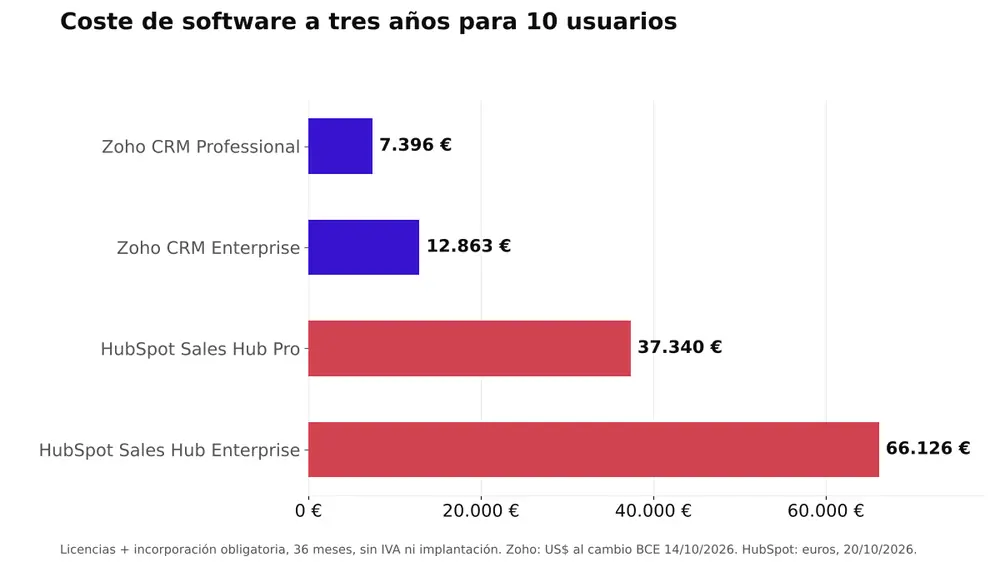
| Licenses | $8,280 (≈ €7,396) | $14,400 (≈ €12,863) | 36,000 € | 63,000 € |
| Mandatory Manufacturer Registration | 0 € | 0 € | $1,500 (≈ €1,340) | $3,500 (≈ €3,126) |
| Total software over three years | ≈ 7,396 € | ≈ 12,863 € | ≈ 37,340 € | ≈ 66,126 € |
The math is straightforward: there’s a difference of about 29,900 € in software costs between Zoho CRM Professional and HubSpot Pro over three years, plus implementation costs, which depend on the scope of each project. Even when comparing Zoho CRM Enterprise to HubSpot Pro, the difference is around €24,500. And with monthly payments for Zoho CRM Professional ($35), the total cost of licenses comes to about €11,255—still far below HubSpot Pro.
To be fair, there are two caveats. The HubSpot implementation includes remote support, so it can reduce the workload involved in setting it up. And part of what you save on licenses with Zoho should be invested in setting it up properly: a Zoho CRM without a predefined design ends up with duplicate fields and automations that no one understands. If your team consists of two or three people and a free plan is enough for you, the difference is minor, and other factors carry more weight.
What Makes Zoho CRM Stand Out
Zoho CRM shines when the CRM needs to adapt to your business—not the other way around:
- Price per user and the cost of scaling. Adding 5 sales reps costs an additional $115 per month (about €103) with Zoho CRM Professional on an annual billing plan and an additional €500 with HubSpot Pro. If you plan to scale, the cost of each new user is just as significant as the starting price.
- Extensive customization without having to upgrade to the most expensive plan. Zoho CRM allows for custom modules within its paid plans (10 in Standard, 25 in Professional, 200 in Enterprise, and 500 in Ultimate). In HubSpot, custom objects require an Enterprise subscription. Illustrative example: An installation company that manages projects, equipment, and maintenance as custom modules linked to each customer. For more details, see the Zoho CRM customization guide.
- Ecosystem. Zoho CRM integrates natively with Zoho Books (invoicing), Zoho Desk (support), and Zoho Projects (projects), and it all fits within Zoho One, the complete suite. This way, the sales rep can see the customer’s outstanding invoices before calling them. And you can integrate WhatsApp Business with Zoho CRM so that every conversation is saved in the history.
- Advanced automation. Workflow rules, step-by-step guided processes (Blueprint) in the Professional plan, webhooks to connect external systems, and—in the Enterprise plan—custom code functions within workflows. For example: assign each lead by region and product, create a “first contact” task, and notify the person in charge if no one has called within 48 hours.
- Reports and AI in the same plan. Custom reports: up to 100 with the Standard plan and unlimited with the Professional plan, compared to 100 with HubSpot Pro and 500 with Enterprise. With the Enterprise plan, Zia (Zoho’s AI) detects anomalies, such as a drop in opportunities in a specific region. We can see this in the Zoho CRM reporting guide.
What Sets HubSpot Apart
HubSpot isn’t expensive just for the sake of it. There are three areas where it clearly comes out on top, and it’s worth acknowledging that:
- Shorter learning curve. It comes with a pre-built structure, views, and processes, and its customer success team helps set up the account in just a few days. A small sales team can get to work in the first week without having to design almost anything. If no one is going to maintain the CRM, that simplicity is worth its weight in gold.
- Integrated inbound marketing. Sales Hub and Marketing Hub share the same database: forms, landing pages, email, and contact tracking from the first visit through to the sale. Zoho achieves this through other applications connected to the CRM; in HubSpot, it’s a single platform, and for companies that rely on inbound marketing, that integration is the most mature.
- Documentation, training, and community. An extensive knowledge base available in Spanish, free courses on HubSpot Academy, and a large user community. Users who get stuck can usually find the answer without opening a support ticket.
Billing and Compliance in Spain
A CRM doesn’t necessarily have to issue invoices, but many small and medium-sized businesses end up invoicing through their business ecosystem. And in Spain, that comes with a specific requirement: VeriFactu, the regulation that requires invoicing software to ensure the integrity and traceability of each invoice.
The current deadlines are set by Royal Decree-Law 15/2025: corporate income tax payers must comply by January 1, 2027, and all others by July 1, 2027, according to the Tax Agency’s informational notice. However, on October 5, 2026, the Ministry of the Treasury announced in an official statement its intention to postpone the deadline until October 2028, aligning it with the electronic invoicing requirement for companies with annual revenue of up to 8 million euros. As of October 15, 2026, this is a projection, not an approved regulation.
- With Zoho: Invoicing is handled in Zoho Books, which integrates with Zoho CRM. According to VeriFactu’s official documentation, it sends invoices to the Tax Agency via B2Brouter (an authorized provider; requires a separate subscription) and adds the QR code after validation.
- With HubSpot: It has an invoicing tool, but its documentation only notes that requirements vary by country and refers you to your advisors. We haven’t found any official HubSpot documentation regarding VeriFactu (as of October 15, 2026), so it’s best to use an invoicing program that’s tailored to HubSpot and integrated with it.
Both have data centers in the European Union. Zoho has them in Amsterdam (primary) and Dublin (secondary), and assigns the data center based on the country you choose when you sign up. HubSpot hosts European data in Germany and assigns the data center based on the location of your connection when you sign up (paid accounts can change this). Check this during sign-up: it’s easier to make the right choice at the beginning than to migrate later.
How to Migrate from HubSpot to Zoho CRM
If you’re looking for alternatives to HubSpot because the cost goes up when you upgrade to Pro or add users, switching to Zoho CRM is a viable option. That said, it’s important to know what transfers over automatically and what you’ll need to set up from scratch.
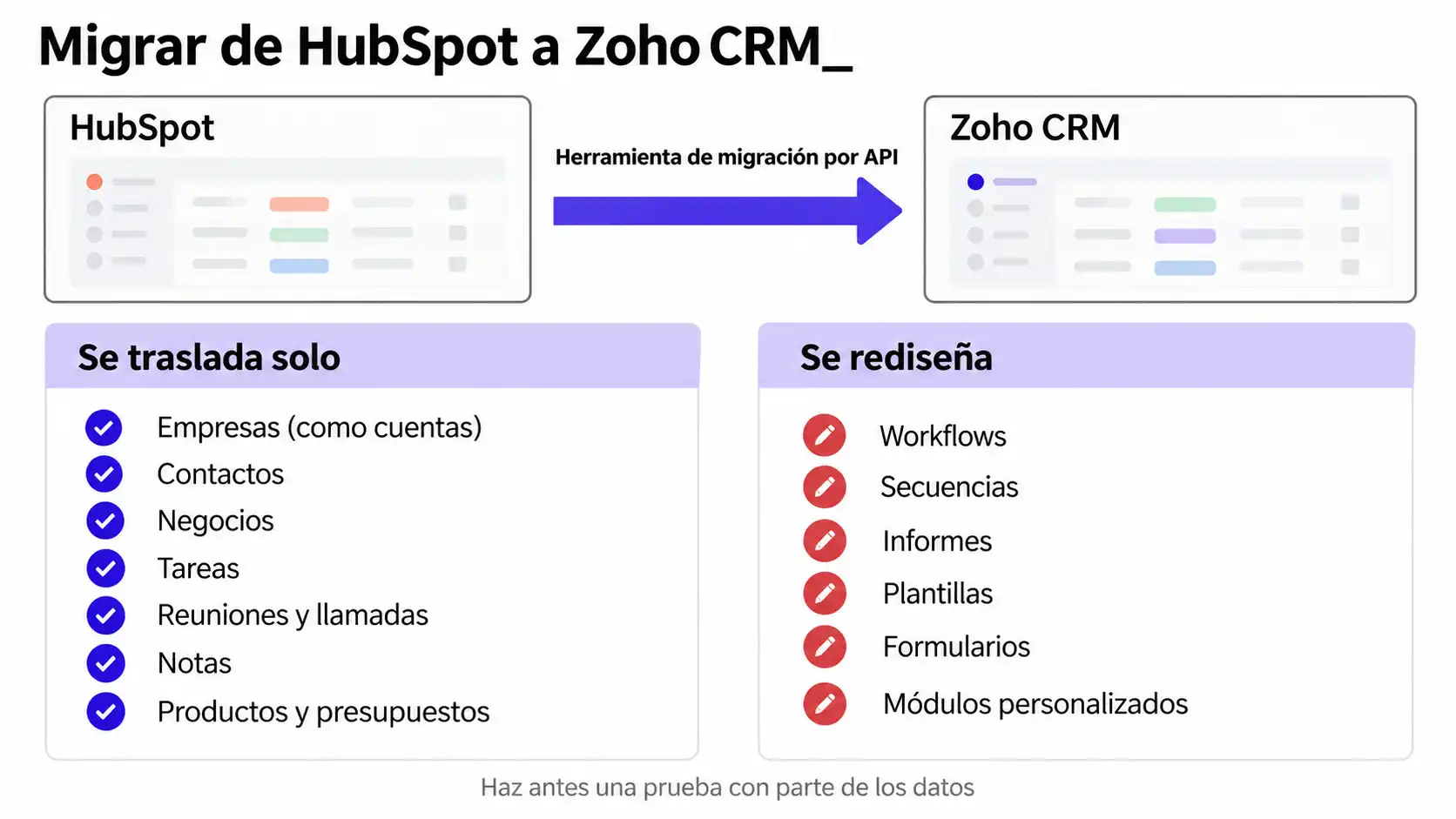
What gets migrated. Zoho CRM includes a migration tool from HubSpot that connects via API and imports companies (as accounts), contacts, deals with their associations, tasks, meetings, calls, notes, owners, products, and quotes.
What doesn’t travel. It does not support custom modules; each record can have a maximum of ten tags; and the documentation does not mention emails or attachments, so it’s best to test this. Additionally, settings are not migrated: workflows, sequences, reports, templates, and forms must be redesigned. Also, be careful if you export manually: HubSpot’s standard export does not include activities such as calls or notes.
How long does it last? Copying data is the least of it. The timeline depends on process redesign, database cleanup, and training, and it varies depending on your volume and how many automations you have.
What to decide before you start:
- The HubSpot renewal date, so you don’t end up paying for two tools any longer than necessary.
- Which data do you keep, and which do you clean up (duplicates, inactive contacts, properties that no one uses)?
- Which automations are kept as is, which are improved, and which are no longer needed.
- Whether marketing also changes its tools or stays the same.
- A test using a portion of the data: Zoho allows you to undo and redo the migration up to three times.
Which One to Choose Based on Your Situation
There’s no way it could be a tie if you look at your specific situation. Here’s a recommendation based on your profile:
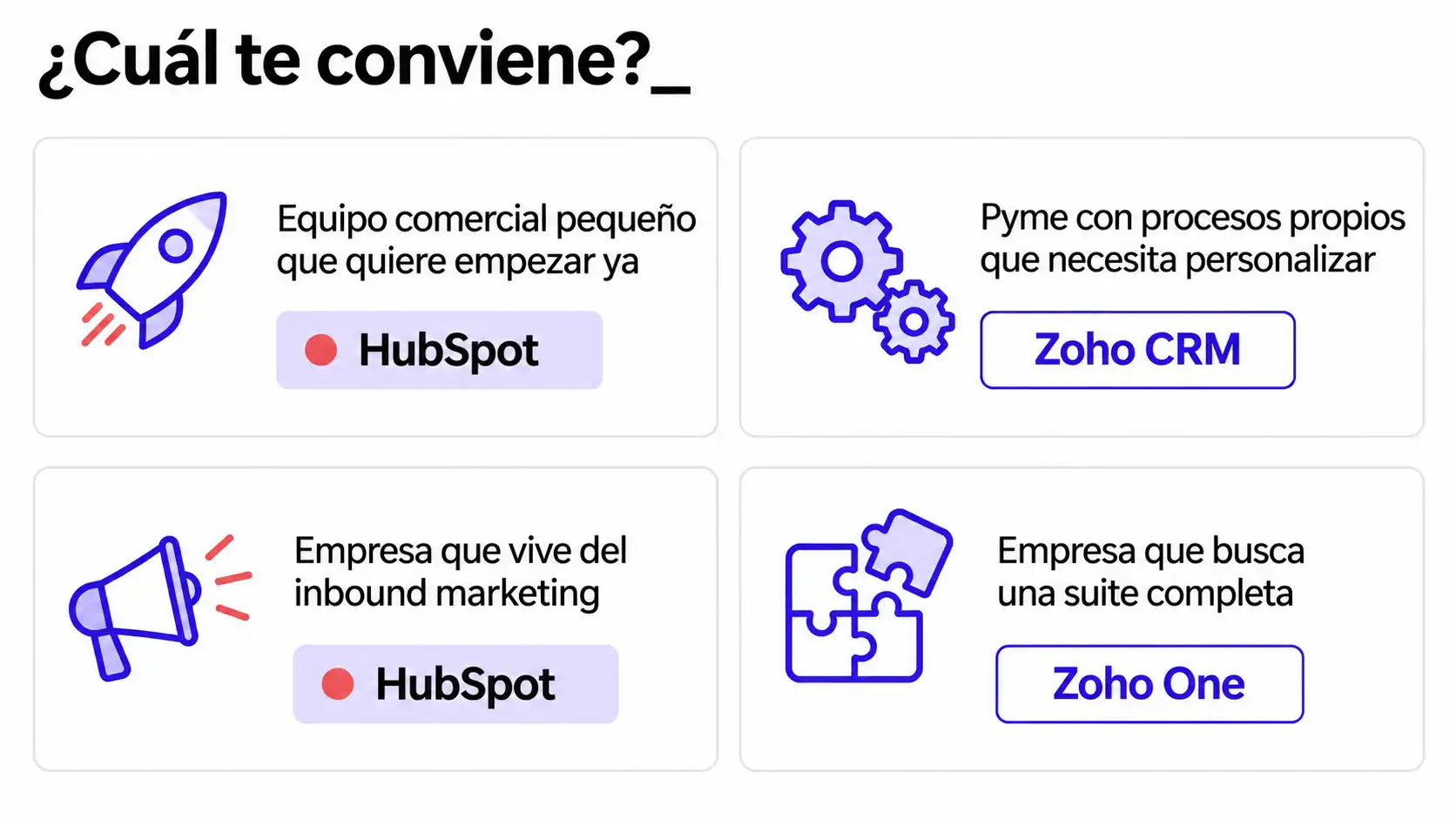
- A small sales team that wants to get started as soon as possible: HubSpot. With just two or three people and a simple process, the free plan—or Starter plan—gets you up and running in a matter of days. Just be sure to figure out now how much it will cost to upgrade to Pro.
- SMEs with their own processes that require customization: Zoho CRM. If your process isn’t standard (projects, recurring services, multiple lines of business), Zoho CRM Professional or Enterprise can adapt to it at a fraction of the cost per user.
- A company that relies on inbound marketing: HubSpot. If most of your leads come from content, forms, and email, the integration of Sales Hub with Marketing Hub justifies the cost.
- A company looking for a comprehensive suite that goes beyond CRM: Zoho One. If, in addition to CRM, you need integrated billing, support, project management, and marketing tools, Zoho One brings together more than 45 apps under a single contract.
If Salesforce is on your list as well, we cover it in our comparison of Zoho CRM and Salesforce.
Preguntas frecuentes
¿Qué es más barato, Zoho CRM o HubSpot?
Zoho CRM, en casi todos los escenarios de pago. Con los precios de lista de octubre de 2026, Zoho CRM Professional cuesta 23 US$ por usuario y mes con facturación anual y HubSpot Sales Hub Pro, desde 100 € por licencia y mes, más 1.500 US$ de incorporación obligatoria. Para 10 usuarios, eso supone unos 30.000 € de diferencia en tres años, sin IVA.
¿Cuál es más fácil de usar?
HubSpot, sobre todo al principio. Llega con una estructura predefinida y un Equipo comercial pequeño puede trabajar con él en pocos días. Zoho CRM necesita más configuración inicial, pero una vez adaptado a tu proceso resulta igual de sencillo para el día a día, porque cada usuario ve solo los campos y pasos que necesita.
¿Se puede migrar de HubSpot a Zoho CRM?
Sí. Zoho CRM incluye una herramienta de migración desde HubSpot que se conecta por API y trae empresas, contactos, negocios, tareas, reuniones, llamadas, notas, productos y presupuestos. Lo que no viaja es la configuración: workflows, secuencias, informes y formularios hay que rediseñarlos. Conviene hacer antes una prueba con una parte de los datos.
¿Cuál es el CRM más usado en España?
No hay una estadística oficial que diga qué marca de CRM es la más usada en España. Lo que sí publica el INE es que el 34,5 % de las empresas de 10 o más empleados con conexión a internet usaba software CRM en el primer trimestre de 2025. Desconfía de los rankings de marcas que no explican su metodología.
¿Zoho CRM sirve para marketing además de para ventas?
Sí, con matices. Desde el plan Standard incluye un módulo de campañas y envío masivo de correo (250 al día por organización en Standard). Para automatización de marketing más completa, Zoho tiene Zoho Campaigns y Zoho Marketing Automation, que se conectan al CRM y están incluidas en Zoho One.
Conclusion
If your priority is to get up and running quickly and your business relies on inbound marketing, HubSpot is worth the cost. If you need a CRM that adapts to your workflow and won’t cause your bill to skyrocket as you grow, Zoho CRM offers more value for every euro. In both cases, the number that matters isn’t the price per user, but what you’ll pay over three years with the plan that truly meets your needs.
At Reinicia, we’re an official Zoho CRM partner: we run the numbers based on your users and your workflow, and we’ll give you an honest assessment of whether the switch is worth it. If you’d rather see it in action first, you can schedule a Zoho CRM demo.
Before choosing a CRM, quantify your needs_
About the sources for this article
Pricing, plan limits, migration, VeriFactu, and data location information are sourced from the official websites of Zoho, HubSpot, the Tax Agency, and the Ministry of Finance, as linked in the text; the Zoho CRM pricing page was also consulted, though it did not display amounts in euros. The exchange rate is the European Central Bank’s reference rate as of October 14, 2026, and the data on CRM usage in Spain comes from the INE survey on ICT usage in businesses (first quarter of 2025). Accessed on October 15, 2026; HubSpot’s prices in euros were accessed on October 20, 2026. Prices do not include VAT. The implementation cost and company examples are illustrative scenarios, identified as such.