An SEO audit of a website consists of a technical and functional inspection of the same in which we analyze the potential that it has in terms of natural positioning in search engines. The main objective is to know the current status of our website and from there define the actions to be taken to achieve the objectives set for it, whether to achieve a number of sales in the case of an online store, or more quality traffic to our article in the case of online publications websites, etc..
The process of search engine positioning has become over the years an activity that requires many hours of continuous dedication and in which many factors are involved, which is why the purpose of this article is to provide in detail what are the main aspects to consider when carrying out a good SEO audit.
SEO Audit
When we are going to get down to work it is necessary that we have very clear what are the main factors that we have to look at to start our SEO Audit. These factors can be grouped from 3 points of view:
1. On-site Optimization
These factors refer to the contents of the website, both at the level of information architecture and the content itself. To highlight:
- Keyword analysis: in order to perform a correct audit, it is convenient to know the keywords on which the website to be analyzed is focused. If no previous SEO work has been done, this list of words will not be available, but a preliminary selection can always be made. With this information, we will be able to see if the content of the web is correctly oriented for SEO or if there are missing contents to be created.
Once we start doing the positioning work, it will be necessary to prepare a report on the evolution that we have achieved in terms of positions as time goes by and it will be necessary to review the keyword consultancy to know if the search trends have changed or not.
- Check that our website is well indexed (Webmaster tools): this process is very important, because it is the only thing that can make our website appear in Google or any other search engine, since any page that the Google robot does not crawl and therefore does not index will not appear in the results. So that this does not happen to us it is advisable to create a sitemap (xml file in which you tell Google which pages you want to be indexed) and upload it to webmaster tools so that Google crawls them and starts indexing them. It is important that you know that sitemaps are NOT mandatory for search engines, but they are a suggestion that they can follow or not. To upload a sitemap, you only have to follow the route that we indicate below:
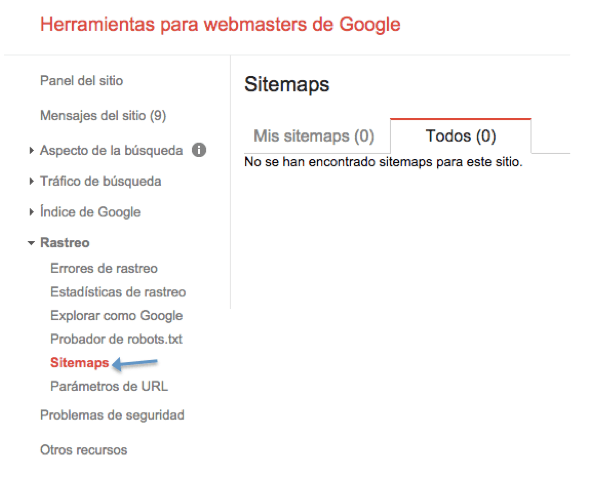 Once in the tab we must click on Add or test sitemap and enter the path of the sitemap.
Through webmaster tools we can know other valuable information such as the number of pages that are crawled per day, the number of pages that have been indexed, crawl errors of pages not found 400 or server errors 500 etc..
- Content for the web: as we have discussed in another post, duplicate content is something that Google penalizes very hard, therefore, it is advisable to perform a thorough analysis of all the content of the web in order to prevent this type of content. It is essential that the content offered on our website is a fresh and updated content, which is related to the activity or services offered on the web and that generates interest to the user.
- Title and Meta Description tags: it is essential that all the contents of our website have these contents of the code filled out correctly and in which the keywords that have been defined for each of the pages of our website are included. In the case of the title they must have a maximum of 65 characters and the meta description must not be longer than 156 -158 characters, although this may vary depending on the search engine.
- Headings: h1, h2, h3,…. h6: you should try to structure the contents by headings and subheadings, as in a Word document, using HTML headings, from H1 [one per page] to H6. This will help to position for the keywords selected in the initial analysis.
- Alt tag in the images: it is very important that all the images of our web have the alt tag filled in, because this will help us to describe our images and will help the search engines to know what that image shows, let’s suppose that we have the following example:
<img src=”https://ejemplo.com/foto.jpg” title=" coches mercedes deportivos" alt=”coche mercedes deportivo” />With this what we say to the search engines is that the image contains a mercedes sports car and in case the image is not seen if we pass the cursor over it we can see that it is a Mercedes sports car.
- Internal links: internal links nowadays are almost as important as external links. We must see if the pages of our site are linked to each other (internal links), something that is very important, as this will help the user to navigate through all the pages without having to leave the web and therefore allowing you to have a good navigability.
- Urls: as for the URLs, we must analyze that none of them are composed of rare terms, meaning those that are not readable. A good option is that when composing the URLs these contain the keyword for which the content is going to be positioned. Next we are going to show you two examples of what are correct URL and URL with rare terms. In the first case we see how our url is composed by the keyword web analytics.
www.miempresa.com/curso-analitica-web/
While in the following case we see how our url is composed of unreadable terms that do not make sense to name the url.
www.miempresa.com/&%%”
- Speed of your website: we live in a world in which things happen faster and faster and in which time is money, for this reason the loading speed of the web has become over the years is a key factor for SEO positioning. Google, for example, provides us with a very easy to use tool such as PageSpeed Insights with which we can know what is the real speed of our website for both mobile and computer by simply entering the url we want to analyze. Keep in mind that an increase in the loading speed of our website can translate into an increase in traffic, a decrease in the bounce rate and therefore a positive experience for the user.
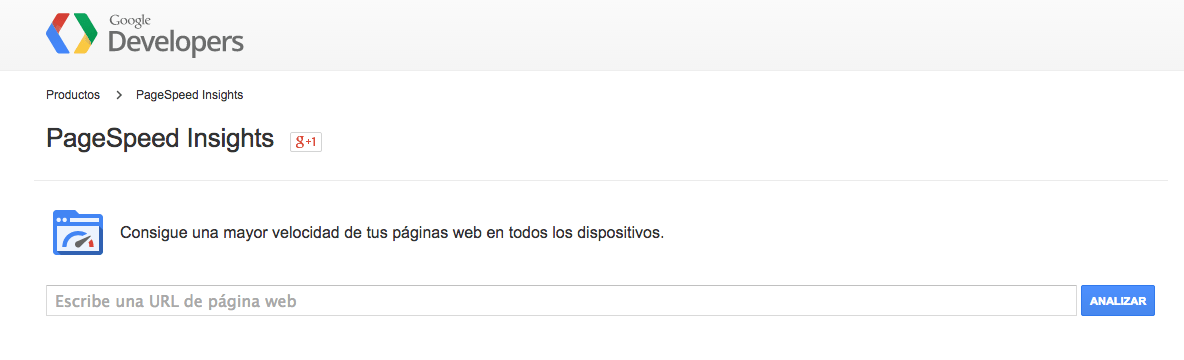
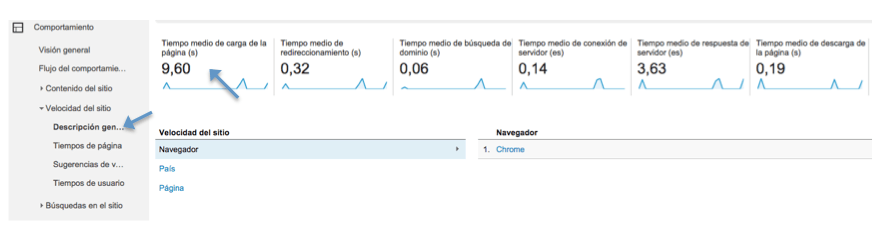
Google establishes that those pages whose score is less than or equal to 60 are relatively slow pages, whereas pages with a score of above 80 are pages with a very good loading speed. For those of you who prefer to view it through Google Analytics, you will have to go to “Behavior > Site Speed” and from there view the average page load time, average redirect time, average domain search time, average server connection time, average server response time, average page download time. Keep in mind that if the average page load time is more than 4 seconds, it is considered by Google as a very slow page. Below we show you where to view this information from the Google Analytics control panel.
2. Off-site Optimization
- External links: as for external links we must know what kind of links point to our website and if they are quality links or on the contrary they are links that are penalized by Google something that in the case of being negative we will have to request that they stop pointing to our website.
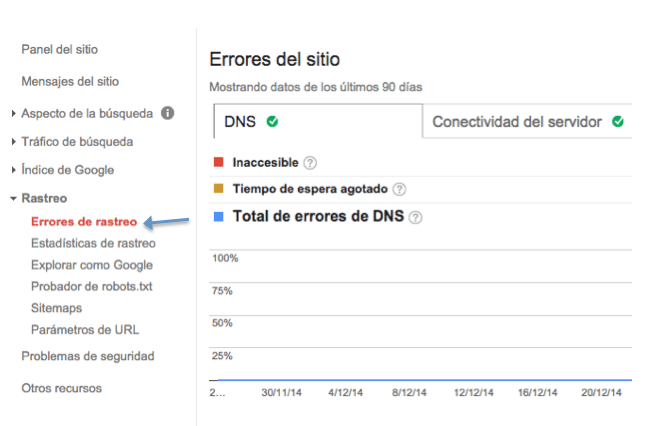
- Broken links: one of the factors that can damage our positioning are broken links, that is to say, those that lead to pages that do not work or no longer exist. This could result in a drop of positions in the search engines. One of the best tools to deal with this type of problem is none other than Webmaster Tools. To do this we access the Tab “Crawl > Crawl errors” and from here we correct the broken links that we have as shown in the following image.

3. Web Usability
They are those factors related to the ease of use of the web, so that visitors meet the objective or objectives for which it was created. Only by having a “usable” web, we will be able to know that the visits that arrive are of quality or not, since if the usability is good and the visitors do not convert, it will mean that the visits are NOT qualified. Some factors to highlight:
- Configuration of Google Analytics: in order to control any aspect of usability, we will have to know if the users who visit the website navigate correctly and meet the objectives set by the business. Therefore, it is of vital importance to configure Google Analytics on our website and monitor conversions and other aspects of web analytics.
- Buttons: Also known as CTAs [Call to actions]. They are one of the aspects to which more and more importance is being given. The web buttons that lead to conversion must be sufficiently visible and not get lost among all the content of the page, they must be self-explanatory in order to avoid that the user browsing does not know where to click to access information, contact page, etc., they must respond immediately and they must change shape or color once we click on them. And of course, they must be homogeneous throughout the web.
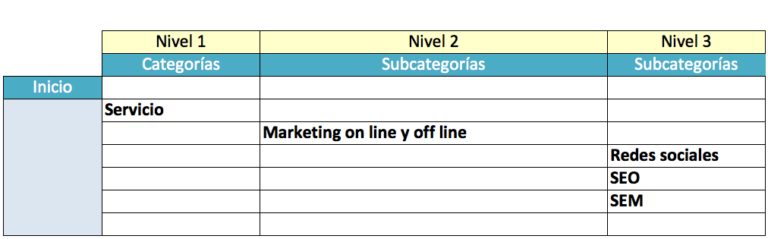
- Web structure: when analyzing the structure of our site we must know how many levels it is composed of. When we talk about levels we refer to how many clicks the user needs to make to reach the last page of the website. As we show in the following image this website has 3 levels, so if the user wants to reach the subcategory of social networks will need to make three clicks to get to the place you want.

It is known that the fewer levels our website has, the easier it will be for Google to index it without any problem and the faster users can access the content they are looking for. A primordial aspect of any web is to make it easy for the user to navigate through the web, otherwise our web will be doomed to failure. Search engines also take this into account.
Tools for an SEO audit
When we embark on an SEO audit, it is true that there is a wide variety of programs oriented to this purpose, but in our case we have decided to give greater relevance to the four programs described below due to their features, free options and powerful interface.
One of the most popular programs is Website Auditor. This program will help us to analyze the most important SEO factors such as: broken links, validation errors, duplicate titles and meta descriptions, non-indexed pages, validation errors (W3C), etc.
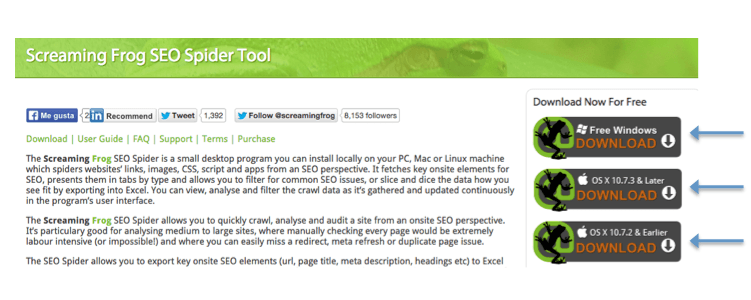
Another of the programs known in SEO audits is Screaming Frog, a very useful program that like the website auditor allows us to analyze various factors such as: 4XX and 5XX type errors, duplicate pages, duplicate titles, unindexed pages, h1,h2 tags, etc. The screaming frog gives us the possibility to download a free version depending on the operating system that we have as shown in the following image.

When auditing backlinks (links pointing to our website from other platforms) some of the best known programs for this type of analysis are for example Spyglass or Open Site Explorer, in our case we are more akin to Spyglass because it offers a much more detailed analysis than the other programs oriented to this purpose. The purpose of these programs is to know what is the quality of the links: link popularity (PageRank) and domain age are for example very important aspects in order to determine whether the links pointing to our website are the ones we need to meet the objectives we have set.