Index
In today’s digital age, effective audience building is critical to the success of marketing campaigns. Mailchimp offers a very powerful platform to help you connect with your target audience, whether you are a highly specialized marketer or just starting out.
Mailchimp is not just an email marketing platform. One of its most attractive features is its ability to help you connect with your audience on a personal level. With advanced segmentation options, you can divide your subscribers into specific groups based on interests, behaviors and preferences.
We take you step by step through the process of creating an audience in Mailchimp, shall we start?
Why are audiences important?
An audience is a group of individuals who have shown interest in your products, services or content. By creating a specific audience, you can tailor your marketing efforts to interact with people who are more likely to become loyal customers or followers.
Personalization is possible because Mailchimp increases the likelihood that your messages will resonate with your audience and generate deeper engagement.
Within your core audience, you can create different segments. This is important for 6 reasons:
1. It is crucial tosend personalized and relevantcontent to different groups of people. You increase the chances that your messages will be well received and generate interaction.
2. Sending relevant content is critical to maintaining your subscribers’ interest. When you create segments based on similar interests, behaviors or characteristics, you can send them information that fits their individual needs and preferences.
3. By sending emails to specific segments, recipients are more likely to open and click on links, as the content is more relevant to them. This can result in higher open and click-through rates compared to sending generic emails to your entire list.
4. When you send relevant content, you reduce the likelihood of subscribers unsubscribing due to lack of interest. Audiences allow you to send only what is important to each group, which helps retain your subscribers in the long run.
5. Email service providers like Mailchimp evaluate the relevance of your emails to determine whether they should be delivered to the primary inbox or the spam folder. Sending content to a segmented audience can improve the perception of relevance and, therefore, increase the chances of your emails reaching the inbox.
6. By segmenting your audience, you can more accurately track the effectiveness of your campaigns on specific groups. This gives you valuable information about what types of content are most successful for different segments of your list.
Take our Email Marketing with Mailchimp course!
How to create an audience
To get started, log in to your Mailchimp account and go to the dashboard. From here, you’ll have an overview of your campaigns, lists and audiences. If this is your first time using Mailchimp, you will need to set up your audience list.
- Click on the “Audience” tab and select “Audience Panel”.
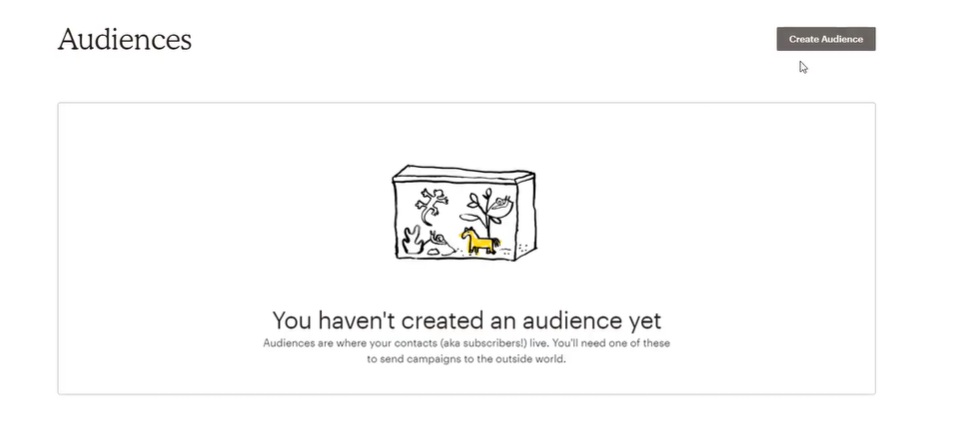
- 2. Click on the “Create Audience” button.
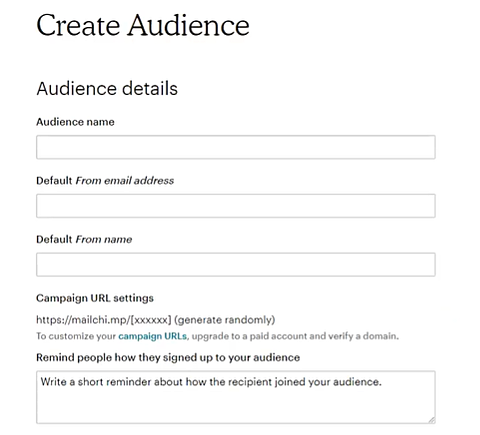
3. Complete the required information, such as audience name, email address and other relevant details.
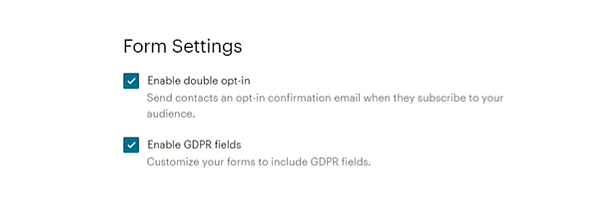
4. In the configuration part, activate the double authentication to avoid bots and have a cleaner database (double opt-in) and also the GDPR (in Europe it is mandatory).
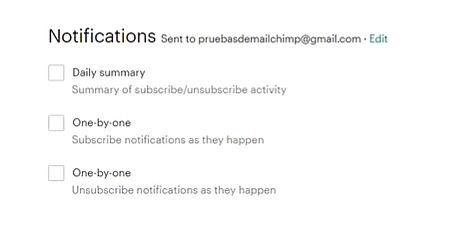
5. In the notifications section, you can configure Mailchimp to send you emails with the status of your database in the form of a summary or on a daily basis.
6. Click “Save” when you are done.
Improve campaigns with your audience data
Once you’ve set up your audience, it’s time to harness the power of data.
Mailchimp provides valuable information on subscriber behavior, open rates and click-through rates. Use this information to optimize your campaigns, fine-tune your content and strategies for better results.
Remember, the key is to understand your audience’s needs and preferences, and to create quality content that brings them something. To find out what content brings value to your audience, you can perform A/B testing campaigns.
How to segment your audience in Mailchimp
Segmenting your audience allows you to send specific content to particular groups. This personalization increases interaction and conversions.
To segment your audience you only have to follow 4 steps:
- In the audience panel, select the audience of your choice.
- Click on“All contacts” and then choose“Groups“.
- Create relevant groups based on demographics, interests or purchase history.
- Assign contacts to their respective groups.
At Reinicia we are experts in Mailchimp.
Can we help you?
Add a checkbox field to your audience
A checkbox field allows subscribers to opt-in for specific topics or types of content. It’s not mandatory, but it’s an effective way to understand their preferences and personalize your campaigns.
- When creating your audience, add a“Checkbox” field.
- Customize the field labels to reflect the categories of your content.
- Subscribers can now select their preferences when registering.
How to create multiple audiences
Mailchimp allows you to manage multiple audiences depending on the type of account you have, although we always recommend having only one and playing with segments. Having multiple audiences will only be relevant if you have very different products or services that are aimed at very different audiences.
- In the audience panel, click on “Manage audiences”.
- Choose “Create Audience” and follow the steps mentioned above.
- Repeat this process for each audience you want to create.
Mailchimp also allows integration with other platforms such as WordPress, which makes it easily adaptable to any type of business.
Do you have any doubts? Ask us, we are Mailchimp Partners and we have more than 10 years of experience in this powerful tool.


