Choosing the target audience of the campaign and the budget will determine how many people we impact with our advertising on Facebook Ads. One of its main advantages is that it allows us to segment very deeply to whom we want to direct our ads, and is in turn one of the most important points in a marketing strategy.
Are you ready? Let’s start with the second step to launch a Facebook Ads campaign.
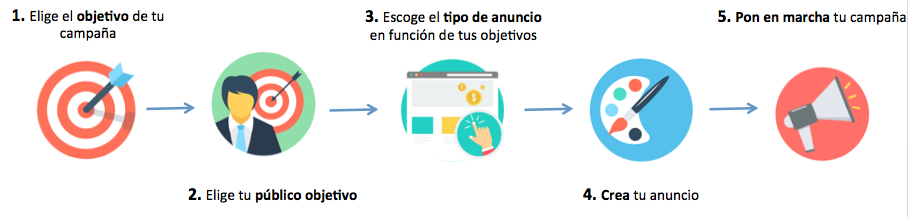
1. Choose your target audience
From a marketing point of view, one of the first steps we have to take is to decide to whom we want to direct our campaign, that is to say, to define our target or objective public. Why? Because we will not advertise in the same way to a 20-year-old as to a 65-year-old, nor will it be the same for a person who does not yet know us as for a customer who occasionally buys from my store. A simple way to identify my target audience is by defining buyer personas.
1.1. Buyer personas
A buyer persona is a representation of our end consumer, with all possible data. We will have to put ourselves in our customer’s shoes and identify the characteristics that define him: age, gender, demographic location, habits, tastes, fears… This could be an example of one of our buyer personas, Guillermo Aguilar:

What is the purpose of defining our buyer persona? By identifying each of our potential customers, putting ourselves in their shoes, we will know what is the best way to impact them, on which pages or platforms, at what times, what type of advertising could be more attractive to them, etc. In our example, we could decide to impact Guillermo using Facebook Ads because he is used to using social networks, as long as we adapt the advertising to his needs and tastes. For recreational activities, it would be better to advertise to him on weekends, when he is looking for something to do with his young children.
1.2. Identify your target for promotion
Our buyer persona profiles divide our Target Audience into smaller groups, so it is easier to focus on what each of them needs to facilitate our communication with them. Am I going to find my customers on Facebook? If the answer is yes, let’s move on. If on the other hand we won’t find them, we will have to think about other channels for our promotion.
Here is an example of a possible client (Guillermo Aguilar) that we want him to know about our agency of routes in the mountains of Madrid:
Client: Mountain routes agency in Madrid
- Location: Madrid city within a 20 km radius
- Between 30 and 45 years old
- Man
- Language: Spanish
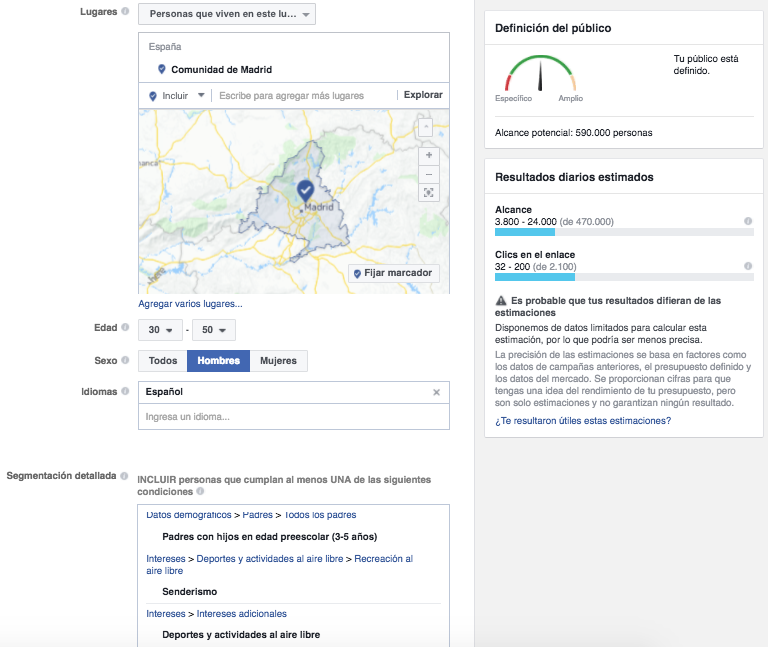
- Demographics: Parents with preschool-age children (3-5 years)
- Interests: hiking; sports and outdoor activities
- Not followers of the website rutasdemontaña.ejemplo.com
Facebook Ads initiation course
2. Facebook Ads Audience
With our audience identified, let’s see how to transfer it to Facebook Ads to use it in our next campaigns. There are three types of audiences in Facebook Ads: saved audiences, similar audiences, and custom audiences.
2.1. Types of audiences in Facebook Ads
Facebook Ads allows you to create groups / segments of people that meet certain criteria.
2.1.1. Saved audiences
Audiences created with Facebook Ads detailed targeting options.
How do they work?
- They are created based on the information that Facebook has on each of the people who use the tool, both from their profile and their behavior in the tool.
- You can combine one or more options and you can narrow or exclude based on certain criteria.
- As a general rule, when you combine different options, e.g. age and gender, they will be combined as “and”, but if you choose several options within the same criterion, they will be combined as “or”, i.e. either “interested in hiking” or “in outdoor activities and sports”.
- As you add criteria, you will be able to see the potential reach, that is, the number of monthly active people that meet the criteria you indicate. This can be seen on the right side of the screen.
- When you activate a targeted ad, the maximum number of times per day that it will be shown to the same person in the Facebook news feed will be 4, and in Instagram, only once.
- It is important to give a name to the campaign so that it is known which segmentations have been used.
This is what our previous example would look like:
2.1.2. Customized audiences
Audiences created based on people’s interaction with your business outside of Facebook or on videos you have posted on your page.
Segmentation options
We will be able to use customer listings using any of the following options:
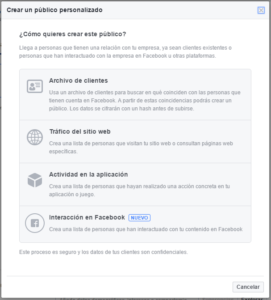
- Customer archive
- Import or paste file
- Mailchimp
- Website traffic: the number of people who have visited our website in the last few days.
- Application activity: people who have used our mobile application or game.
- Facebook interaction: about the people who have interacted with the contents of your page.
- Video: create a list of people who have been watching your videos.
- Contact form: create a list of potential customers for your business who have opened or filled out a form in your ads.
- Canvas: create a list of people who have opened your Canvas space on Facebook.
2.1.3. Similar audiences (Lookalike)
Similar audiences are audiences that Facebook creates similar to our current consumers, based on the data and characteristics it has about them. As a reference to use these audiences, it is allowed to start from the following:
Segmentation options
- Custom audiences: based on the custom audiences we have created, for example, users who visit our website, Facebook will be able to create a sample of other users to whom to show our advertising similar to ours.
- Page followers: you will also be able to do this from the followers of our Facebook page.
- Conversion pixel: it will be users similar to our best customers who convert. To do this, it will be enough to tell Facebook what we do, where the conversions take place and install its conversion pixel on our website.
2.2. Overlapping audiences
When we define several different audiences for the same Facebook Ads campaign, something that is highly recommended (both for testing and to make changes in the texts and/or images of our advertising oriented to each audience), it can happen that the audiences overlap.
What is the problem?
By having the same people within different audiences we could impact them more times than we want, that is, there will be an over cost in the delivery of the ads and saturation on the part of the advertising recipients.
How can I check if my audiences are overlapping?
- In “Audiences”, select by checking the checkbox the audiences you want to compare, and in the action menu access “show overlapping audiences”.
- The first one you mark will appear as the first selected audience.
- The rest will be considered public for comparison.
3. Conclusions
Identifying the target audience of your campaigns is essential to define your advertising strategy in Facebook Ads. You will see that it is very easy to create your audiences in this tool, but if you have any doubts you can write us a comment and we will be happy to help you. Don’t forget to take into account our next tips:


