What is it?
Google Webmaster Tools is a free tool in the cloud that Google makes available to owners and other managers of a website so that we can know how the search engine sees our pages and improve the performance of the same in the same.
In parallel, Bing and Yandex also offer similar tools that serve similar purposes.
What is it for?
It allows us to correctly optimize the different aspects of the pages for this search engine. In any case, these Google recommendations, in general, are aimed at improving the user experience on our website, so it is likely that following these guidelines we will benefit from better business results on our website.
Why should I have a Webmaster Tools account with Google?
Because this is the only way to know for sure if you are really doing a good job of positioning for this search engine, improve how and when your website appears and take the appropriate measures in time to correct incidents, since Google alerts you of any problem that arises in the crawling of your site.
And let’s not fool ourselves, search engines have become today the main gateway for users to the Internet and in general Google is the most popular engine. In Spain, it is the search engine used by more than 90% of Internet users. Surely in a few years there will be tools that will displace it, but nowadays not being well positioned in Google means losing many opportunities. To be able to be, the first thing you need to know is how Google sees you and, from there, you will be able to make decisions.
Five aspects that you will be able to monitor through GWT:
- Search aspect: Allows you to improve how your web pages appear in the search results.
- Search traffic: It allows to know for which searches our web appears in the search results, the results that it reports us and the links that it has indexed.
- Google Index: Allows us to know what Google has indexed of our web and what we do not want it to index.
- Crawling: Allows us to know how Google crawls our site and the results of such crawling.
- Security issues: Informs you if it has detected any malicious software that may pose a risk to site visitors.
At Reinicia we are specialists in SEO We help you!
How to configure it?
To set up an account, the first thing you will need to do is create a Gmail account. With this account, you will be able to access Google Webmaster Tools and log in. Once inside, you will have to click on the “Add site” button at the top right of the screen and enter the URL of the domain you want to add.

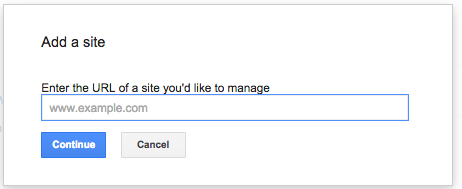
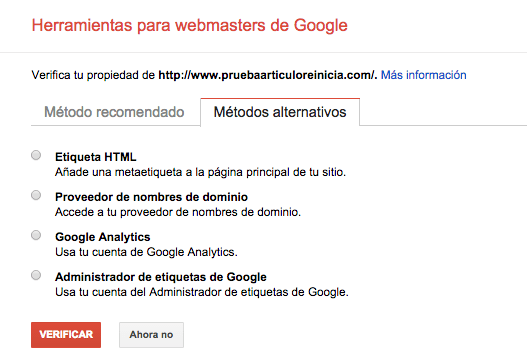
From here, you will have to follow one of the 5 validation methods that Google has enabled to prove that you are the owner or that you at least have access to the website. In general, we usually use the method of uploading an HTML file to the root of the domain via FTP. Any web designer / developer will be able to help you if you have no technical knowledge. Otherwise, in case you use the same account for GWT and Google Analytics, alternative methods allow you to validate by connecting both accounts, in which case, you will not need any file or technical support ;]
How does it help me to improve my web positioning?
The most important things you will need to configure to get the most out of this tool are:
Search aspect
Microdata
For those of you who don’t know, microdata are special semantic tags that we insert in the code of the page and that make it easier for search engines to know what kind of information they are reading: product/service sheets, recipes, videos, locations, etc.
Through GWT we can find out if our microdata markup is being detected by the search engine, so that it will be presented in the search results of the search engine. You will even be able to mark up the data yourself without any technical knowledge by using the “Data Marker”. This will improve the %CTR of your pages in the search results, since the information will be more complete. For example, product ratings or price may appear, so the user will have better information to know if it is worth accessing your website.
Site links [Sitelinks].
These are links that appear in Google search results for certain searches. For example these:
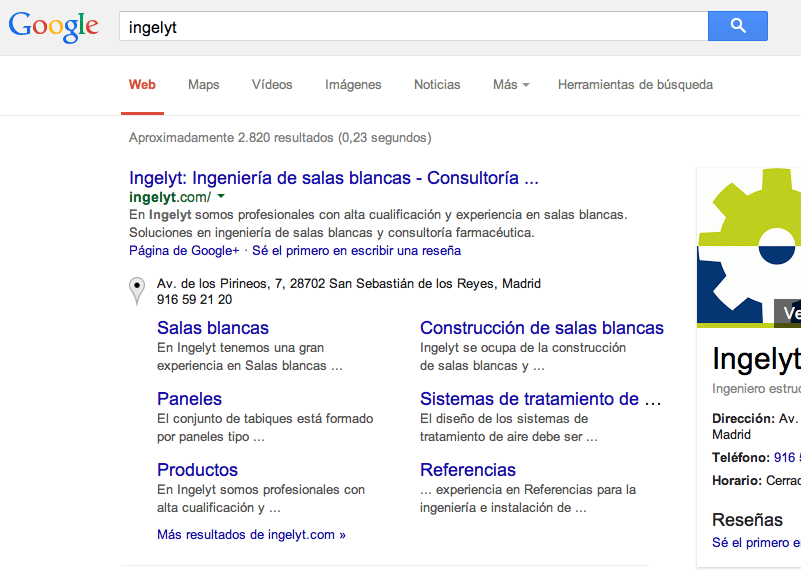
Sometimes, Google shows pages in sitelinks that do not provide value for users or that are not particularly relevant for us. Until now, Google put it and we could not do anything if it was wrong, and believe us, it does it regularly. But with this tool, we will be able to indicate which URLs we want to “demote” and NEVER show in the sitelinks. In this case, we have taken out pages like the “Privacy Policy” that Google was showing O_O
HTML enhancements
You will be able to quickly check which Titles and Meta Descriptions of your website are giving problems: too long or too short texts, texts that do not appear or duplicated elements that lead to penalties.
Taking advantage of this information is as simple as clicking on any of the options and either correcting the errors one by one without closing this browser tab or downloading the table and cleaning it up. In general, fixing these issues is quite simple, although you may encounter pages that you do not know how to reach or for which you have no idea how to change the elements that Google tells you. In such a case, call in a technician to give you a hand ;]
Search traffic
Search queries
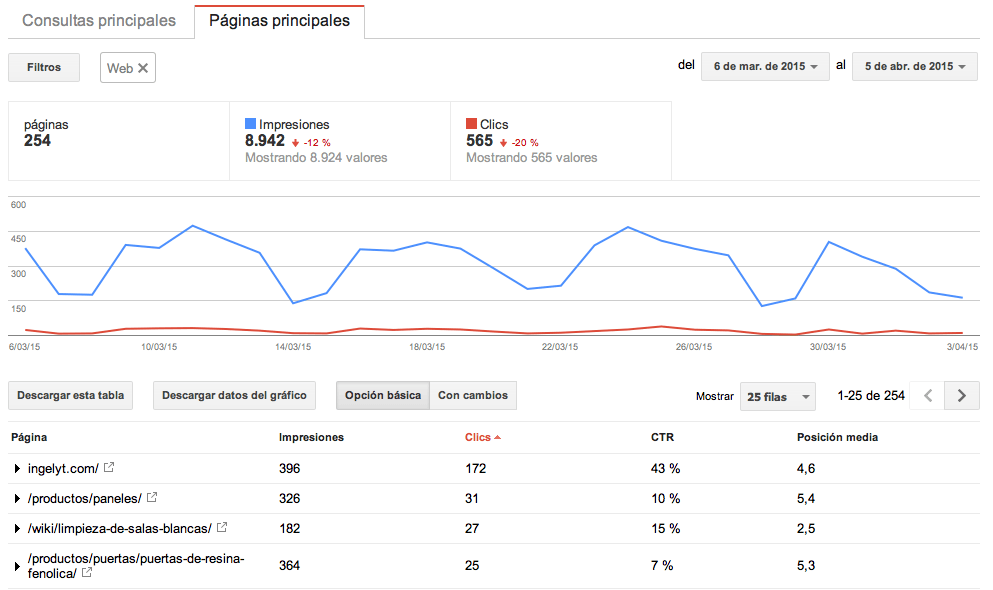
Believe us when we tell you that we love this tab. For one thing, you’ll be able to find the words for which your site is appearing in Google search results and the clicks you’re getting. Isn’t that great? You’ll be able to quickly find out what keywords you’re ranking for and what percentage of clicks you’re getting. The bad news is that these results are average and could differ from the positions you get with any SEO tool or by searching manually, either in custom or incognito mode. You can learn more about this issue in a Moz article.
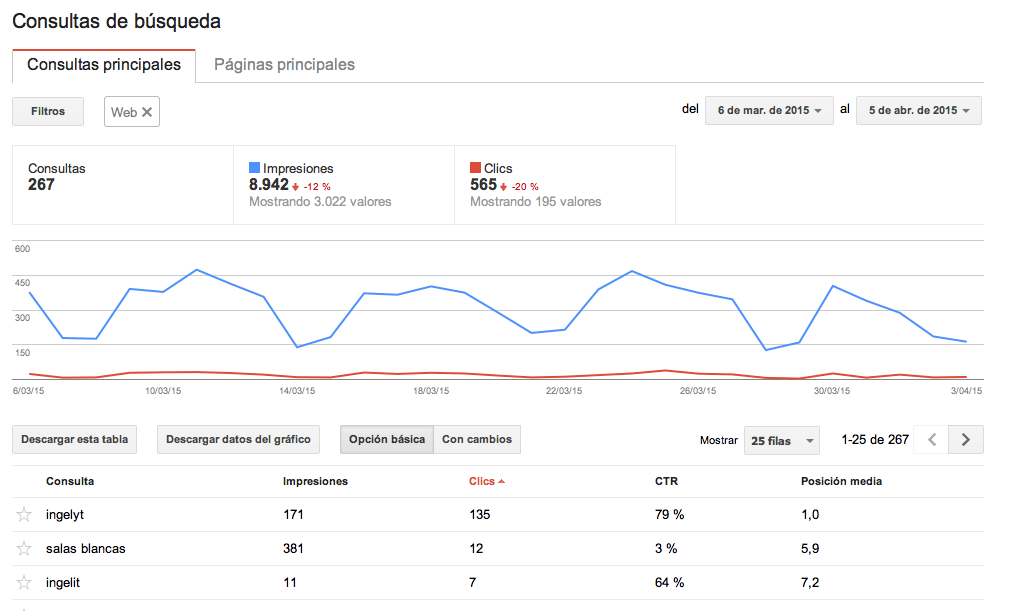
On the other hand, you will be able to see the most important landing pages that users reach when they land on your website from search engines. Incredible, isn’t it? You will be able to see which ones generate the most clicks and you can work on them to get better results for your business. You can also add a new call to action button or insert a banner with a promotion and see if this data changes.
Links to your site
Google will show the links that its robot has detected linking to your site and the most common anchor texts. Remember that one of the most important factors when it comes to positioning each of the pages of your site in Google are the links to these pages, which count as votes, so this information will be vital to know how the SEO work you are carrying out is evolving.
International Targeting
This section has two tabs:
- A language one, which will only be enabled if your website is focused on different languages and/or regions and you have inserted the code that Google needs to categorize your website. To learn more about this we recommend you to read our article on Multilanguage Webs.
- Another country, which you should only use if your website is oriented to a single country, for example Spain. Or imagine that you create a website for the French market, you can indicate it here.
Google Index
Indexing status
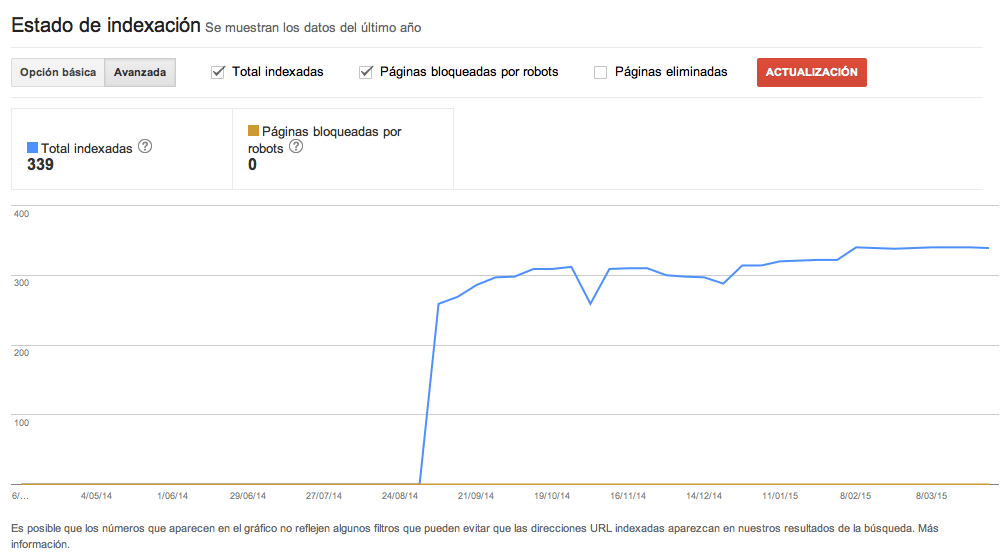
How many pages does Google say it has indexed on our website? Are there many differences with respect to the total number of pages on our site? It could be that Google is not crawling our site correctly, or worse, that in doing so, it decides that including certain pages in its index will not provide anything useful to its users. It is important that we periodically compare the number of pages that our site really has with those that Google claims to have indexed. We will have to work so that the percentage is as high as possible.
URL deletion
Are there pages that we do not want Google to index? Using robots.txt you can tell Google which sections of the web you do NOT want it to crawl. However, using this tool, you can indicate individual URLs and even complete folders that you do NOT want to appear in the search engine.
Tracking
Tracking errors
In case Google has any problem accessing your page, this will be the place to let you know. It is important to be aware of these errors and try to keep them to zero.
Robots.txt Tester
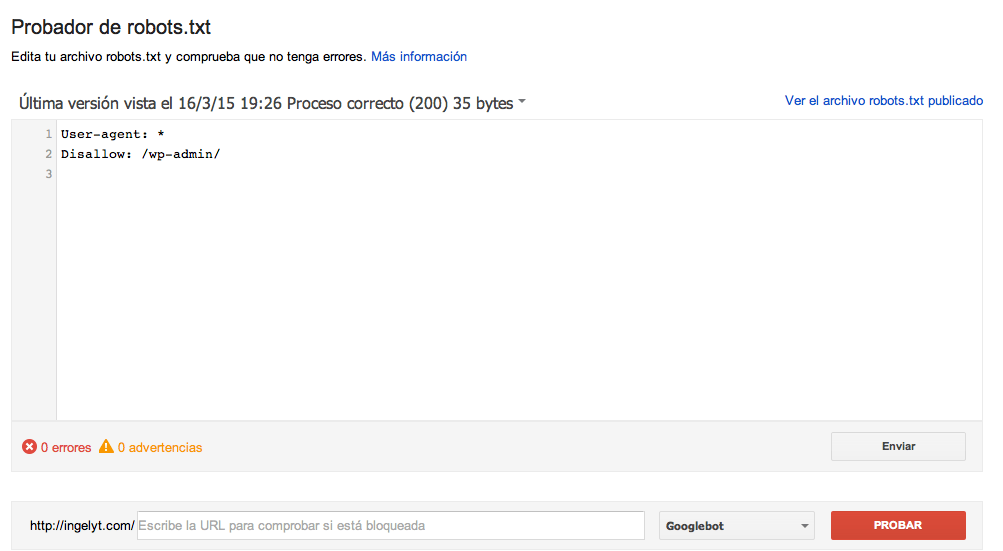
There are many free tools to generate the robots.txt file, a file that uploaded to the server where the web is hosted, will serve to tell Google which sections and folders you do not want it to access, that is, not to index, but not to access directly, either for security reasons or because you do not want that information to appear in search engines.
With this tool you will be able to create it, test that it works correctly and check that Google is reading it.
Sitemaps
Sitemaps are files in .xml format that are used to inform search engines of the different pages a site contains, their importance, their update frequency and other relevant metadata to know what they are indexing. Google explains how to create sitemaps.
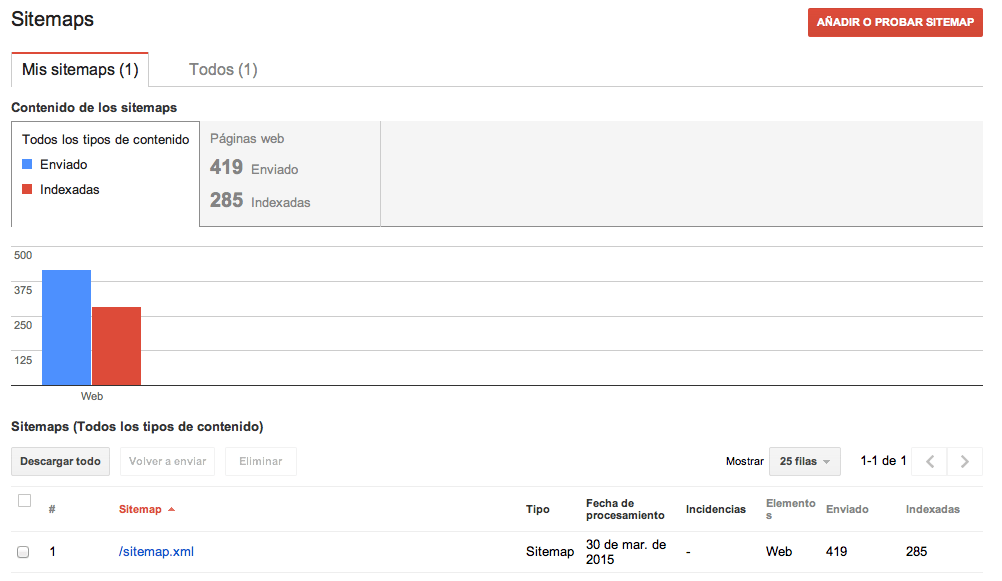
In addition to page sitemaps, sitemaps can be submitted for some types of content: videos, images, mobile and news.
Similarly, if you have a very large website and your sitemap exceeds 50,000 pages or 50MB, you will have to split it into several sitemaps.xml and create a sitemaps.P index.
Therefore, in this list it is likely that there is not only one sitemap, but several.
URL parameters
Very important for large pages with many parameters in the URL such as pagination and similar. It will be necessary to indicate to Google those URL parameters that it should not take into account. This will avoid possible incidences of duplicate content.
Security issues
If they detect a virus in the hosting where you have hosted the web, they will warn you. If you do not fix it, they will initially warn users who are going to access from Google that your website is a risk, and if time passes and you still have not fixed it, they will remove your entire website from their index.
