Last November saw two important changes in the social networks of the moment: reactions appeared on Facebook -exclusively in Spain and Ireland- and likes on Twitter. What are these changes intended to achieve? What attention should be paid to them in social network strategies?
Facebook decided to open up to the world of reactions after years of requests for a “dislike” button. The main demand from users was based on the fact that sometimes news is shared on the wall that is not pleasant enough to say “like”, for example, deaths of famous people, catastrophes or bad news.
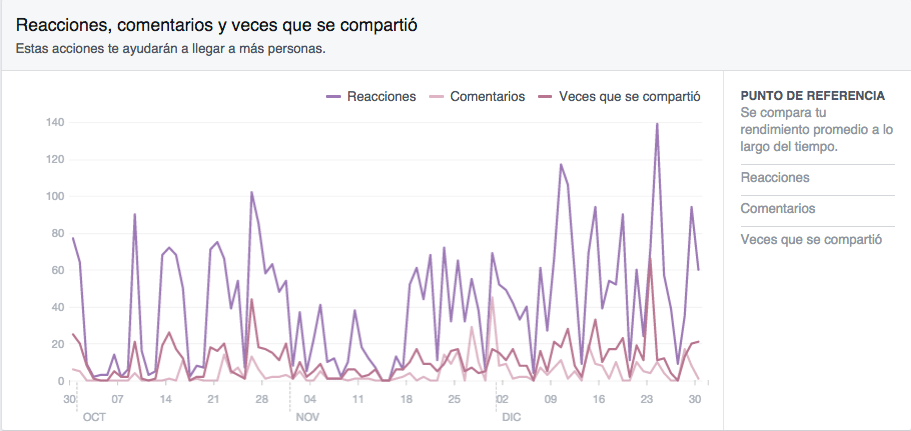
This suggestion has been heeded by Mark Zuckerberg’s team and taken further. Users can no longer just like a post, but can be delighted, amazed, amused, saddened and angered. The buttons called Reactions have been very well accepted by the general public, who started to use them from the very first moment, although the data have not skyrocketed in general terms. The level of interaction has risen but has not reached statistically relevant figures, such as doubling the number of Likes, etc. As can be seen in this graph showing the reactions since October, shortly before the reactions arrived on Facebook and up to December 30, 2015, the most remarkable thing is that the interaction is more constant with some peaks on specific dates.
How to use it

It should be noted that it is only available for profiles in Spain and Ireland (in fact, abroad the counters only register the likes, with no trace of the other reactions) and also for the mobile version of Android and not iOS. Its use is more personal than anything else. It depends on the empathy it arouses in the user, who will opt for one reaction or another.
To do so, you have to leave the pointer over the Like icon and the new buttons will be displayed: I like, with the classic extended thumb; I love, with a white heart on a red background; I am am amused with an emoticon with a big smile; I am amazed with the emoticon opening its mouth in an attitude of surprise; I am saddened in which a tear accompanies the drawing and I am angry, represented by an emoticon with a red complexion and a face of few friends.
After clicking on any of them, they will be counted in the same way as the “Like” buttons, but separately, so that you will see the total number of times someone has reacted to the publication. By hovering the mouse pointer over each icon, you can see the specific number of each reaction with the names of those who used the buttons.
How to interpret it
Facebook leaves nothing to chance. The appearance of these buttons seeks to encourage the activity of this social network on mobile devices since there had been an increase in the use of emoticons with the comments and a decrease in the number of Likes.
As for companies, it should be interpreted as a very useful new tool to better understand their followers and know their responses to the content they generate on Facebook. If a brand gets a lot of angry reactions, it doesn’t have to be bad when it’s a news item they post and it’s not really friendly content. For example, an animal shelter that announces that they have picked up a litter of abandoned puppies can’t expect a barrage of I love it on their wall but I’m saddened or angry. In other words, they will also discover an interaction that did not exist before: that of those who did not feel comfortable giving a Like to this type of content because they did not really like it.
Likewise it was easy to expect that many followers would abuse the Me Angry reaction against those brands they don’t like as a whole – not for what they share – however this has not been the case.
And while on Twitter…
Twitter also surprised tweeters with its latest change, which first appeared on the mobile version to arrive a few days later on desktops: getting rid of FAVs or Favorites and replacing them with Likes represented in this case by hearts. A curious mix of Facebook and Instagram, actually. The change is not that noticeable or remarkable as it only affects the category of the reaction and the name it was known by. Its usefulness is the same: to mark the tweets of others to read them later and indicate that this publication has been liked or caught our attention.
How it is reflected in FB and Tw statistics
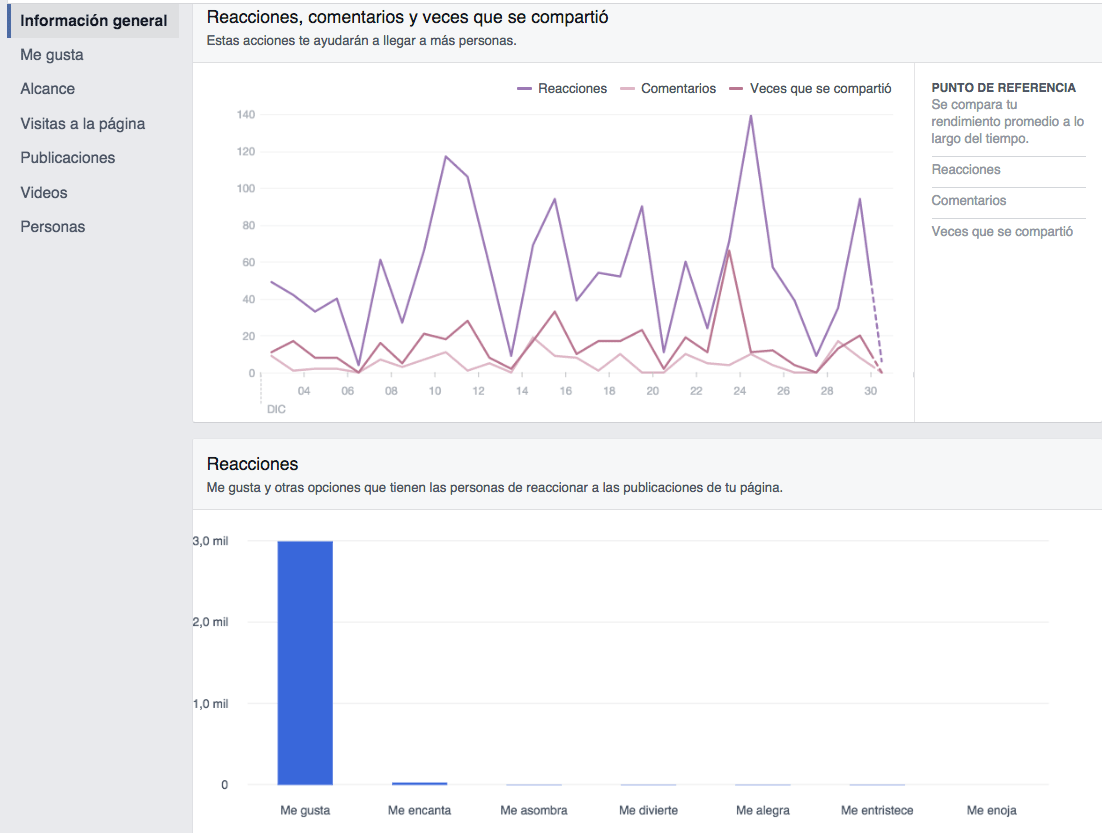
In the Facebook statistics, under General Information, you can consult the data in the Participation column. > Reactions. By clicking on this section we will go to the graphs with all the information that will show us the total number of reactions (in purple) and a second bar graph differentiating the figures for each reaction. It will be interesting to see if the overall interactions have really improved compared to previous periods. The comparison should be made in percentage terms, not absolute, in relation to the number of fans.
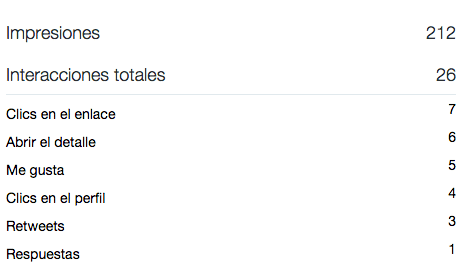
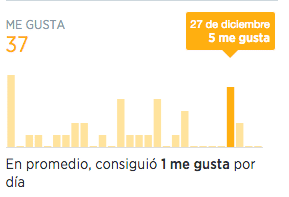
As for the Twitter likes, they can be consulted at Twitter Analytics. Just open the top tab of Tweets and click on each of them to obtain a detailed summary with the number of Likes among other data. Also within this section, in the right column of Interactions, you will find a yellow bar chart with the number of Likes per day.