Index
What is the customer journey?
The customer journey refers to the experience that a customer lives from the moment he/she discovers a brand until he/she makes a purchase and, subsequently, maintains a relationship with it. It is a complex and multidimensional process that involves various stages, channels and emotions or needs on the part of the customer.
In today’s context, where consumers have access to a wealth of information and purchasing options, the customer journey has become a critical aspect of a company’s success. Good customer journey management can make the difference between a satisfied and loyal customer or a dissatisfied customer who abandons the brand.
In order to properly manage the customer journey, it is important to understand the stages that comprise it. Although they may vary depending on the model used, the most common stages are: awareness, research, consideration and loyalty. At each of these stages, the customer has different needs, expectations and emotions, and the company must adapt its strategy to meet them.
In this article, we will focus on how to apply the customer journey in Mailchimp, a digital marketing tool that allows you to create and automate email campaigns and other customer communications. We will see how to identify the stages of the customer journey, create specific content for each of them and automate the process with Mailchimp.
Importance of the customer journey in Email Marketing

The customer journey is fundamental in email marketing, as it allows you to create a personalized and effective communication strategy with potential and current customers. It is an automation process for recurring actions (blog subscription, store welcome, abandoned carts, etc).
Automating this process will not only save you time and increase your company’s productivity, it will also increase the likelihood that recipients will open and click on your emails, which will translate into greater success in your email marketing campaigns.
By understanding the different stages of the customer journey, you can send targeted emails at each stage of the buying decision process, which will increase the likelihood that your messages will be relevant and engaging to the recipient. For example, you can send welcome emails when someone subscribes to your email list, follow-up emails after someone has made a purchase and promotional emails for customers who haven’t purchased in a while. We will look at different examples of practical applications later on.
In addition, by automating the email marketing process at each stage of the customer journey, you can save time and resources, and improve the effectiveness of your email marketing campaigns.
At Reinicia we are specialists in Customer Journey. We help you!
How to apply the customer journey in Mailchimp
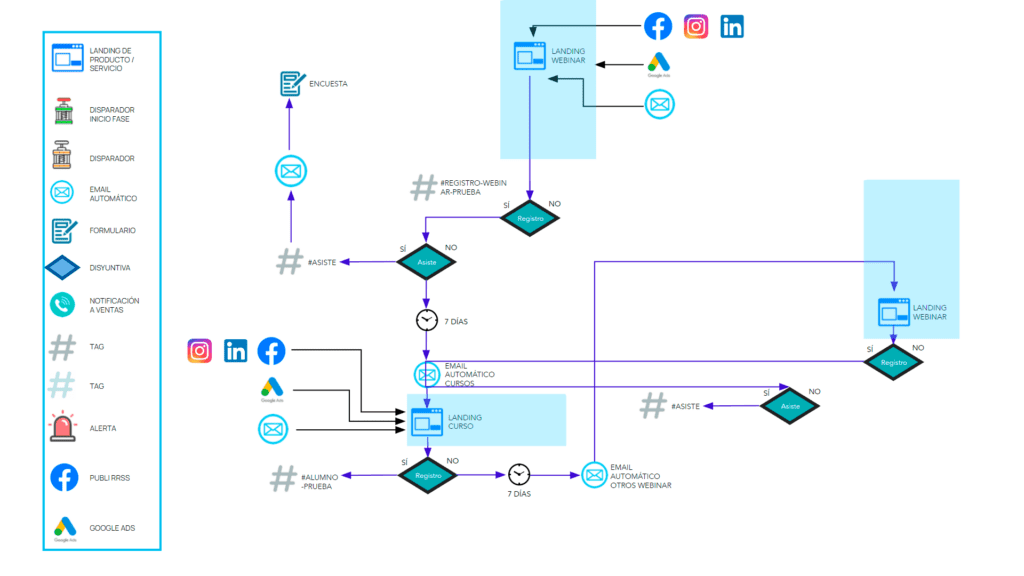
- Identification of the points of contact that customers have with the company, whether through the website, social networks or email. This will allow understanding how customers interact with the brand.
The flow or map of interactions, triggers and emails should be painted. In this map we must consider the frequency of sending, possible conversions and opportunities for improvement.
Once the flow is defined, we can go to our email marketing tool in Mailchimp to start building the customer journey.
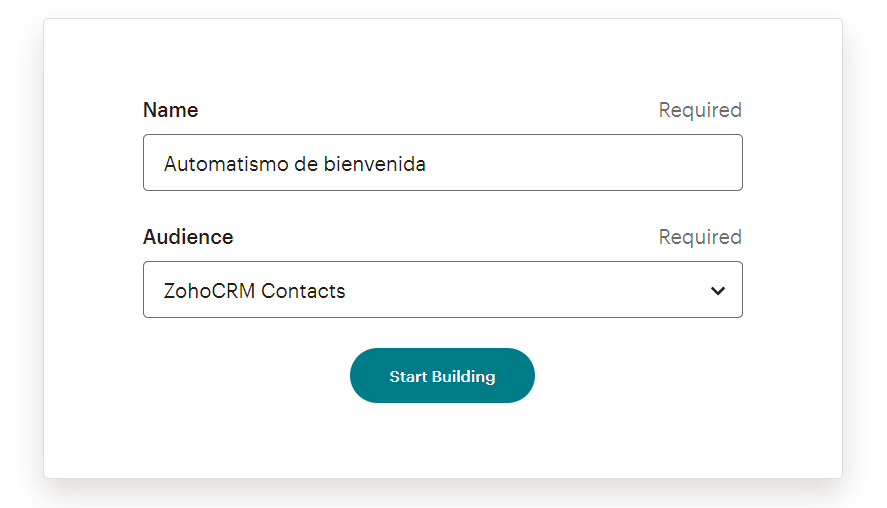
- Segmentation of the email list: in order to send personalized content, it is important to define which audience in Mailchimp we are going to target and give a name to this automation.
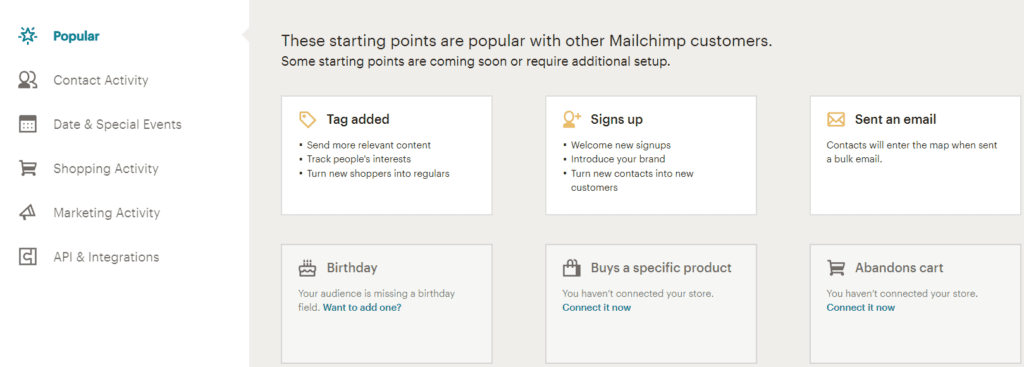
- Select the trigger or desired action for this automatic message flow. for automatic emails to be sent, it is necessary to configure the triggers that will activate the sending.
These triggers can be specific subscriber actions, such as subscribing to a list, making a purchase or opening an email.
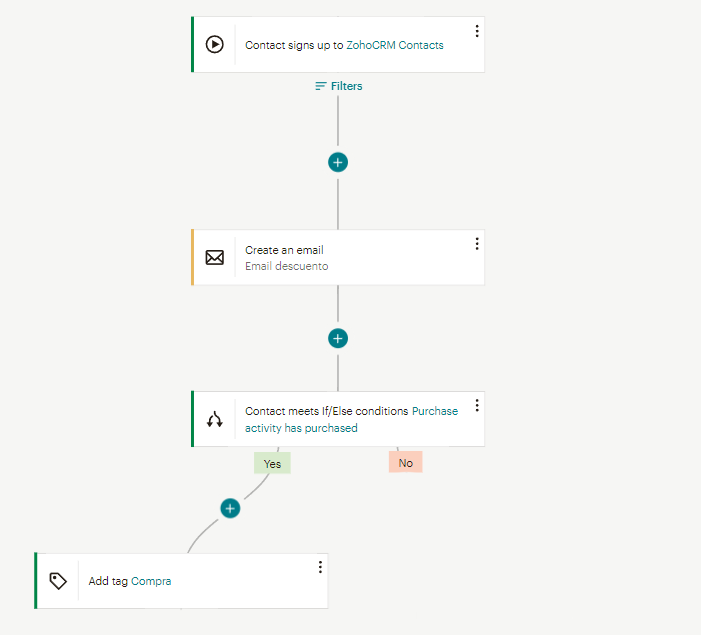
- Design of the communication flow with the necessary emails and conditions. For example, below is an automation map consisting of a welcome email that is triggered when contacts create an account in an online store through a recruitment form to our database.
You will immediately receive a welcome email with a discount that you can apply to the products in that store.
A condition is added to know if a purchase is made and if it is, the contact is tagged to be identified in our database as an active subscriber.
- Once the automated emails have been sent, it is important to monitor and analyze the results to determine their effectiveness and make adjustments if necessary.
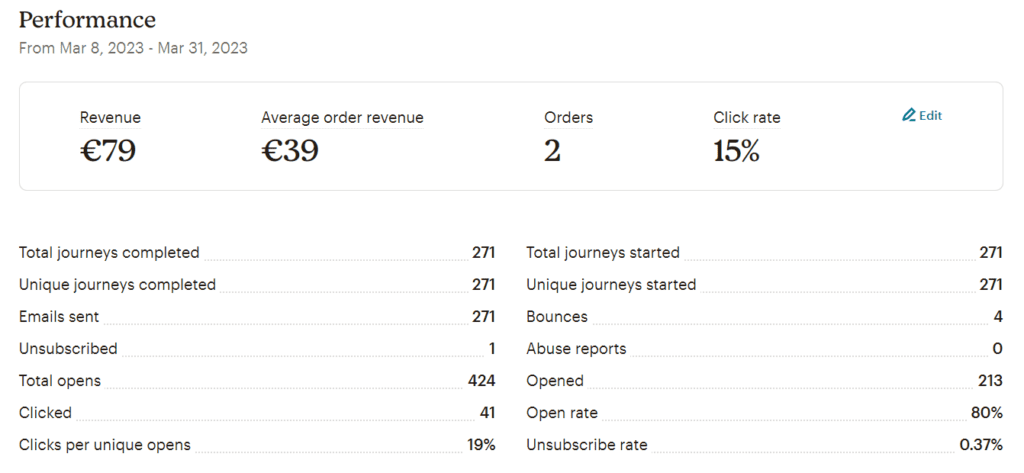
- And finally, implement improvements based on the results obtained.
Practical examples of the application of the customer journey in Mailchimp
These automated mailings are useful for maintaining constant communication with customers and can save the sender time by automating the email tracking and sending process.
They have good open rates [above 50%] because they are usually triggers for actions that generate potential interest, such as, for example, attending an event from which you will be sent the video or materials. Or the subscription to a campaign from which you will receive a discount for future purchases.
Some automatisms that we can put into practice are:
- Subscriber welcome: When subscribing to an email list, it is important to send a personalized welcome email that includes relevant information about the company and the benefits of subscribing. In addition, you can use this opportunity to request more information about the subscriber’s preferences.
- Follow-up emails: once a customer makes a purchase, you can send a series of follow-up emails to make sure they are satisfied with their purchase and offer them other products or services that may be of interest to them.
For example, you can send an email with a satisfaction survey and then offer a discount coupon for an upcoming purchase. - Emails based on customer behavior: personalized emails can be sent based on customer behavior on the website, such as abandoning the shopping cart or viewing a specific product multiple times.
These emails can include related product recommendations and special offers to motivate purchase. - Seasonal email campaigns: special email campaigns can be sent for seasons or holidays relevant to the customer.
For example, a clothing store can send a promotional email for the summer season with discounts on swimsuits and light clothing. - Membership renewal reminders: For companies that offer memberships or subscriptions, it is important to send renewal reminder emails. This not only helps retain customers, but can also include special offers or exclusive benefits for renewed members.
- Shopping cart abandonment: automatically sent to customers who have abandoned a shopping cart without completing the purchase.
Key metrics
In Mailchimp, there are several key metrics you can analyze to understand your customers’ journey:
- Open rate: This metric tells you how many people have opened your emails. A high open rate indicates that your emails are reaching your subscribers’ inboxes and that your subject lines are effective.
An open rate of around 20% can be considered good, although it will depend on factors such as the sector or your audience volume. - Click-through rate: Indicates how many people have clicked on the links in your emails. A high click-through rate indicates that your emails are relevant to your subscribers and that the links you include are interesting to them.
We can say that between 3% and 5% is a good click-through rate although, as we have already mentioned, it depends a lot on other factors. - Bounce rate: How many of your emails have not been delivered to your subscribers’ inbox.
A high bounce rate (2%) may indicate that your mailing lists need to be updated or that your emails do not comply with spam policies. - Unsubscribe / unsubscribe rate: This metric tells you how many of your subscribers have unsubscribed from your mailing lists after receiving an email.
A high unsubscribe rate (1 – 2%) may indicate that your emails are not relevant enough to your subscribers or that you are sending too many emails.
In any case, Mailchimp provides us with a table of statistics by sector based on the stored results of all customers with an account on this platform, which can be very useful to take as a reference when analyzing our own campaigns.
Tips to improve your customer journey strategy in Email Marketing
- Segment your subscriber list: Group your subscribers into different categories based on their interests, buying behaviors and stages of the customer journey. This way, you can send personalized and relevant emails that meet their needs and expectations.
- Personalize your emails: Use the information you have about your subscribers to personalize your emails with their names, previous purchase behavior and other relevant data. Personalized emails have a higher open and click-through rate than generic emails.
- Choose a good subject headline: It is advisable to play with the tone depending on the message:
- Apprehensive: Sign up now!
- Question: Do you know our courses?
- Direct: Last available dates
Or include hooks in it: - Price or discounts: Only for 100€
- Dates: 5 days left
- Exclusivity: Just for being a subscriber we give you…
- Use compelling and persuasive language: Make sure your email content is compelling and persuasive, with a clear and concise call to action. Use language that speaks directly to the recipient and highlights the benefits of your products or services.
- Always go for responsive design: Blue Hornet’s “Consumer of Email Marketing 2019” study indicates that 72% of consumers use mobile devices to check their email.
It is crucial to ensure that emails look clear and readable on any mobile device, including promotional images and videos, sign-up forms and purchase buttons. Doing so focuses on the user experience and improves the ability to reach more people on multiple channels, increasing the likelihood of converting subscribers into sales. - Draw attention to your product: It is important to highlight your product or service in your emails and an effective way to do this is through a CTA (call to action), which can be a button or link to attract potential customers and convert them into sales opportunities.
CTAs can have different forms and objectives within the email, some offer free downloads, others lead to web links, documents or registration forms. - Cross-selling through email: Consists of offering customers complementary or related products to those they have already purchased, using email as a communication channel.
The idea is to leverage existing customer relationships to encourage new purchases and increase the value of each transaction. To carry out effective cross-selling through email, it is important to know your customers and their needs well, and to offer relevant and attractive products. - Choose an anti-spam sender: It is important to choose an email sender that inspires trust and is relevant to your target audience segment. Anti-spam filters carefully check the sender’s name to assess the security of the email.
It is a common mistake to use senders such as info@, noreply@ or comunicacion@, as these can cause your emails to end up in the spam folder.
Choosing a sender with a proper person’s name in e-mails can be ideal for several reasons:
- Builds trust: Emails sent from an email address with a person’s own name can appear more authentic and legitimate. Recipients are more likely to open emails sent by someone they know or who appears to be a real person, rather than a generic email address.
- Creates a personal relationship: Helps establish a more personal relationship with recipients. By sending emails from a named address, the sender can create a stronger and more lasting connection with recipients, which can result in greater loyalty and long-term engagement.
- Increases open rate: Recipients may be more likely to open emails sent from an email address that looks like a real person, rather than an impersonal or generic email address.
Using the customer journey with Mailchimp for email marketing can be very useful for improving the effectiveness of email campaigns. By creating a map of the journey a user follows from the moment they subscribe until they make a purchase, you can personalize the content of the email sent at any given moment and improve the user experience.
This allows for more effective and relevant communication with the potential customer, which can increase the open and click-through rate of emails, as well as the conversion rate of leads into actual customers.
In addition, it is possible to measure and analyze the performance of email campaigns, allowing you to adjust your strategy and improve the sales process in the future.
Do you want to try it out? Do you already have Mailchimp automations in place?
Tell us about your experience with Mailchimp or other tools! 😉