One of the great benefits of the Internet is that it enables the internationalization of many businesses that 20 years ago would have found it very difficult, if not impossible. However, nowadays, by making a good translation of our websites, having the right logistics and marketing actions, we can be selling anywhere in the world [it sounds easy, but it is not].
In any case, these new possibilities of internationalization do not come without new, hitherto unknown problems. One of them is that the Search Engines, those tools that almost all of us use as a gateway to the Internet, serve the appropriate version of our website in terms of language and region, to a User who performs a search. To solve this, Google introduced years ago the attributes rel=”alternate” hreflang=”x”, which allow us to indicate the language and / or region to which the specific version of a page of our website is directed.
At the code level, these attributes can be used in 3 different ways, although we generally use the insertion mode in the <head section.></head> of each of the pages.
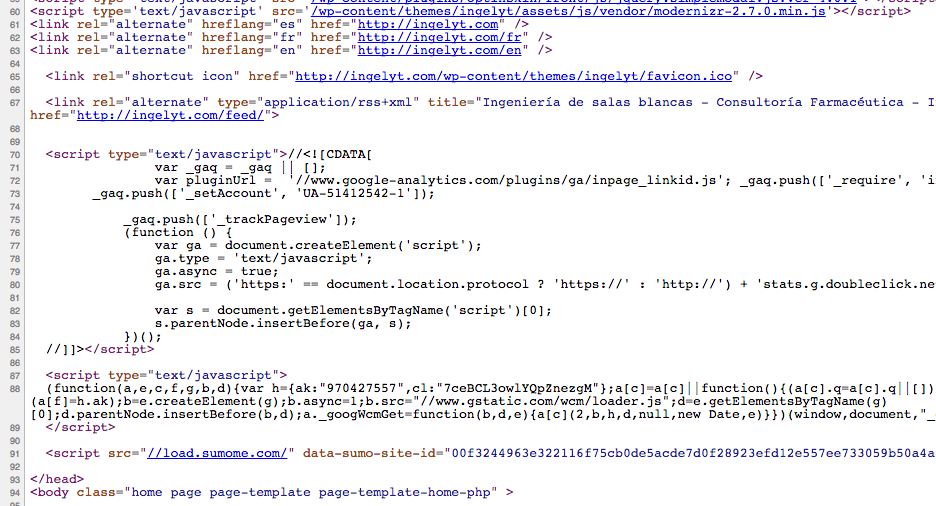
When it comes to putting it into practice, we may find ourselves in one of the following situations:
Web with two or more languages without geographic distinction of each one.
For example, we have English and Spanish versions for our entire website, which translates into something like the following for each of the pages:
- English: https://www.miempresa.com/sobrenosotrosespanol
- English: https://www.miempresa.com/en/aboutusinenglish
To indicate to Google the language of each of the pages and, therefore, the language that should be served to each person who accesses and searches from each regional version of its search engine [google.es, google.fr, google.it, etc.], we will insert the following code in the section <head> of these pages, the same in both of them:
<head>

...

<link rel="alternate" hreflang="es" href="https://www.miempresa.com/sobrenosotrosespanol.html" />

<link rel="alternate" hreflang="en" href="https://www.miempresa.com/en/aboutusinenglish" />

...

</head>
Web with two or more languages and with geographic distinction in terms of orientation
In case we have two or more language versions and, in addition, some of them have a specific geographic orientation, we will have to use the “hreflang” indicating not only the language, but also the region. To do this, we will introduce a small variation in the code. Let’s imagine the following:
- English: https://www.miempresa.com/sobrenosotrosespanol
- English United Kingdom: https://www.miempresa.com/enuk/aboutusinenglishuk
- English United States: https://www.miempresa.com/enusa/aboutusinenglishusa
In this case, in addition to indicating the language, we will indicate the region for the English versions. We will insert the following code in the head section of these pages, the same in all three:
<head>

...

<link rel="alternate" hreflang="es" href="https://www.miempresa.com/sobrenosotrosespanol.html" />

<link rel="alternate" hreflang="en-uk" href="https://www.miempresa.com/enuk/aboutusinenglish" />

<link rel="alternate" hreflang="en-us" href="https://www.miempresa.com/enusa/aboutusinenglish" />

...

</head>
For those cases in which there is a page on the web that does not point to any specific language, Google asks us to use the rel=”alternate” hreflang=”x-default” tagging. This type of page, to give you an idea, is usually the classic home page in which a language or region selector is displayed and the user is asked to make the appropriate selection. You can see an example of this in Zara’s web, that if, whenever you have not entered previously to buy some whim, because if not it will redirect you to the page of your corresponding region automatically.
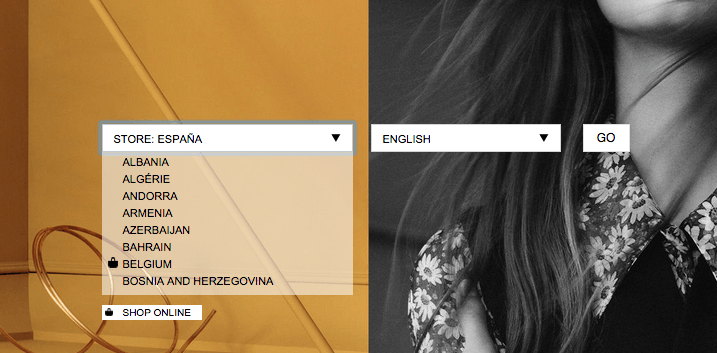
And the code will look like this:
 <head>

...

<link rel="alternate" hreflang="x-default" href="https://www.miempresa.com/ />

<link rel="alternate" hreflang="es" href="https://www.miempresa.com/es/" />

<link rel="alternate" hreflang="en-uk" href="https://www.miempresa.com/enuk/" />

<link rel="alternate" hreflang="en-us" href="https://www.miempresa.com/enusa/" />

...

</head>
Web with two or more languages, some of which target two or more regions
This last case is perhaps the most complicated. It occurs in international companies that sell in regions such as the European Union, which does not exist as a region in the ISO coding. For whatever reason, they do not have the capacity to translate the website into each of the country’s own languages, so they decide to translate the site into a single language, English for example, and work with the different regional markets. It would be something like the following:
- English: https://www.miempresa.com/sobrenosotrosespanol
- English United Kingdom: https://www.miempresa.com/en/aboutusinenglish
- English Germany: https://www.miempresa.com/en/aboutusinenglish
- English Italy: https://www.miempresa.com/en/aboutusinenglish
- English United States: https://www.miempresa.com/enusa/aboutusinenglishusa
In other words, we have the same page that targets three markets. To solve this situation, what we have to do is to indicate for each page the combination of language / region to which it is addressed. It would be as follows:
 <head>

...

<link rel="alternate" hreflang="x-default" href="https://www.miempresa.com/ />

<link rel="alternate" hreflang="es" href="https://www.miempresa.com/es/" />

<link rel="alternate" hreflang="en-uk" href="https://www.miempresa.com/en/aboutusinenglish" />

<link rel="alternate" hreflang="en-de" href="https://www.miempresa.com/en/aboutusinenglish" />

<link rel="alternate" hreflang="en-it" href="https://www.miempresa.com/en/aboutusinenglish" />

<link rel="alternate" hreflang="en-us" href="https://www.miempresa.com/enusa/" />

...

</head>
This solution is adequate as long as the language is maintained in all three countries and as long as the website is actually in that language.
Once these changes have been made, we can check that the code is correctly implemented and that Google is receiving the information by accessing our Google Webmaster Tools account for this domain. Under the heading“Search Traffic > International Targeting“, we will be able to see this data:
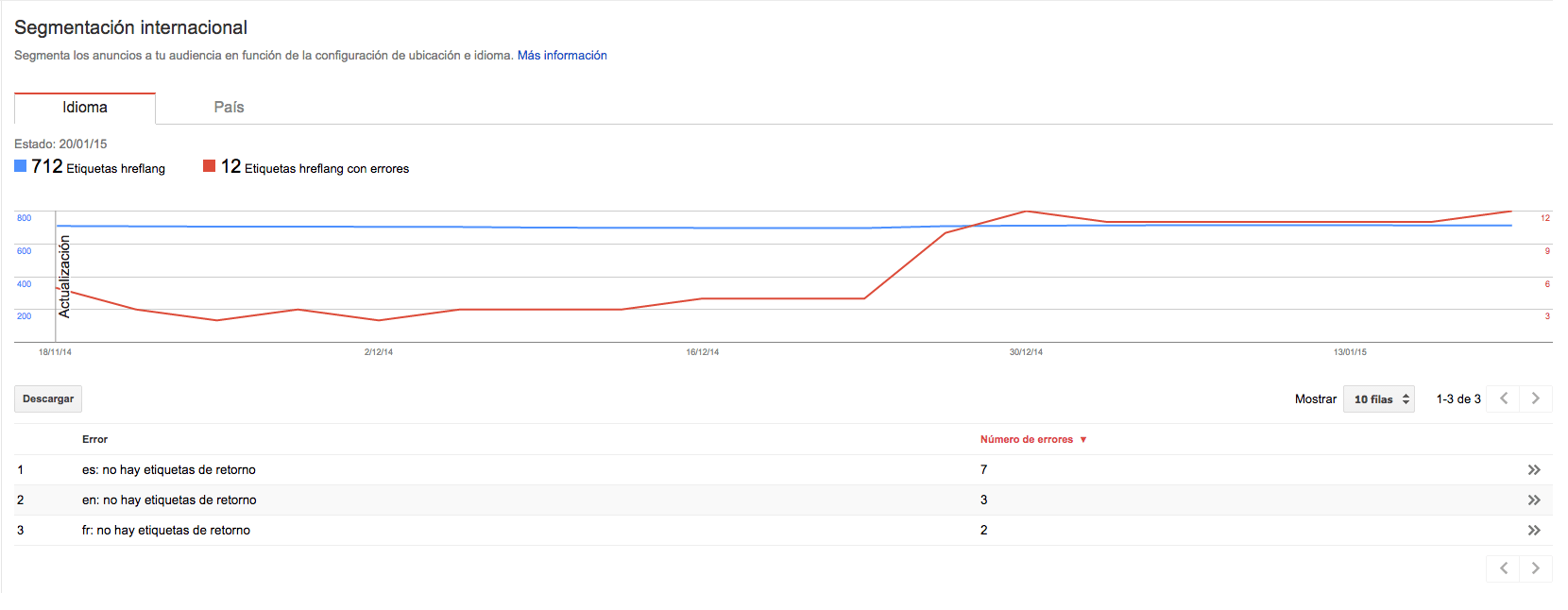
In case Google is NOT collecting the information, we will see the following screen:
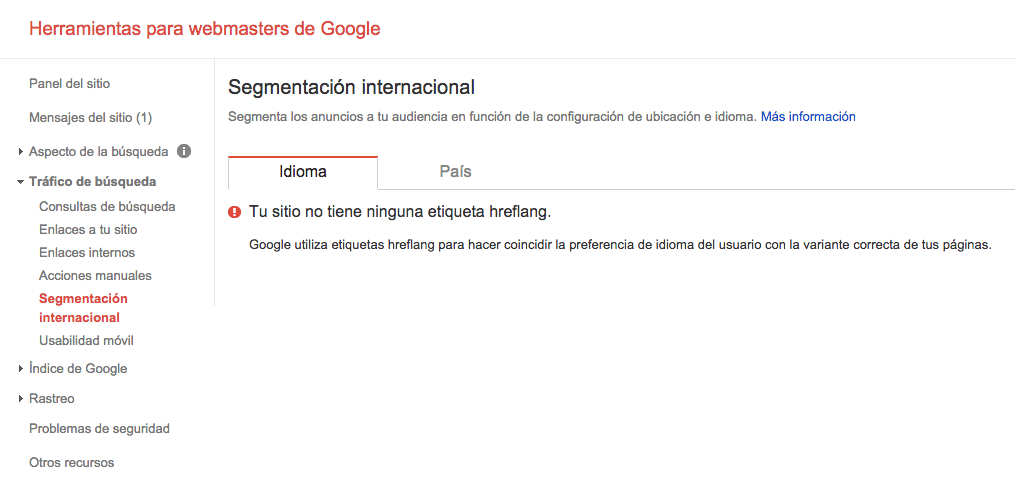
If this happens, we will have to review the code in case we have made a mistake and wait for Google to re-crawl our website or store to check if it has been fixed.
Conclusions
- Define what type of orientation each language has: language without a specific region, language for a grouping or language for a specific region.
- Consider whether it is necessary to make a generic page for region and language selection to redistribute traffic.
- Insert the code in ALL pages of the website to inform Google of language and, if applicable, region targeting.
- Enable tools that allow Users to change the language when browsing any of the pages of the website.
- Check that the data is being properly collected by Google.


